
Participant
September 15, 2023

Can't change the weight of variable fonts after update to 25.0

  • September 15, 2023
  • 42 replies
  • 24511 views

When I try to change the font weight, only a few letters have their weight replaced. First, this happened on Photoshop Beta version, but I updated both of the versions at the same time, and after trying it in the current Photoshop version (v25.0), the same problem happens.
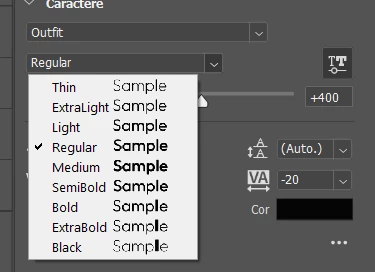


Even the font preview shows it bugged. (Only the L in "Sample" changing weight)

 

The letters affected change when I try it on the canvas, but it's still the same problem. I didn't test a lot of fonts, but the fonts that have this problem are Raleway and Outfit, both from Google Fonts. From what I've seen from other people's posts, a lot of people using fonts from Google Fonts are having this problem. We really need a way to fix this.

42 replies

J E L
Community Expert
Community Expert
September 21, 2023

Hi @ktaki, I can confirm that the Adobe font Sculpin Variable in Bold and Black weights are throwing off the character error (Windows 10; Photoshop 25.0.0 Release). This means it's not only Google fonts that are affected. Can you confirm the bug and let us when we can expect a fix? Thanks! CC: @Rocketstro

marcelocavalcanti
Participant
September 21, 2023

Hi, guys! I was having this same issue with Red Hat Display and Photoshop.

But, as a read everything here, i could manage to work aroung the problem.
What i did was unnistall Red Hat and download it from another source (DaFont https://www.dafontfree.io/red-hat-font/) and install the OTF version.

I just tested with Photoshop 25 and it works! So, if you guys want to try it, check it out!
Thanks for the insights, everybody!


Rocketstro
Participant
September 21, 2023

Hi Photoshop 24.7.1 is not displaying variable cloud font Adobe Sculpin Variable correctly.


This is a cloud font so can't reinstall. I tried turning it off and on and didn't help. This is the font used by my company's branding so kind of need it.... thanks

Participating Frequently
September 19, 2023

The only solution I have found for this issue is to reinstall version 24.7 until the bug is fixed.

Inspiring
September 19, 2023

Not just Google Fonts. This same type of situation is happening with Sequel 100 Wide - Variable Font. The higher weight "95" no longer appears at the weight it used to in Photoshop.

Kevin Stohlmeyer
Community Expert
Community Expert
September 18, 2023

@J E L combining now

J E L
Community Expert
Community Expert
September 18, 2023

We have another thread here: https://community.adobe.com/t5/photoshop-ecosystem-bugs/font-coming-with-different-weights/idc-p/14091537


Can a moderator combine these into one?

Ged_Traynor
Community Expert
Community Expert
September 18, 2023
Participant
September 18, 2023

I think I have the same problem, when I try to change the font weight, only a few of the letters have their weight replaced. 

Even the font preview shows it bugged. (Only the L in "Sample" changing weight)

The letters affected change when I try it on the canvas, but it's still the same problem. All fonts that I've tried have this problem. It's not only in Beta, but in the current Photoshop version as well. (v25.0). I've updated them both at the same time, and now I really don't know what to do. Can i revert to a previous version?

Participant
September 18, 2023

I'm having a problem with some fonts in this Photoshop update, Google Fonts typography is buggy with the weight variation, especially in the bolder versions. Some letters are in bold/black while most remain in regular/light. I tried reinstalling the software and fonts, I tried variable and static ones, but nothing works. Now Photoshop only recognizes font italics. Some of the fonts I'm having trouble with are "Red Hat Display" and "Figtree".

Ged_Traynor
Community Expert
Community Expert
September 18, 2023

@Evandro Leite I can confirm the issue here as well with both the Red Hat Display and Figtree fonts


Edit: there's another thread here about it

https://community.adobe.com/t5/photoshop-ecosystem-bugs/font-not-displaying-correctly-in-photoshop/idi-p/14092236

Participant
September 18, 2023

I have been using the Red Hat Display font consistently the last couple of days and now all of a sudden the font isn't working properly. The letters show up mismatched in different weights, as shown in the screenshot.  I have tried both Photoshop 24.7.1 and 25.0 and get the same results. If you look at the dropdown list, you'll notice that the different weights all look the same.


I have tested other fonts and haven't had any issues. Also tried the same font in Illustrator and it works fine. My operating system is macOS. I'm desperate for a solution as I am required to use this font, so any help would be greatly appreciated!

Participant
September 18, 2023

Hi all, it seems like I found a solution to my problem. I deleted the font off my computer and reinstalled it which seemed to do the trick.