
Participant
September 15, 2023

Can't change the weight of variable fonts after update to 25.0

  • September 15, 2023
  • 42 replies
  • 25019 views

When I try to change the font weight, only a few letters have their weight replaced. First, this happened on Photoshop Beta version, but I updated both of the versions at the same time, and after trying it in the current Photoshop version (v25.0), the same problem happens.
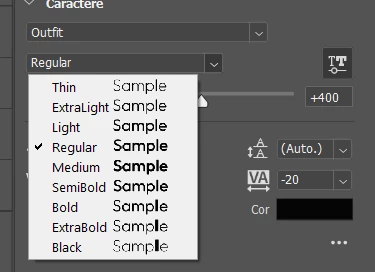


Even the font preview shows it bugged. (Only the L in "Sample" changing weight)

 

The letters affected change when I try it on the canvas, but it's still the same problem. I didn't test a lot of fonts, but the fonts that have this problem are Raleway and Outfit, both from Google Fonts. From what I've seen from other people's posts, a lot of people using fonts from Google Fonts are having this problem. We really need a way to fix this.

42 replies

Participant
September 17, 2023

I've tried to use a higher weight for this font, and it seems to not be applying that weight to some of the letters. Yes, I've made sure the font works by testing it in another app, and yes, I'm sure the letter has the right weight assigned. I'm using Red Hat Display which allows variable weights.


Latest version of photoshop (25.0)

Windows 10

J E L
Community Expert
Community Expert
September 17, 2023

Maybe in a few versions we'll get enough letters working to complete a full sentence! Ha, that made me laugh. I spun it through all the settings and options I could think of, but I sure can't figure out what is causing it yet.

Participating Frequently
September 19, 2023

I have noticed a bug that displays the weight of a font incorrectly. Specifically, when using a bold weight of the League Spartan Google font family, all lower-case "e"s are displaying at a thinner weight. As a result, I am unable to type a bold lower-case "e". This was not an issue until the most recent update, and the issue was resolved by installing an earlier version of the software. I am sure this issue occurs with other font families. An example of the issue is attached. 


I am using Windows OS. Version 25 and 24.7.1 are bugged. Version 24.7 has no issue.

marcelocavalcanti
Participant
September 15, 2023

Hi, guys.

So, i've just update to the latest Photoshop version (27.0).


But i saw an error on displaying my fonts. To be more specific, the Red Hat Display font.

Photoshop doesn't render the bold and/or the black weights (see print screen). Only some letters gets the new weight.


I've tried everything i could find on the internet. I deleted the font from my computer, install a new version, downgrade Photoshop to 25.0, cleared Photoshop font cache and all of that. Nothing works.


By the way, the print screen is from the 25.0 version (technically, this version were working fine, but not now).


Can someone help me? This thing is making me crazy right now.

Thanks in advance!

marcelocavalcanti
Participant
September 18, 2023

Just to clarify: i messed up the versions numbers: The current PS version is 25. I downgraded to the previous 24.7.1.


And yes, i'm still having the issue with the typeface.