
Inspiring
May 22, 2026

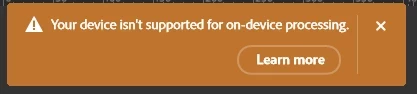
P: Photoshop 27.7 & 27.8 on-device Remove Tool model remains unavailable, or Your device isn't supported for on-device processing

  • May 22, 2026
  • 106 replies
  • 4569 views

Hello Adobe team,

I am reporting an issue with Photoshop 27.7 on Windows 11 where the new Remove Tool on-device generative AI model cannot be enabled on an NVIDIA GeForce RTX 5080.

The “Device” option remains greyed out, even though all documented requirements appear to be met.

SYSTEM SUMMARY

Photoshop version: Adobe Photoshop 2026 / 27.7

Operating system: Windows 11

GPU: NVIDIA GeForce RTX 5080

VRAM: approximately 16 GB

DirectX: DirectX 12 / DirectX 12.2 available

NVIDIA driver: current and newer than Adobe’s stated minimum requirement

Photoshop GPU acceleration: enabled

Photoshop GPU status: GPU is detected and allowed

Available disk space: sufficient

The GPU is usable for normal Photoshop GPU acceleration.

The important detail is that Photoshop appears to detect and use the RTX 5080 for general GPU acceleration, but in the system information / GPU identification path the card is shown as:

NVIDIA GeForce RTX 5080 UNKNOWN

This strongly suggests that the issue is not general GPU acceleration, but the separate GPU qualification or capability check used for the on-device AI model.

WHAT I ALREADY CHECKED

I confirmed that “Use Graphics Processor” is enabled in Photoshop.

I checked the Remove Tool / Image Processing preferences.

I confirmed that the Remove Tool setting is set to “Faster”.

I also checked the “more stable / safer” setting path and switched back as needed.

I restarted Photoshop after changing the setting.

I reset Photoshop preferences.

I deleted / reset the relevant Photoshop user configuration data under AppData / Roaming.

I reinstalled Photoshop 27.7.

Adobe removal / cleanup components were triggered during reinstall.

The additional / advanced Adobe cleanup tool had to be started manually again.

I checked that the GPU is detected by Photoshop.

I checked that GPU acceleration is not disabled.

I checked that the VRAM requirement is fulfilled.

I checked that the NVIDIA driver is current.

I checked that the issue is not caused by insufficient disk space.

The standard Remove Tool components were installed automatically during the Photoshop reinstall.

After the the complete reinstallatiom I saw the missing “Remove Tool advanced components” anr installed manually the Photoshop plug-in through the Creative Cloud app.

So the issue should not be caused by missing Remove Tool Advanced  components.

I considered whether the Windows system language / locale could be involved, but there is no evidence for that so far.

Despite all of this, the on-device option remains unavailable.

SNIFFER / GPU DETECTION SUMMARY

The Photoshop GPU sniffer runs successfully and detects the RTX 5080.

The GPU is not rejected for normal Photoshop GPU acceleration.

The relevant situation is:

GPU detected: NVIDIA GeForce RTX 5080

GPU acceleration: enabled / allowed

DirectX: available

VRAM: sufficient

Photoshop system info reports GPU as: NVIDIA GeForce RTX 5080 UNKNOWN

So the card is not missing, disabled, or unusable in Photoshop. The problem seems to happen later, in the qualification path for the local AI model.

COMPARISON WITH OTHER USERS

Other users appear to report the same or very similar issue with RTX 50-series / Blackwell GPUs.

Reported affected GPUs include RTX 5070 Ti, RTX 5080, and RTX 5090.

The pattern appears to be the same:

Windows 11

Photoshop 27.7 or recent Photoshop version

Current NVIDIA driver

RTX 50-series GPU

More than enough VRAM

GPU acceleration works in Photoshop

Remove Tool on-device model remains greyed out

Photoshop system info may show the GPU as UNKNOWN

This suggests that the problem may be related to RTX 50-series / Blackwell GPU qualification rather than an individual local installation issue.

CURRENT CONCLUSION

At this point, this does not look like a local configuration problem anymore.

The RTX 5080 fulfills the published requirements:

RTX 30-series or newer

At least 14 GB VRAM

Current NVIDIA driver

GPU acceleration enabled

Remove Tool set to Faster

Sufficient disk space

However, the on-device model is still blocked.

My suspicion is that Photoshop 27.7 currently does not correctly qualify some RTX 50-series / Blackwell GPUs for the local Remove Tool AI model.

The GPU works for normal Photoshop acceleration, but the separate on-device AI model check seems to fail because the GPU is internally treated as UNKNOWN or is not yet properly whitelisted / recognized.

REQUEST TO ADOBE

Please confirm whether RTX 50-series / Blackwell GPUs, especially the RTX 5080 and RTX 5090, are currently officially qualified for the Photoshop 27.7 on-device Remove Tool AI model on Windows.

If they are supposed to be supported, this appears to be a bug in the GPU detection / qualification / gating logic for the local AI model.

A clear confirmation would be helpful:

Is RTX 50-series support currently expected to work in Photoshop 27.7?

Is the UNKNOWN GPU identification relevant to the Device option being greyed out?

Is this a known issue?

Is a fix planned for an upcoming Photoshop Beta or release build?
    Pinned Reply By Srishti Bali

    Hi all,


    There were two separate issues being tracked in this thread, and they are unrelated.


    1. On-device Remove Tool model is unavailable

    This is the issue reported in the original post. Affected users are unable to use the on-device Remove Tool model and receive the following error: “Your device isn't supported for on-device  processing.”  This issue is being tracked in this current thread.


    2. On-device model falls back to CPU instead of using the GPU. This is a different issue. In this case, users are able to install and use the on-device model, but it is not utilizing the GPU correctly and instead falls back to CPU processing. We are tracking that issue separately here:
    https://community.adobe.com/questions-712/generative-remove-runs-on-the-cpu-instead-of-the-gpu-since-version-27-9-1-1635615

    I have moved all replies related to the GPU/CPU issue to the second thread so that the two issues can be tracked separately.

    Please reply to this thread only if you are still receiving the “Your device isn't supported for on-device processing” error.

    If the on-device model is available on your system but is not using the GPU correctly and is falling back to the CPU, please use the other thread linked above.

    At this point, it appears that the issue causing the “Your device isn't supported for on-device processing” error has been resolved with 27.9.1.

    If you are still seeing this error, please feel free to reply to this thread and let us know.

    106 replies

    Participant
    September 14, 2026

    On Photoshop Beta 27.11 with an NVIDIA GeForce RTX 5080 ( 16 GB), I receive the following error message in an orange dialog when clicking on the Remove Tool “On Device” button (which is at least active):  

    Your NVIDIA GPU doesn't have enough VRAM for on-device processing.

    Here is my info from Help/System Info:

    Adobe Photoshop Version: 27.11.0 20260909.m.3669 481f204  x64 (beta, PublicBeta)
    Number of Launches: 7
    Operating System: Windows 11 64-bit
    Version: 11 or greater 10.0.26200.9445
    System architecture: Intel CPU Family:6, Model:6, Stepping:2, AVX2, AVX-VNNI, HybridCPU(8:16)
    Physical processor count: 24
    Processor speed: 3686 MHz
    Built-in memory: 130328 MB
    Free memory: 83606 MB
    Memory available to Photoshop: 103238 MB
    Memory used by Photoshop: 70 %
    Crash Handler: Adobe
    DCX Version: 9.22.0
    SAM SDK Version: 15.1.5
    ACPL.next Status:
     - SDK Version: 5.11.6
     - Sync Engine Status: Reachable and compatible
     - Sync Engine Running: 4.0.0
     - Min Sync Engine Required: 4.0.0
    Live Edit Client SDK Version: v6.1.1
    Adobe Firefly: Please use any generative AI feature to view the latest version.
    OpenColorIO version: 2.5.2
    C2PA library version: Adobe CAI SDK: adobe_api/1.75.3
    NGL Version: 1.42.0.5
    Sophia Info:
     - Ps_Feature_Flag, Feature Flag URL (AEM) campaignID:7ab988f4-a340-44bc-904e-bbe18aafa867#3edb1997-bf0a-435c-a254-129f5aa290ac::: variationID:34256976-bf43-4803-9ab6-1efab537517f-0:::d79c11dd-6653-4ca1-bb59-7638a9d64691#3edb1997-bf0a-435c-a254-129f5aa290ac, 9b0a2dd4-58f8-4cf2-9c5c-88cc62ac1609#3edb1997-bf0a-435c-a254-129f5aa290ac, 9e51f07b-08e0-4321-9789-ede4b497a21e#7f680ed4-3a7f-4aac-93e0-beef42e28f49, c4021a25-0011-4e57-a37c-d0de4e51cae6#3edb1997-bf0a-435c-a254-129f5aa290ac, 960e3a50-0736-4628-b67c-5597262d4ba6#d18d6438-3ee4-4151-8c93-2072b82cd098, 49526554-cc4d-42c0-a986-0c00f9916099#ddf8400b-3f21-4b8e-be2b-c9272c2bf749, 492bbece-8db3-45b0-8985-2b81ec70faa1#67358097-7f36-483e-9330-2208641ad8bc, eefe4a5c-fad2-4ad9-b412-674574c1c92a#b15682f8-8089-40e7-8ab3-aca419c0af37::::::4f293cbf-2cf0-457a-bb1b-ab7979f455d6
    D3D12Warp renderer: Disabled.
    Precise Color Management for HDR Display: Disabled.
    Alias Layers: Disabled.
    Highbeam: Enabled.
    Image tile size: 1024K
    Image cache levels: 4
    Font Preview: Large
    HarfBuzz Version: 11.0.0
    TextEngine: ATE 7.11.0 (8034a1e)
     ======= GPU
    Native API stable: True
    OpenCL API stable: True
    GPUDeny:               0
    GPUForce:              0
    useGPU:                1
    useOpenCL:             1
    isGPUCapable:          1
    isGPUAllowed:          1
    GPUName:               NVIDIA GeForce RTX 5080
    GPUVendor:             NVIDIA
    NVIDIA GeForce RTX 5080  UNKNOWN, NVIDIA
    Intel(R) Graphics  UNKNOWN, INTEL
    IsNativeGPUCapable:    1
    IsOpenCLGPUCapable:    1
    HasSufficientRAM:      1
      GPU accessible RAM:                15,977 MB
      Required GPU accessible RAM:        1,500 MB
    UseGraphicsProcessorChecked:   1
    UseOpenCLChecked:              1
    Windows remote desktop:  0
    Windows available feature level:     12.2
    Windows required feature level:      12.0
    Windows has required feature level:  1
    Display: 1
      Display Bounds: (0, 0) -> (3840, 2160)
      Display scale: 2
      Main Display
      Display Type: WCG
      Display Profile: sRGB IEC61966-2.1
     ------- Sniffer output
    [0 ms]
      Launch GPUSnifferThread

    [0 ms]
      Start RunAllAPIs

    [0 ms]
      C:\Program Files\Adobe\Adobe Photoshop (Beta)\sniffer.exe -baseTimeMS=388090032 -comment=Photoshop Version: Adobe Photoshop 27.11.0 20260909.m.3669 481f204 x64

    [1 ms]
      Start GetSnifferResult

    [1159 ms]
      Start sniffer 2026-09-14 16:44:37
      # Photoshop Version: Adobe Photoshop 27.11.0 20260909.m.3669 481f204 x64
      C:\Program Files\Adobe\Adobe Photoshop (Beta)\sniffer.exe -baseTimeMS=388090032 -comment=Photoshop Version: Adobe Photoshop 27.11.0 20260909.m.3669 481f204 x64
      
      {38 ms}
      Start platform native
        # displays:                   1
        Display 0
          Display:                      \\.\DISPLAY1
          Main:                         TRUE
          Built in:                     FALSE
          Stereo:                       FALSE
          Bounds:                       (0, 0) -> (3,840, 2,160)
          Dimensions:                   (3,840 2,160)
          Display scale:                2
          Physical size:                (0 0)
          Pixel size:                   (0 0)
          Dynamic range:                (0 1)
          Attached Device:              (DeviceID name=NVIDIA GeForce RTX 5080 index=0)
        
        # devices:                    2
        Device 0
          Name:                         NVIDIA GeForce RTX 5080
          Preferred:                    TRUE
          Power Envelope:               DISCRETE
          Attachment:                   UNKNOWN
          # attached displays:          1
            \\.\DISPLAY1
          GPU accessible RAM:               15,977 MB
          VRAM:                             15,977 MB
          Dedicated System RAM:                  0 MB
          Shared System RAM:               109,326 MB
          API version:                  12.2 (12.2)
          Device version:               12.0 (12.0)
          Vendor name:                  NVIDIA
          Driver date:                  2026-08-20  000000.000000-000
          Driver age:                   1 month
          Driver version:               32.0.16.1656
          Supports UMA:                 UNSUPPORTED
          D3D-ID:                       11266
          LUID:                         0x16cb3
        
        Device 1
          Name:                         Intel(R) Graphics
          Preferred:                    FALSE
          Power Envelope:               INTEGRATED
          Attachment:                   UNKNOWN
          # attached displays:          0
          GPU accessible RAM:              109,454 MB
          VRAM:                                128 MB
          Dedicated System RAM:                  0 MB
          Shared System RAM:               109,326 MB
          API version:                  12.2 (12.2)
          Device version:               12.0 (12.0)
          Vendor name:                  INTEL
          Driver date:                  2026-08-24  000000.000000-000
          Driver age:                   1 month
          Driver version:               32.0.101.8991
          Supports UMA:                 SUPPORTED
          D3D-ID:                       32103
          LUID:                         0x181d1
      End platform native
      {913 ms}
      
      {913 ms}
      Start platform OpenCL
        # displays:                   0
        
        # devices:                    2
        Device 0
          Name:                         NVIDIA GeForce RTX 5080
          Preferred:                    TRUE
          Power Envelope:               DISCRETE
          Attachment:                   UNKNOWN
          # attached displays:          0
          GPU accessible RAM:               17,066 MB
          VRAM:                             17,066 MB
          Dedicated System RAM:                  0 MB
          Shared System RAM:                     0 MB
          API version:                  3.0 (OpenCL 3.0 CUDA)
          Device version:               3.0 (OpenCL 3.0 CUDA)
          Vendor name:                  NVIDIA
          Driver date:                  UNKNOWN
          Driver age:                   UNKNOWN
          Driver version:               UNKNOWN
          Bandwidth:                    1,275 GB / s
          Compute score:                25,562.4
          Device name string:           NVIDIA GeForce RTX 5080
          Device vendor string:         NVIDIA Corporation
          Platform name string:         NVIDIA CUDA 
          Platform vendor string:       NVIDIA Corporation
        
        Device 1
          Name:                         Intel(R) Graphics
          Preferred:                    FALSE
          Power Envelope:               INTEGRATED
          Attachment:                   UNKNOWN
          # attached displays:          0
          GPU accessible RAM:               72,749 MB
          VRAM:                             72,749 MB
          Dedicated System RAM:                  0 MB
          Shared System RAM:                     0 MB
          API version:                  3.0 (OpenCL 3.0 )
          Device version:               3.0 (OpenCL 3.0 NEO )
          Vendor name:                  INTEL
          Driver date:                  UNKNOWN
          Driver age:                   UNKNOWN
          Driver version:               UNKNOWN
          Bandwidth:                    63 GB / s
          Compute score:                951.201
          Device name string:           Intel(R) Graphics
          Device vendor string:         Intel(R) Corporation
          Platform name string:         Intel(R) OpenCL Graphics
          Platform vendor string:       Intel(R) Corporation
      End platform OpenCL
      {1123 ms}
      
      Exit code kExitNormal
      End sniffer 2026-09-14 16:44:38
    [kStatusNormal, kExitNormal]

    [1159 ms]
      Finish RunAllAPIs

    [1161 ms]
      Finish GetSnifferResult

     ------- Sniffer output
     ======= GPU
    License Type: Subscription
    Serial number: 90970490387307083177
    GUIDBucket: 
    Composite Core GPU (comp_core_gpu): on 
    Composite Core Threads (MultithreadedCompositing): on 
    Composite Core UI (CompositingDocumentTabUI): off 
    Composite Core Feature Prefs (CompCoreFeaturePrefs): off 

    Application folder: C:\Program Files\Adobe\Adobe Photoshop (Beta)\
    Temporary file path: C:\Users\MARYWA~1\AppData\Local\Temp\
    Photoshop scratch has async I/O enabled
    Scratch volume(s):
      Startup, 3.64T, 3.18T free
    Required Plugins folder: C:\Program Files\Adobe\Adobe Photoshop (Beta)\Required\Plug-ins\
    Primary Plugins folder: C:\Program Files\Adobe\Adobe Photoshop (Beta)\Plug-ins\

    Installed components:
       ACE.dll   ACE    O   O
       act_tracing.dll   Adobe Common Toolkit   1.0.70   
       AdobeLinguistic.dll   Adobe Linguistic Library   69ef127   
       AdobeOwl.dll   Adobe Owl   5.5.0   
       AdobePDFL.dll   PDFL 2026/09/02-02:13:52   79.57e22525   79.57e22525
       AdobePIP.dll   Adobe Product Improvement Program   8.2.0.16   
       AdobeSVGAGM.dll   AdobeSVGAGM   O   O
       AdobeXMP.dll   Adobe XMP Core 2026/08/17-13:39:43   79.4332aae   79.4332aae
       AdobeXMPCompareAndMerge.dll   Adobe XMP CompareAndMerge 2026/08/17-13:39:43   79.4332aae   79.4332aae
       AdobeXMPFiles.dll   Adobe XMP Files 2026/08/17-13:39:43   79.4332aae   79.4332aae
       AdobeXMPScript.dll   Adobe XMP Script 2026/08/17-13:39:43   79.4332aae   79.4332aae
       AGM.dll   AGM    O   O
       AID.dll   AID DLL   1.0.0.58   
       AIDE.dll   AIDE 2026/09/02-02:14:55   79.20d21d3   79.20d21d3
       aifm.dll   AIFM   1.0   23.68434
       AILib.dll   Adobe Illustrator 2026   30.0.0   
       aiport.dll   AIPort   1.0   23.68434
       ARE.dll   ARE    O   O
       assay-svc.dll   Windows (R) Win 7 DDK driver   10.0.10011.16384   
       AXE8SharedExpat.dll   AXE8SharedExpat    O   O
       AXEDOMCore.dll   AXEDOMCore    O   O
       AzureAttest.dll   Windows (R) Win 7 DDK driver   10.0.10011.16384   
       AzureAttestManager.dll   Windows (R) Win 7 DDK driver   10.0.10011.16384   
       AzureAttestNormal.dll   Windows (R) Win 7 DDK driver   10.0.10011.16384   
       BIB.dll   BIB    O   O
       BIBUtils.dll   BIBUtils    O   O
       CoolType.dll   CoolType    O   O
       CRClient.dll   Adobe Crash Reporter Client DLL   2026.9.0.7606a18   
       cudart64_13.dll   NVIDIA CUDA 13.4.36 Runtime   6,14,11,13040   
       DirectML.dll   DirectML Redistributable Library   1.15.4+241025-1615.1.dml-1.15.fac7597   
       dnssd.dll   Bonjour   3,0,0,2   
       dvaaccelerate.dll   Adobe DVA 2025   25.2.0   
       dvaadameve.dll   Adobe DVA 2025   25.2.0   
       dvaappsupport.dll   Adobe DVA 2025   25.2.0   
       dvaaudiodevice.dll   Adobe DVA 2025   25.2.0   
       dvaaudiotoolkit.dll   Adobe DVA 2025   25.2.0   
       dvacore.dll   Adobe DVA 2025   25.2.0   
       dvacrashhandler.dll   Adobe DVA 2025   25.2.0   
       dvaevefactory.dll   Adobe DVA 2025   25.2.0   
       dvamarshal.dll   Adobe DVA 2025   25.2.0   
       dvamediatypes.dll   Adobe DVA 2025   25.2.0   
       dvametadata.dll   Adobe DVA 2025   25.2.0   
       dvametadataapi.dll   Adobe DVA 2025   25.2.0   
       dvametadataUI.dll   Adobe DVA 2025   25.2.0   
       dvanet.dll   Adobe DVA 2025   25.2.0   
       dvaplayer.dll   Adobe DVA 2025   25.2.0   
       dvascripting.dll   Adobe DVA 2025   25.2.0   
       dvastorage.dll   Adobe DVA 2025   25.2.0   
       dvatemporalxmp.dll   Adobe DVA 2025   25.2.0   
       dvatransport.dll   Adobe DVA 2025   25.2.0   
       dvaui.dll   Adobe DVA 2025   25.2.0   
       dvauxphost.dll   Adobe DVA 2025   25.2.0   
       dvauxpui.dll   Adobe DVA 2025   25.2.0   
       dvavulcansupport.dll   Adobe DVA 2025   25.2.0   
       dvaworkspace.dll   Adobe DVA 2025   25.2.0   
       dxcompiler.dll   Microsoft(r) DirectX for Windows(r) - Out Of Band   1.9.0.1 (d73829d4)   
       dxil.dll      101.7.2308.24 (release/github-release-1.7.2308, ShaderCompiler.dxcbin.0.231001.0+01e0098ba93c6973e72b7fa37b8ff7f019e383f7-101.7.2308.24.github-release-1.7.2308)   
       dynamic-torqnative.dll   Unified Extensibility Platform   uxp-9.4.1-0   
       dynamiclink.dll   Adobe DVA 2025   25.2.0   
       ExtendScript.dll   ExtendScript 2022/08/18-12:50:45   82.4   82.4
       filterport.dll   FilterPort   1.1   BUILDVERSION
       icucnv77.dll   International Components for Unicode    Build 14.3.3.9087c7c   
       icuin77.dll   International Components for Unicode    Build 14.3.3.9087c7c   
       icuuc77.dll   International Components for Unicode    Build 14.3.3.9087c7c   
       ippcc.dll   ippCC. Intel(R) Integrated Performance Primitives. Color Conversion.   2021.6 (r0xbffe3c5b)   
       ippcck0.dll   ippCC. Intel(R) Integrated Performance Primitives. Color Conversion.   2021.6 (r0xbffe3c5b)   
       ippccl9.dll   ippCC. Intel(R) Integrated Performance Primitives. Color Conversion.   2021.6 (r0xbffe3c5b)   
       ippccy8.dll   ippCC. Intel(R) Integrated Performance Primitives. Color Conversion.   2021.6 (r0xbffe3c5b)   
       ippcore.dll   core. Intel(R) Integrated Performance Primitives. Core Library.   2021.6 (r0xbffe3c5b)   
       ippcv.dll   ippCV. Intel(R) Integrated Performance Primitives. Computer Vision.   2021.6 (r0xbffe3c5b)   
       ippcvk0.dll   ippCV. Intel(R) Integrated Performance Primitives. Computer Vision.   2021.6 (r0xbffe3c5b)   
       ippcvl9.dll   ippCV. Intel(R) Integrated Performance Primitives. Computer Vision.   2021.6 (r0xbffe3c5b)   
       ippcvy8.dll   ippCV. Intel(R) Integrated Performance Primitives. Computer Vision.   2021.6 (r0xbffe3c5b)   
       ippi.dll   ippIP. Intel(R) Integrated Performance Primitives. Image Processing.   2021.6 (r0xbffe3c5b)   
       ippik0.dll   ippIP. Intel(R) Integrated Performance Primitives. Image Processing.   2021.6 (r0xbffe3c5b)   
       ippil9.dll   ippIP. Intel(R) Integrated Performance Primitives. Image Processing.   2021.6 (r0xbffe3c5b)   
       ippiy8.dll   ippIP. Intel(R) Integrated Performance Primitives. Image Processing.   2021.6 (r0xbffe3c5b)   
       ipps.dll   ippSP. Intel(R) Integrated Performance Primitives. Signal Processing.   2021.6 (r0xbffe3c5b)   
       ippsk0.dll   ippSP. Intel(R) Integrated Performance Primitives. Signal Processing.   2021.6 (r0xbffe3c5b)   
       ippsl9.dll   ippSP. Intel(R) Integrated Performance Primitives. Signal Processing.   2021.6 (r0xbffe3c5b)   
       ippsy8.dll   ippSP. Intel(R) Integrated Performance Primitives. Signal Processing.   2021.6 (r0xbffe3c5b)   
       ippvm.dll   ippVM. Intel(R) Integrated Performance Primitives. Vector Math.   2021.6 (r0xbffe3c5b)   
       ippvmk0.dll   ippVM. Intel(R) Integrated Performance Primitives. Vector Math.   2021.6 (r0xbffe3c5b)   
       ippvml9.dll   ippVM. Intel(R) Integrated Performance Primitives. Vector Math.   2021.6 (r0xbffe3c5b)   
       ippvmy8.dll   ippVM. Intel(R) Integrated Performance Primitives. Vector Math.   2021.6 (r0xbffe3c5b)   
       JP2KLib.dll   JP2KLib 2026/06/10-02:47:27   79.28a66d4   79.28a66d4
       libcrypto-4-x64.dll   The OpenSSL Toolkit   4.0.1   
       libifcoremd.dll   Intel(r) Visual Fortran Compiler   10.0 (Update A)   
       libiomp5md.dll   Intel(R) OpenMP* Runtime Library   5.0   
       libmmd.dll   Intel(R) C/C++/Fortran Compiler   Mainline   
       libssl-4-x64.dll   The OpenSSL Toolkit   4.0.1   
       LogSession.dll   LogSession   8.2.0.16   
       mediacoreif.dll   Adobe DVA 2025   25.2.0   
       mkl_avx2.2.dll   Intel(R) oneAPI Math Kernel Library   2022.1   
       mkl_avx512.2.dll   Intel(R) oneAPI Math Kernel Library   2022.1   
       mkl_core.2.dll   Intel(R) oneAPI Math Kernel Library   2022.1   
       mkl_def.2.dll   Intel(R) oneAPI Math Kernel Library   2022.1   
       mkl_mc3.2.dll   Intel(R) oneAPI Math Kernel Library   2022.1   
       mkl_sequential.2.dll   Intel(R) oneAPI Math Kernel Library   2022.1   
       mkl_vml_avx2.2.dll   Intel(R) oneAPI Math Kernel Library   2022.1   
       mkl_vml_avx512.2.dll   Intel(R) oneAPI Math Kernel Library   2022.1   
       mkl_vml_def.2.dll   Intel(R) oneAPI Math Kernel Library   2022.1   
       mkl_vml_mc3.2.dll   Intel(R) oneAPI Math Kernel Library   2022.1   
       MPS.dll   MPS 2026/08/25-22:49:18   79.f7f249f   79.f7f249f
       onnxruntime.dll   Microsoft® Windows® Operating System   1.24.4   
       onnxruntime_providers_nv_tensorrt_rtx.dll   ONNX Runtime TensorRT RTX Execution Provider   0.4.0   
       onnxruntime_providers_shared.dll   Microsoft® Windows® Operating System   1.24.4   
       opencv_world4120.dll   OpenCV library   4.12.0   
       pdfport.dll   PDFPort 2020/11/19-11:34:27   79.625377   79.625377
       Plugin.dll   Adobe Photoshop 2026   27.11   
       PlugPlugExternalObject.dll   Adobe(R) CEP PlugPlugExternalObject Standard Dll (64 bit)   12.0.0   
       PlugPlugOwl.dll   Adobe(R) CSXS PlugPlugOwl Standard Dll (64 bit)   12.0.0.14   
       PSCloud.dll                                                   1.0.0.1   
       PSRes.dll   Adobe Photoshop 2026   27.11   
       PSViews.dll   Adobe Photoshop 2026   27.11   
       ScCore.dll   ScCore 2022/08/18-12:50:45   82.4   82.4
       SVGRE.dll   SVGRE   79.9d98a92.   79.9d98a92.
       svml_dispmd.dll   Intel(R) C/C++/Fortran Compiler   Mainline   
       tensorrt_onnxparser_rtx_1_6.dll   NVIDIA TensorRT for RTX   1.6.1.120   
       tensorrt_plugins.dll   TensorRT-RTX Plugins   0.6.0   
       tensorrt_rtx_1_6.dll   NVIDIA TensorRT for RTX   1.6.1.120   
       VulcanControl.dll   Vulcan Application Control Library   7.2.0.34   
       VulcanMessage5.dll   Vulcan Message Library   7.2.0.34   
       WinRTSupport.dll   Adobe Photoshop Windows RT Support   1.0.1.0   
       Unified Extensibility Platform  uxp-9.4.1-0
       UPIC  2.6.0


    Required plugins:

       Accented Edges 27.11 - from the file “Filter Gallery.8bf”
       Adaptive Wide Angle 27.11 - from the file “Adaptive Wide Angle.8bf”
       Angled Strokes 27.11 - from the file “Filter Gallery.8bf”
       Average 27.11 - from the file “Average.8bf”
       Bas Relief 27.11 - from the file “Filter Gallery.8bf”
       BMP 27.11 - from the file “Standard MultiPlugin.8bf”
       Camera Raw 18.6 - from the file “Camera Raw.8bi”
       Camera Raw Filter 18.6 - from the file “Camera Raw.8bi”
       Chalk && Charcoal 27.11 - from the file “Filter Gallery.8bf”
       Charcoal 27.11 - from the file “Filter Gallery.8bf”
       Chrome 27.11 - from the file “Filter Gallery.8bf”
       Cineon 27.11 - from the file “Cineon.8bi”
       Clouds 27.11 - from the file “Clouds.8bf”
       Color Halftone 27.11 - from the file “Standard MultiPlugin.8bf”
       Colored Pencil 27.11 - from the file “Filter Gallery.8bf”
       Conté Crayon 27.11 - from the file “Filter Gallery.8bf”
       Craquelure 27.11 - from the file “Filter Gallery.8bf”
       Crop and Straighten Photos 27.11 - from the file “CropPhotosAuto.8li”
       Crop and Straighten Photos Filter 27.11 - from the file “Standard MultiPlugin.8bf”
       Crosshatch 27.11 - from the file “Filter Gallery.8bf”
       Crystallize 27.11 - from the file “Standard MultiPlugin.8bf”
       Cutout 27.11 - from the file “Filter Gallery.8bf”
       Dark Strokes 27.11 - from the file “Filter Gallery.8bf”
       De-Interlace 27.11 - from the file “Standard MultiPlugin.8bf”
       Dicom 27.11 - from the file “Dicom.8bi”
       Difference Clouds 27.11 - from the file “Clouds.8bf”
       Diffuse Glow 27.11 - from the file “Filter Gallery.8bf”
       Displace 27.11 - from the file “Standard MultiPlugin.8bf”
       Dry Brush 27.11 - from the file “Filter Gallery.8bf”
       Entropy 27.11 - from the file “statistics.8ba”
       Export Color Lookup Tables 27.11 - from the file “Export3DLUT.8be”
       Extrude 27.11 - from the file “Standard MultiPlugin.8bf”
       Fibers 27.11 - from the file “Standard MultiPlugin.8bf”
       Film Grain 27.11 - from the file “Filter Gallery.8bf”
       Filter Gallery 27.11 - from the file “Filter Gallery.8bf”
       Fresco 27.11 - from the file “Filter Gallery.8bf”
       Glass 27.11 - from the file “Filter Gallery.8bf”
       Glowing Edges 27.11 - from the file “Filter Gallery.8bf”
       Grain 27.11 - from the file “Filter Gallery.8bf”
       Graphic Pen 27.11 - from the file “Filter Gallery.8bf”
       Halftone Pattern 27.11 - from the file “Filter Gallery.8bf”
       Halide Bottlenecks 27.11 - from the file “HalideBottlenecks.8bx”
       HDRMergeUI 27.11 - from the file “HDRMergeUI.8bf”
       HSB/HSL 27.11 - from the file “Standard MultiPlugin.8bf”
       IFF Format 27.11 - from the file “Standard MultiPlugin.8bf”
       Ink Outlines 27.11 - from the file “Filter Gallery.8bf”
       JPEG 2000 27.11 - from the file “JPEG2000.8bi”
       Kurtosis 27.11 - from the file “statistics.8ba”
       Lens Blur 27.11 - from the file “Lens Blur.8bf”
       Lens Correction 27.11 - from the file “Lens Correction.8bf”
       Lens Flare 27.11 - from the file “Standard MultiPlugin.8bf”
       Liquify 27.11 - from the file “Liquify.8bf”
       Luminar Neo 17.0 - from the file “LuminarNeo.8bf”
       Matlab Operation 27.11 - from the file “ChannelPort.8bf”
       Maximum 27.11 - from the file “statistics.8ba”
       Mean 27.11 - from the file “statistics.8ba”
       Measurement Core 27.11 - from the file “MeasurementCore.8me”
       Median 27.11 - from the file “statistics.8ba”
       Mezzotint 27.11 - from the file “Standard MultiPlugin.8bf”
       Minimum 27.11 - from the file “statistics.8ba”
       Mosaic Tiles 27.11 - from the file “Filter Gallery.8bf”
       Multiprocessor Support 27.11 - from the file “MultiProcessor Support.8bx”
       Neon Glow 27.11 - from the file “Filter Gallery.8bf”
       Note Paper 27.11 - from the file “Filter Gallery.8bf”
       NTSC Colors 27.11 - from the file “NTSC Colors.8bf”
       Ocean Ripple 27.11 - from the file “Filter Gallery.8bf”
       OpenEXR 27.11 - from the file “Standard MultiPlugin.8bf”
       Paint Daubs 27.11 - from the file “Filter Gallery.8bf”
       Palette Knife 27.11 - from the file “Filter Gallery.8bf”
       Parametric Filter NO VERSION - from the file “MaterialFilter.8bf”
       Patchwork 27.11 - from the file “Filter Gallery.8bf”
       Paths to Illustrator 27.11 - from the file “Standard MultiPlugin.8bf”
       PCX 27.11 - from the file “PCX.8bi”
       Photocopy 27.11 - from the file “Filter Gallery.8bf”
       Picture Package Filter 27.11 - from the file “ChannelPort.8bf”
       Pinch 27.11 - from the file “Standard MultiPlugin.8bf”
       Pixar 27.11 - from the file “Pixar.8bi”
       Plaster 27.11 - from the file “Filter Gallery.8bf”
       Plastic Wrap 27.11 - from the file “Filter Gallery.8bf”
       Pointillize 27.11 - from the file “Standard MultiPlugin.8bf”
       Polar Coordinates 27.11 - from the file “Standard MultiPlugin.8bf”
       Portable Bit Map 27.11 - from the file “PBM.8bi”
       Poster Edges 27.11 - from the file “Filter Gallery.8bf”
       Radial Blur 27.11 - from the file “Standard MultiPlugin.8bf”
       Radiance 27.11 - from the file “Radiance.8bi”
       Range 27.11 - from the file “statistics.8ba”
       Render Color Lookup Grid 27.11 - from the file “Export3DLUT.8be”
       Reticulation 27.11 - from the file “Filter Gallery.8bf”
       Ripple 27.11 - from the file “Standard MultiPlugin.8bf”
       Rough Pastels 27.11 - from the file “Filter Gallery.8bf”
       Save for Web 27.11 - from the file “Save for Web.8be”
       Save for Web Drover 27.11 - from the file “Save for Web Drover.8be”
       ScriptingSupport 27.11 - from the file “ScriptingSupport.8li”
       Shear 27.11 - from the file “Standard MultiPlugin.8bf”
       Skewness 27.11 - from the file “statistics.8ba”
       Smart Blur 27.11 - from the file “Standard MultiPlugin.8bf”
       Smudge Stick 27.11 - from the file “Filter Gallery.8bf”
       Solarize 27.11 - from the file “Solarize.8bf”
       SP Substance Suite NO VERSION - from the file “MaterialSuite.8li”
       Spatter 27.11 - from the file “Filter Gallery.8bf”
       Spherize 27.11 - from the file “Standard MultiPlugin.8bf”
       Sponge 27.11 - from the file “Filter Gallery.8bf”
       Sprayed Strokes 27.11 - from the file “Filter Gallery.8bf”
       Stained Glass 27.11 - from the file “Filter Gallery.8bf”
       Stamp 27.11 - from the file “Filter Gallery.8bf”
       Standard Deviation 27.11 - from the file “statistics.8ba”
       Sumi-e 27.11 - from the file “Filter Gallery.8bf”
       Summation 27.11 - from the file “statistics.8ba”
       Targa 27.11 - from the file “Standard MultiPlugin.8bf”
       Texturizer 27.11 - from the file “Filter Gallery.8bf”
       Tiles 27.11 - from the file “Standard MultiPlugin.8bf”
       Topaz Gigapixel NO VERSION - from the file “TopazGigapixelAutomate.8bi”
       Topaz Impression 2 10.0 - from the file “tlimpression2ps_x64.8bf”
       Topaz Photo (Studio) NO VERSION - from the file “TopazPhotoAutomate.8bi”
       Topaz Photo NO VERSION - from the file “TopazPhoto.8bf”
       TopazGigapixelApplyImageDataFilter NO VERSION - from the file “TopazGigapixelApply.8bf”
       TopazGigapixelGatherImageDataFilter NO VERSION - from the file “TopazGigapixelGather.8bf”
       TopazPhotoApplyImageDataFilter NO VERSION - from the file “TopazPhotoApply.8bf”
       TopazPhotoGatherImageDataFilter NO VERSION - from the file “TopazPhotoGather.8bf”
       Torn Edges 27.11 - from the file “Filter Gallery.8bf”
       Twirl 27.11 - from the file “Standard MultiPlugin.8bf”
       Underpainting 27.11 - from the file “Filter Gallery.8bf”
       Vanishing Point 27.11 - from the file “VanishingPoint.8bf”
       Variance 27.11 - from the file “statistics.8ba”
       Water Paper 27.11 - from the file “Filter Gallery.8bf”
       Watercolor 27.11 - from the file “Filter Gallery.8bf”
       Wave 27.11 - from the file “Standard MultiPlugin.8bf”
       WIA Support 27.11 - from the file “WIASupport.8li”
       Wind 27.11 - from the file “Standard MultiPlugin.8bf”
       Wireless Bitmap 27.11 - from the file “WBMP.8bi”
       ZigZag 27.11 - from the file “Standard MultiPlugin.8bf”

    Optional and third party plugins:

       Qimage Ultimate NO VERSION - from the file “C:\Program Files\Adobe\Adobe Photoshop (Beta)\Plug-ins\QUAutomate.8li”
       QUExport (Use Automate|Qimage Ultimate) NO VERSION - from the file “C:\Program Files\Adobe\Adobe Photoshop (Beta)\Plug-ins\QUExport.8be”
       Reactor Player 12.0 - from the file “C:\Program Files\Adobe\Adobe Photoshop (Beta)\Plug-ins\reactor64.8bf”

    Duplicate and Disabled plugins:

       Topaz Gigapixel NO VERSION - from the file “C:\Program Files\Adobe\Adobe Photoshop (Beta)\Plug-ins\TopazGigapixelAutomate.8bi”
       Topaz Photo (Studio) NO VERSION - from the file “C:\Program Files\Adobe\Adobe Photoshop (Beta)\Plug-ins\TopazPhotoAutomate.8bi”
       Topaz Photo NO VERSION - from the file “C:\Program Files\Adobe\Adobe Photoshop (Beta)\Plug-ins\TopazPhoto.8bf”
       TopazGigapixelApplyImageDataFilter NO VERSION - from the file “C:\Program Files\Adobe\Adobe Photoshop (Beta)\Plug-ins\TopazGigapixelApply.8bf”
       TopazGigapixelGatherImageDataFilter NO VERSION - from the file “C:\Program Files\Adobe\Adobe Photoshop (Beta)\Plug-ins\TopazGigapixelGather.8bf”
       TopazPhotoApplyImageDataFilter NO VERSION - from the file “C:\Program Files\Adobe\Adobe Photoshop (Beta)\Plug-ins\TopazPhotoApply.8bf”
       TopazPhotoGatherImageDataFilter NO VERSION - from the file “C:\Program Files\Adobe\Adobe Photoshop (Beta)\Plug-ins\TopazPhotoGather.8bf”

    Plugins that failed to load: NONE

    Unified Extensibility Platform - Extensions:

       Home Screen (Loaded) 10.14.0.5 - from Shared UXP folder
       CmdN: 1.35.3
       CmdN Redesign: 1.0.114
       FMS: 1.21.2
       UAM: 1.40.0
       UAB: 2.18.0-17
       UAB4: 5.235.2
       SAM.js: 10.0.697
       AXT: 1.0.8
       PTF: 0.11.0
          Loaded at: 141 ms - launch time impact: 10 ms
       ccx-timeline (Prepared) 3.1.12.0 - from Required folder
       CCX Commenting UXP Webview (Loaded) 30.20.1.0 - from Required folder
          Loaded at: 3438 ms - launch time impact: 0 ms
       Adobe Stock (Prepared) 4.1.0.15 - from Required folder
       Beta Feedback (Prepared) 1.15.5.0 - from Required folder
       CCX Sharesheet UXP (Prepared) 30.37.17.0 - from Required folder
       CC Libraries Panel (Prepared) 4.14.50.0 - from Shared CEP folder
       CAPTURE: 2.0.41  STOCK: 4.2.7
       Unified Account Menu (Loaded) 1.50.0.0 - from Shared UXP folder
          Loaded at: 156 ms - launch time impact: 0 ms
       Share Panel (Loaded) 1.0.35.0 - from Required folder
          Loaded at: 156 ms - launch time impact: 0 ms
       In app notifications (Loaded) 10.0.1016.0 - from Required folder
          Loaded at: 172 ms - launch time impact: 0 ms
       PiXimperfect Compositing (Prepared) 1.6.5.0 - from Plugin Marketplace
       Content Credentials (Loaded) 0.59.28.0 - from Required folder
          Loaded at: 2828 ms - launch time impact: 0 ms
       Parametric Filter (Prepared) 1.0.0.0 - from Required folder
       Photoshop Adjustments Panel (Loaded) 2.4.1.0 - from Required folder
          Loaded at: 2094 ms - launch time impact: 1 ms
       Photoshop UXP Export-As (Prepared) 5.12.20.0 - from Required folder
       Photoshop In App Messaging (Loaded) 5.0.1.0 - from Required folder
          Loaded at: 3438 ms - launch time impact: 6 ms
       Information Alert (Prepared) 0.5.0.0 - from Required folder
       Photoshop Selection Feedback (Prepared) 0.5.0.0 - from Required folder
       Plugins Panel (Prepared) 1.6.9.0 - from Required folder
       Substance 3D Viewer Plugin for Photoshop (Prepared) 1.0.0.0 - from Shared UXP folder
       Discover Panel (Loaded) 2608.149.0.506 - from Required folder
          Loaded at: 3438 ms - launch time impact: 1 ms
       Neural Filters (Registered) 1.15.0.109 - from Required folder
       Scan time: 0 ms - entries: 29 

    Extensions:

       com.adobe.stock.panel.licensing-embedded  4.0.35 - from the file “C:\Program Files\Common Files\Adobe\CEP\extensions\CC_LIBRARIES_PANEL_EXTENSION_4_14_50\extensions\stock-panel-licensing\index.html”
       com.adobe.capture.extension  2.0.41 - from the file “C:\Program Files\Common Files\Adobe\CEP\extensions\CC_LIBRARIES_PANEL_EXTENSION_4_14_50\extensions\capture\capture.html”
       Export As  4.8.16 - from the file “C:\Program Files\Adobe\Adobe Photoshop (Beta)\Required\CEP\extensions\com.adobe.photoshop.crema\index.html”
       Export As  4.8.16 - from the file “C:\Program Files\Adobe\Adobe Photoshop (Beta)\Required\CEP\extensions\com.adobe.photoshop.crema\index.html”
       com.adobe.cclibraries.manager  1.0.0 - from the file “C:\Program Files\Common Files\Adobe\CEP\extensions\CC_LIBRARIES_PANEL_EXTENSION_4_14_50\manager.html”
       Logi Options+ v2.1.846799.0  7.0.0 - from the file “C:\Program Files\Common Files\Adobe\CEP\extensions\LogiOptionsPlusAdobe\index.html”

    Installed TWAIN devices: NONE
     

    Srishti Bali
    Community Manager
    Community Manager
    September 7, 2026

    Hi all,


    There were two separate issues being tracked in this thread, and they are unrelated.


    1. On-device Remove Tool model is unavailable

    This is the issue reported in the original post. Affected users are unable to use the on-device Remove Tool model and receive the following error: “Your device isn't supported for on-device  processing.”  This issue is being tracked in this current thread.


    2. On-device model falls back to CPU instead of using the GPU. This is a different issue. In this case, users are able to install and use the on-device model, but it is not utilizing the GPU correctly and instead falls back to CPU processing. We are tracking that issue separately here:
    https://community.adobe.com/questions-712/generative-remove-runs-on-the-cpu-instead-of-the-gpu-since-version-27-9-1-1635615

    I have moved all replies related to the GPU/CPU issue to the second thread so that the two issues can be tracked separately.

    Please reply to this thread only if you are still receiving the “Your device isn't supported for on-device processing” error.

    If the on-device model is available on your system but is not using the GPU correctly and is falling back to the CPU, please use the other thread linked above.

    At this point, it appears that the issue causing the “Your device isn't supported for on-device processing” error has been resolved with 27.9.1.

    If you are still seeing this error, please feel free to reply to this thread and let us know.

    Thanks, Srishti Bali | Community & Engagement Strategist, Digital Imaging | Adobe
    Inspiring
    August 11, 2026

    so with the release version of PS 27.9.1 everything is fine here.
    my system log is in the attachment. and i upload the log collector tool too.

    i use the actual game ready driver 610.88 on win11 25h2 
     

    Srishti Bali
    Community Manager
    Community Manager
    July 20, 2026

    Hi all,

    Thank you for your continued patience. To help our Product team identify the exact root cause, we need the following details:

    These details will help our team perform a more in-depth analysis and move us closer to a resolution. 

    Thanks, Srishti Bali | Community & Engagement Strategist, Digital Imaging | Adobe
    Participant
    July 16, 2026

    I got the same problem with a 4079Ti Super and a 9900X, according to the task manager theres more than enough VRAM left but it still tells me its not possible

    Srishti Bali
    Community Manager
    Community Manager
    September 7, 2026

    Hi ​@wasab1_vie 


    Can you please confirm if you are seeing the same issue on version 27.10? 

    Thanks, Srishti Bali | Community & Engagement Strategist, Digital Imaging | Adobe
    Participant
    September 21, 2026

    YES 我在  27.10 版本,依然遇到此問題
    GPU Driver Ver = NV GeForce Game Ready 616.92

    Participant
    July 3, 2026

    the Beta version I tried was/is 27.9.0

    Inspiring
    July 3, 2026

    you have to check the specific version of 27.9.0.
    It doesn’t exist one specific version. adobe release around every 4 days an update

    3 june (260603) kryptic error message
    10 june (260610) not enough ram message
    14 june (260614) not enough ram message 
    16 june (260616) runs for the first time but freeze after several runs
    21 june (260621) start hanging after around 10 tasks and freeze later
    24 june (260624) runs much smoother but not good enough for a stable release

    Participant
    July 3, 2026

    oh ok, it’s: Adobe Photoshop Version: 27.9.0 20260624.m.3583 6d2c17c  x64 (beta, PublicBeta)

    Participant
    July 2, 2026

    I can confirm that this issue is still present on an RTX 5070 Ti with Photoshop Beta 27.9.

    System

    • Windows 11 24H2
    • Photoshop Beta 27.9.0
    • NVIDIA Studio Driver 610.62
    • NVIDIA GeForce RTX 5070 Ti (16 GB)

    Behaviour

    Photoshop 27.8:

    "Your device isn't supported for on-device processing."

    After installing Photoshop Beta 27.9 and the Remove Tool Advanced Components, the message changed to:

    "Your NVIDIA GPU doesn't have enough VRAM for on-device processing."

    Diagnostics performed

    • GPU Compatibility Check passes.
    • Photoshop detects the GPU correctly.
    • GPU acceleration enabled.
    • Remove Tool Advanced Components installed.
    • Latest Studio driver installed.
    • Fresh reboot with minimal background applications.
    • Same result.

    Photoshop System Info reports approximately 15,997 MB accessible VRAM.

    Windows Task Manager reports 16.0 GB dedicated GPU memory.

    nvidia-smi -q reports:

     
    FB Memory Usage

    Total : 16303 MiB
    Free : 14877 MiB

    This was immediately after a clean reboot with Photoshop Beta as the primary application.

    It appears the Remove Tool runtime is incorrectly failing the VRAM validation despite the GPU meeting the published requirements.

    Inspiring
    July 2, 2026

    which beta version do you try exactly?

    since beta 20260616 it works with a rtx 5080 and
    since 20260624 it can handel more than around 15 tasks


    Participant
    June 28, 2026

    RTX 3090 24GBVRAM, 64 RAM, Intel i5-13600K
    Latest studio Nvidia drivers 610.62 and older stable 596.49 - same bug.

    Srishti Bali
    Community Manager
    Community Manager
    September 7, 2026

    Hi ​@Ser30275031fhqz 


    Can you please confirm if you are seeing the same issue on version 27.10? 

    Thanks, Srishti Bali | Community & Engagement Strategist, Digital Imaging | Adobe
    Participant
    June 28, 2026

    Remove tool not working on my RTX 3090 24Gb VRAM and 64RAM. Your device isn’t supported for on-device processing. How much bugs with any new release!

    Inspiring
    June 22, 2026

    ​@Sameer K 

    Yesterday, I tried using the AI ​​removal tool to take people out of a harbor scene filled with sailboats. The result using auto-detection was poor—very poor. Areas where no people were visible got selected and edited.
    The complex textures created by the many overlapping sailboats, parasols, and advertising displays completely overwhelmed the AI. The result was a useless, pixelated mess.

    When I manually selected individual people (step-by-step), the removal tool worked great at first, but Photoshop became increasingly sluggish with each step. After 15–20 operations, the mouse started lagging significantly while I was selecting objects for removal, even though the GPU wasn't heavily taxed during the actual processing and was delivering usable results.

    After restarting Windows, Photoshop ran normally again.
    I have no idea if the RAM or VRAM wasn't being cleared properly; the CPU was idling at 4% usage, and the GPU had nothing to do during the manual selection process either. Adobe definitely still has some work to do here.

    Sameer K
    Community Manager
    Community Manager
    June 22, 2026

    Hey, ​@Matthias.G.ermany. We appreciate your feedback, especially when it is use-case oriented, specific, and detailed. However, this thread is primarily for tracking new user reports, development updates, and other health metrics. 


    It would be helpful if you could create a separate post in either the Photoshop or Photoshop (beta) section, since the local model has only worked for you since you installed version 27.9 (beta). Please continue to add your feedback in that new post.


    I hope you understand. Thanks!
    Sameer K