


Inspiring
May 22, 2026

P: Photoshop 27.7 & 27.8 on-device Remove Tool model remains unavailable, or Your device isn't supported for on-device processing

  • May 22, 2026
  • 103 replies
  • 4358 views

Hello Adobe team,

I am reporting an issue with Photoshop 27.7 on Windows 11 where the new Remove Tool on-device generative AI model cannot be enabled on an NVIDIA GeForce RTX 5080.

The “Device” option remains greyed out, even though all documented requirements appear to be met.

SYSTEM SUMMARY

Photoshop version: Adobe Photoshop 2026 / 27.7

Operating system: Windows 11

GPU: NVIDIA GeForce RTX 5080

VRAM: approximately 16 GB

DirectX: DirectX 12 / DirectX 12.2 available

NVIDIA driver: current and newer than Adobe’s stated minimum requirement

Photoshop GPU acceleration: enabled

Photoshop GPU status: GPU is detected and allowed

Available disk space: sufficient

The GPU is usable for normal Photoshop GPU acceleration.

The important detail is that Photoshop appears to detect and use the RTX 5080 for general GPU acceleration, but in the system information / GPU identification path the card is shown as:

NVIDIA GeForce RTX 5080 UNKNOWN

This strongly suggests that the issue is not general GPU acceleration, but the separate GPU qualification or capability check used for the on-device AI model.

WHAT I ALREADY CHECKED

I confirmed that “Use Graphics Processor” is enabled in Photoshop.

I checked the Remove Tool / Image Processing preferences.

I confirmed that the Remove Tool setting is set to “Faster”.

I also checked the “more stable / safer” setting path and switched back as needed.

I restarted Photoshop after changing the setting.

I reset Photoshop preferences.

I deleted / reset the relevant Photoshop user configuration data under AppData / Roaming.

I reinstalled Photoshop 27.7.

Adobe removal / cleanup components were triggered during reinstall.

The additional / advanced Adobe cleanup tool had to be started manually again.

I checked that the GPU is detected by Photoshop.

I checked that GPU acceleration is not disabled.

I checked that the VRAM requirement is fulfilled.

I checked that the NVIDIA driver is current.

I checked that the issue is not caused by insufficient disk space.

The standard Remove Tool components were installed automatically during the Photoshop reinstall.

After the the complete reinstallatiom I saw the missing “Remove Tool advanced components” anr installed manually the Photoshop plug-in through the Creative Cloud app.

So the issue should not be caused by missing Remove Tool Advanced  components.

I considered whether the Windows system language / locale could be involved, but there is no evidence for that so far.

Despite all of this, the on-device option remains unavailable.

SNIFFER / GPU DETECTION SUMMARY

The Photoshop GPU sniffer runs successfully and detects the RTX 5080.

The GPU is not rejected for normal Photoshop GPU acceleration.

The relevant situation is:

GPU detected: NVIDIA GeForce RTX 5080

GPU acceleration: enabled / allowed

DirectX: available

VRAM: sufficient

Photoshop system info reports GPU as: NVIDIA GeForce RTX 5080 UNKNOWN

So the card is not missing, disabled, or unusable in Photoshop. The problem seems to happen later, in the qualification path for the local AI model.

COMPARISON WITH OTHER USERS

Other users appear to report the same or very similar issue with RTX 50-series / Blackwell GPUs.

Reported affected GPUs include RTX 5070 Ti, RTX 5080, and RTX 5090.

The pattern appears to be the same:

Windows 11

Photoshop 27.7 or recent Photoshop version

Current NVIDIA driver

RTX 50-series GPU

More than enough VRAM

GPU acceleration works in Photoshop

Remove Tool on-device model remains greyed out

Photoshop system info may show the GPU as UNKNOWN

This suggests that the problem may be related to RTX 50-series / Blackwell GPU qualification rather than an individual local installation issue.

CURRENT CONCLUSION

At this point, this does not look like a local configuration problem anymore.

The RTX 5080 fulfills the published requirements:

RTX 30-series or newer

At least 14 GB VRAM

Current NVIDIA driver

GPU acceleration enabled

Remove Tool set to Faster

Sufficient disk space

However, the on-device model is still blocked.

My suspicion is that Photoshop 27.7 currently does not correctly qualify some RTX 50-series / Blackwell GPUs for the local Remove Tool AI model.

The GPU works for normal Photoshop acceleration, but the separate on-device AI model check seems to fail because the GPU is internally treated as UNKNOWN or is not yet properly whitelisted / recognized.

REQUEST TO ADOBE

Please confirm whether RTX 50-series / Blackwell GPUs, especially the RTX 5080 and RTX 5090, are currently officially qualified for the Photoshop 27.7 on-device Remove Tool AI model on Windows.

If they are supposed to be supported, this appears to be a bug in the GPU detection / qualification / gating logic for the local AI model.

A clear confirmation would be helpful:

Is RTX 50-series support currently expected to work in Photoshop 27.7?

Is the UNKNOWN GPU identification relevant to the Device option being greyed out?

Is this a known issue?

Is a fix planned for an upcoming Photoshop Beta or release build?
    Pinned Reply By Srishti Bali

    Hi all,


    There were two separate issues being tracked in this thread, and they are unrelated.


    1. On-device Remove Tool model is unavailable

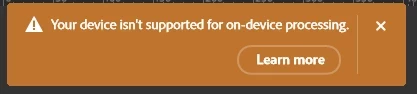
    This is the issue reported in the original post. Affected users are unable to use the on-device Remove Tool model and receive the following error: “Your device isn't supported for on-device  processing.”  This issue is being tracked in this current thread.


    2. On-device model falls back to CPU instead of using the GPU. This is a different issue. In this case, users are able to install and use the on-device model, but it is not utilizing the GPU correctly and instead falls back to CPU processing. We are tracking that issue separately here:
    https://community.adobe.com/questions-712/generative-remove-runs-on-the-cpu-instead-of-the-gpu-since-version-27-9-1-1635615

    I have moved all replies related to the GPU/CPU issue to the second thread so that the two issues can be tracked separately.

    Please reply to this thread only if you are still receiving the “Your device isn't supported for on-device processing” error.

    If the on-device model is available on your system but is not using the GPU correctly and is falling back to the CPU, please use the other thread linked above.

    At this point, it appears that the issue causing the “Your device isn't supported for on-device processing” error has been resolved with 27.9.1.

    If you are still seeing this error, please feel free to reply to this thread and let us know.

    103 replies

    gener7
    Community Expert
    Community Expert
    June 18, 2026

    I tried installing “Device mode” for the remove tool, but the Macbook Neo doesn’t meet M1pro/16GB/8 cores requirements. OTOH ACR 14 is just fine.


    Sad note: The ACR splash screen pays tribute to Jeff Schewe who passed away May 28.

    Inspiring
    June 18, 2026

    the new release version Adobe Photoshop Version: 27.8.0 20260610.r.13 4081857  x64 (final, Release): your nvidia gpu does not have enough VRAM for device-side processing

    @Sameer K 

    Confirmed working in Photoshop Beta 27.9.0 20260616.m.3575 (199f0a1 x64).

    The previous issues appear to be resolved on my RTX 5080 system.

    • Device mode can be selected without any error message.
    • The Remove Tool completes successfully using on-device processing.
    • GPU core clock and VRAM clock increase during processing (verified with MSI Afterburner), indicating local GPU utilization.
    • Processing is significantly faster than on my Mac Studio M2 Max.

    It looks like Adobe has fixed the issue somewhere between build 3569 and 3575.
    Please let me know if other RTX 50-series users can confirm.

    Rockabilly Outlet
    Participating Frequently
    June 19, 2026

    Adobe Photoshop Version: 27.8.0 20260610.r.13 4081857  x64 (final, release) PC with RTX 5090 -> “Device” can be selected, but the error message “Device-side processing is not supported on your device” appears. So we’ll have to keep waiting for Adobe to fix the bug. 😴

    Inspiring
    June 19, 2026

    but the new beta runs on my hardware!!!

    Inspiring
    June 16, 2026

    a new beta is released Adobe Photoshop Version: 27.9.0 20260614.m.3573 f286363  x64 (beta, PublicBeta) in memory of jeff schewe.

    But my error message is the same (I delete my beta folder (C:\Users\***\AppData\Roaming\Adobe\Adobe Photoshop (Beta) ) to take care that the old profile has no influence to the error message. 


    Participant
    June 14, 2026

    Remove Tool Advanced Components are already installed on my system, but the “Device” option is still greyed out.

    System info:

    Photoshop 27.7.0
    Windows 11 64-bit, build 10.0.26200.8655
    GPU: NVIDIA GeForce RTX 4090
    GPU accessible RAM: 24,138 MB
    Driver version: 32.0.16.1047
    Use GPU: 1
    Use OpenCL: 1
    isGPUCapable: 1
    isGPUAllowed: 1
    HasSufficientRAM: 1

    Photoshop uses the RTX 4090 normally for GPU acceleration, but System Info shows:

    NVIDIA GeForce RTX 4090 UNKNOWN, NVIDIA

    Since the required components are installed and the GPU meets the VRAM requirement, this looks like an internal GPU qualification issue for the on-device Remove Tool model.

    Can Adobe confirm whether the “UNKNOWN” GPU entry is causing the Device option to remain unavailable?

    Inspiring
    June 13, 2026

    today i get a clear informafion: at Adobe Photoshop Version: 27.9.0 20260610.m.3569 5354c19  x64beta 

    my rtx 5080 has not enough vram *lol*

    before with  27.9.0 20260603.m.3562 1a80e9b it was nonsense

    vladinir37492500kny1
    Participating Frequently
    June 13, 2026

    I've been dealing with this problem for six months or even longer. I've tried it on different computers, but I can't solve it. Today, the cloud version stopped working.

    Rockabilly Outlet
    Participating Frequently
    June 12, 2026

    Here, the same thing happens—the feature remains grayed out and this is the case on two different PCs running Windows 11 with an RTX 5090 and an RTX 4080.
    I tried contacting Adobe Support, but I haven't received a response yet. 🙁

    Inspiring
    June 13, 2026

    Would be nice if someone with a rtx5090,  rtx4090 or a amd gpu with more than 16gb RAM would try the newest beta 27.9.0 20260610.m.3569 5354c19  x64 (beta, PublicBeta)
    to check the error message. it would be interesting if 16gb are now not enough or if the ram size detection failed 


    Known Participant
    June 13, 2026

    3090 with 24GB VRAM and the newest beta it actually installed. Funny thing is I was trying it earlier today and spent about an hour copying and pasting data from windows sandbox where it downloaded lol. 

    jonathan_bdlf
    Inspiring
    June 12, 2026

    Same over here running an Intel Arc A770 (16GB of VRAM)


    Ged_Traynor
    Community Expert
    Community Expert
    June 12, 2026

    @jonathan_bdlf it’s not just you, it’s grayed out for me too, and I have an RTX 3090 with 24GB on VRAM


    jonathan_bdlf
    Inspiring
    June 12, 2026

    Ho ! For once that it’s not an Intel Arc specific issue 🥹

    jonathan_bdlf
    Inspiring
    June 12, 2026

    I’ve found out about the new local / offline Generative AI stuff !
    So freaking cool imo 

    I checked the requirements for Windows users, which clearly states 8+ CPU cores, 16+GB of RAM and 12 to 23+GB of VRAM

    I was so happy for the new features, since my computer is the following :

    • AMD Ryzen 9 7950x (16 core CPU)
    • 64GB DDR5
    • Intel Arc A770 with 16GB of VRAM (requirements : 12GB of VRAM for Intel Arc discrete GPUs)

    But when I tried it on the stable version of Photoshop, I was faced with a grey out dot, like so

    “Nuage” = cloud. “Périphérique” = local computing


    And, on the beta version, it clearly told me that my system is incompatible… 
    Which, if I refer to Adobe, is not the case.

    I guess it’s another bug for Intel Arc users ? :/
    Even though this card is perfect at this price point for local AI use (which I’m already doing). 


    Sysinfo is attached, please translate from French. 
    Drivers : 32.0.101.8735 (Apr. 2026)