
Participant
July 26, 2026

Not enough RAM ver 2026

  • July 26, 2026
  • 5 replies
  • 49 views

Just upgraded from Phootoshoop 2025 to Phootoshoop 2026 (27.8.0). When running large batch jobs get this crap:
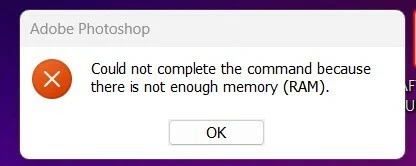
Have 40GB RAM so that’s not the prob. My (wild) guess is that the Phootoshoopers have messed with the “close” command - files are closed but their RAM remnants are not purged.

End up having to split single jobs into multiples (huge headache), never happened with Phootoshoop 2025. New versions are supposed to be improvements,  Phootoshoop????

[edited by moderator]

    5 replies

    D Fosse
    Community Expert
    Community Expert
    July 27, 2026

    @dougr1988 

    Photoshop does not release memory when you close a file. That memory is reused and recycled for the next file you open. 


    This is, in fact, what makes batch processing possible and workable in the first place. Requesting memory from the operating system for every file, would be very slow and inefficient.


    The memory is released when Photoshop exits.


    Then only thing you need to watch when running large batches, is that each file is closed before the new one is opened. If not, the whole system will choke quickly, not just from exhausted memory, but also scratch files growing without check.


    Now, there is one more element to this: the GPU. The GPU uses large amounts of memory itself, performing tasks called by Photoshop. This is normally allocated by the OS, but there is a possibility of conflicts. Specifically, we’ve seen quite a few cases where corrupt preferences causes the GPU to eat up memory unchecked. This can especially be a potential problem with systems that have an integrated GPU that uses shared system memory, or dual GPUs, like most laptops.


    To be clear, this is not normal behavior when it happens, and most of us never see it. But those who do, usually report back that a complete reset of preferences fixed it. So always try that first.


    I understand the frustration when things don’t behave as you expect, but in this case it can probably be remedied easily.


    Trevor.Dennis
    Community Expert
    Community Expert
    July 27, 2026

    Are you Windows or Mac?

    Have you checked to see how much memory is in use?

    How much memory is allocated to Photoshop?

    Are you sure that it is a Photoshop function that is running out of memory? i.e. are you printing a lot of images?  That could use a lot of memory.

    What is the process (list of steps)) being batched?

    How far does the batch process go before the error is displayed?

    How big are the files?

    How much total Photoshop temp files are showing on the primary scratch drive?


    If you are using Windows, check Resource Monitor, and maybe show us some screen shots.

    Participant
    July 27, 2026

    I agree with your troubleshooting approach. I'd also be interested to know whether this only happens in Photoshop 2026 with the exact same batch that completed successfully in 2025. If that's the case, and RAM/scratch disk usage looks normal, it may indicate a bug introduced in the new version rather than an actual lack of memory. More details about the workflow and system resources would help narrow it down.

    Participant
    July 27, 2026

    IMO, 40 GB RAM should be more than enough, so this doesn't sound like a physical RAM issue. I'd check the scratch disk first, then reset Photoshop preferences. I've also seen major version upgrades inherit old preference files that cause strange memory errors. If the same batch works in 2025 but fails in 2026, there's a good chance it's a bug in 27.8.0 rather than your hardware.

    dougr1988Author
    Participant
    July 27, 2026

    No probs with 2025...

    Nancy OShea
    Community Expert
    Community Expert
    July 26, 2026

    Photoshop Elements 20206 or Photoshop? 

    I ask because they are separate products with different technical requirements.


    Photoshop Element 2026  
    https://helpx.adobe.com/photoshop-elements/desktop/introduction-to-photoshop-elements/system-requirements.html


    Photoshop ver 27.x and later

    https://helpx.adobe.com/photoshop/desktop/get-started/technical-requirements-installation/adobe-photoshop-on-desktop-technical-requirements.html


    This post was incorrectly posted in the Stock customer forum. Please repost in the proper product forum below, where the experts there will see it. 

    Good luck.


    [Reply merged by a moderator]

    Nancy O'Shea— Product User & Community Expert
    yamato713108855
    Community Expert
    Community Expert
    July 26, 2026

    We will move to the Photoshop thread.

    [Reply merged by a moderator]