

luisnbispo
Participant
December 14, 2022

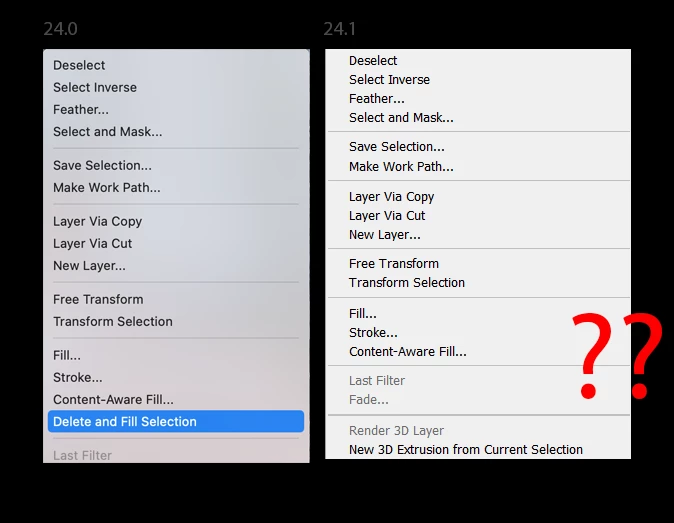
P: 24.1 - Where has Delete and Fill context menu gone?

  • December 14, 2022
  • 84 replies
  • 18635 views

I just updated photo shop today two version 24.1 and I have noticed delete and fill has been removed. This is really disheartening because it works so much better than content aware fill. Normally you can right click on the selection to access this, but I have looked through all the menus and have not found it since this update.


This topic has been closed for replies.

84 replies

Participant
December 30, 2022

thats the one of many reasons why i never update photoshop when adobe release new "better" version

RosaPerry
Inspiring
December 29, 2022

@D.Calafato 
Hello, just to let you know that the Materials panel not opening is a bug in PS v 24.1
You can post your issue here at this link.
https://community.adobe.com/t5/photoshop-ecosystem-bugs/p-materials-panel-does-not-open/idi-p/13425365


Rosa
RosaPerry
Inspiring
December 29, 2022
 

@Kevin Stohlmeyer  "If you do Shift+Delete with a regular selection tool (Not Object) it will bring up the Fill Menu."
Yes, it does bring up the Fill Menu but without the Delete and Fill Selection option in PS v 24.1
People in this thread are using v 24.1 and are commenting that the option Delete and Fill Selection are missing from both sources, whether using the shortcut, Shift+Delete, or right clicking to access the Contextual Menu.
We are waiting for news from @CShubert to get back to us with an answer on this bug. Until then users should revert back to v 24.0.1 

My screen shots for both options showing Delete and Fill Selection missing.

Rosa
Known Participant
December 29, 2022

Grazie mille Kevin, Maiuscolo + Canc permette di aprire Riempi in base al contenuto, ma non esiste più Elimina e riempi la selezione.....sono due funzionalità diverse. Quest'ultima è molto più veloce e funzionava benissimo! Come non si apre più il Pannello MATERIALI. dopo l'aggiornamento 24.1.....ci devono essere stati dei problemi!

Known Participant
December 29, 2022

Grazie mille Rosa!!

RosaPerry
Inspiring
December 29, 2022

@HooliganImages 

It is a bug in version 24.1. It doesn't matter what others say, we just have to wait until they develop a fix for it. Hopefully sooner than later.

Rosa
Known Participant
December 28, 2022

ESATTO!!! Vorrei che le versioni aggiornate....come la 24.1....funzionassero correttamente!

HooliganImages
Inspiring
December 28, 2022
@Kevin Stohlmeyer - yes that was covered in the thread but that’s not what some people want, as they want the other updates/changes/improvements. They want 24.1 to work correctly.
Kevin Stohlmeyer
Community Expert
Community Expert
December 28, 2022

@D.Calafato Did you try rolling back to 24.0 if 24.1 is causing the issue?

Known Participant
December 28, 2022

Se hai fatto l'aggiornamento 24.1 .....questa funzione scompare!!!!!