


Participant
February 28, 2018

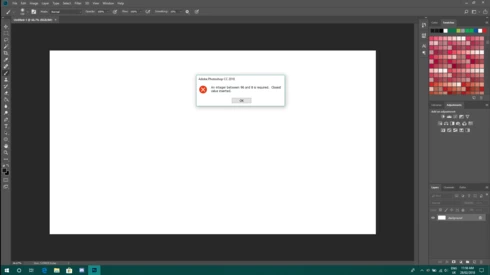
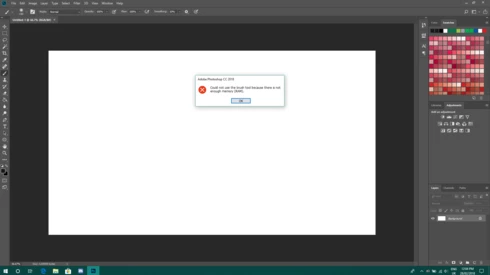
P: An integer between 96 and 8 is required. Closest value inserted. "...not enough memory (RAM)"

  • February 28, 2018
  • 132 replies
  • 3186 views

Photoshop has become suddenly unusable. Almost every tool gives me an "Out of memory (RAM)" error and when I try to open the Performace pane I get the error in the title. I cannot get inside the settings, as this error keeps on popping up. I tried everything (reinstalling PS, deleting everything (including preferences), updating PS, updating Windows 10, switching to the latest Insider Preview). Nothing fixes this error.
This topic has been closed for replies.

132 replies

Hannah Nicollet
Community Manager
Community Manager
May 25, 2018
Hi Michael,

I'll check to see if a there is a case in progress with Elements. Thanks for letting me know.

Regards,
Hannah
Inspiring
May 25, 2018
Having the same problem tried the fix but didn't work I'm getting further and further behind...
Inspiring
May 25, 2018
Please tell me that fix is coming soon. I am unable to do any work for my business
Hannah Nicollet
Community Manager
Community Manager
May 24, 2018
I'll pm you.
Participant
May 24, 2018
Hi Hannah
Well, after two attempts I have now downloaded it but no idea where it is, what it is called or what to do with it to install when I find it?
Best
Michael
Participant
May 24, 2018
Wow! That is very efficient Hannah - thank you very much.
I will go ahead and get back to you if I have any problem.
Best wishes
michael
Hannah Nicollet
Community Manager
Community Manager
May 24, 2018
Michael, since your Adobe ID was the same as your email associated with this site, I found you easily and went ahead and sent you the invitation. Please let me know if you have any trouble getting started with the build. I would be happy to assist you.

Thank you,
Hannah
Hannah Nicollet
Community Manager
Community Manager
May 24, 2018

Michael please email me with your Adobe ID if you would like to try the fix. This would be installing a different build, as opposed to altering your registry.

Thank you,
Hannah

cv95159831
Participating Frequently
May 24, 2018
I'm with you. Is it time to sue Adobe for malpractice?? 😉 
Participant
May 24, 2018
OK - I have the same problem - Photoshop crashes every time following RAM full message. I was told I could go into Preference>Performance and change the memory but every time I do that I get the Integer between 96 and 8 message.
I see that there is a link to a page where this can be fixed with a warning that you need to be IT savvy if you go ahead and alter a directory - I am not that savvy and wouldn't risk it.
Is there any other way this can be fixed? I need photoshop to make my living and not very happy at all since it is now completely useless.