


Participant
February 28, 2018

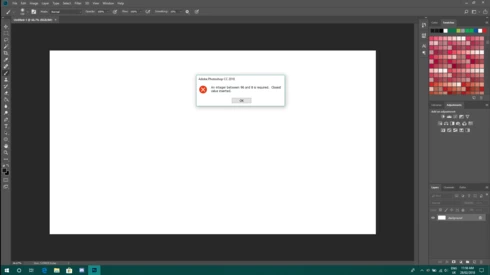
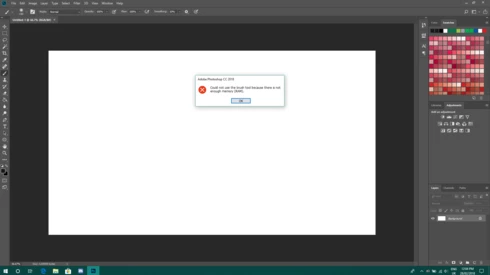
P: An integer between 96 and 8 is required. Closest value inserted. "...not enough memory (RAM)"

  • February 28, 2018
  • 132 replies
  • 3186 views

Photoshop has become suddenly unusable. Almost every tool gives me an "Out of memory (RAM)" error and when I try to open the Performace pane I get the error in the title. I cannot get inside the settings, as this error keeps on popping up. I tried everything (reinstalling PS, deleting everything (including preferences), updating PS, updating Windows 10, switching to the latest Insider Preview). Nothing fixes this error.
This topic has been closed for replies.

132 replies

Inspiring
May 23, 2018
Hannah, 

I suppose you are aware that the same issue is becoming a plague for Photoshop Elements (several versions) since the latest Windows 10 (build 1803)?

Same error message plus various other issues, and the only workaround is to edit the Windows registry. Not without risks for a consumer application like Elements.

Will Elements users receive good news in a near future?
cv95159831
Participating Frequently
May 23, 2018
Thanks, I'll let you know.
Hannah Nicollet
Community Manager
Community Manager
May 23, 2018
Thanks for reaching out! I put in a request for you to receive the build. Let me know if you have any trouble and I'll help you get set up.

Regards,
Hannah
cv95159831
Participating Frequently
May 23, 2018
I sent her my info, eagerly awaiting for a solution....
Rikk Flohr_Photography
Community Manager
May 23, 2018
She is brilliant. I am stealing that too!
Rikk Flohr: Adobe Photography Org
Victoria Bampton LR Queen
Community Expert
Community Expert
May 23, 2018
Oh what a good idea using an image to avoid spam emails... I'll borrow that one, thanks Hannah!
Victoria - The Lightroom Queen
Hannah Nicollet
Community Manager
Community Manager
May 23, 2018

Hi Jason,

We have a fix and would like to find users to test it who are seeing that error. Would you like to download the fix? If you would, email me with your Adobe ID (or the email associated with it) and I'll send you a link with the build.

Thanks,
Hannah

jasonm9364
Participant
May 23, 2018


This is turning into a nightmare.  I updated to photoshop/lightroom 2018 and I have various problems.  One of which is I cannot open the preferences dialog now.  e.g. If I choose Preferences->Performance I just get warning dialog saying 'an integer between 96 and 8 is required.  Closest value inserted' and I cannot get rid of the dialog.  The preferences dialog does not appear

-- 

 tried this solution and it also worked for Photoshop CC 2018

In Regedit:

\HKEY_CURRENT_USER\Software\Adobe\Photoshop\120.0

Added DWORD "OverridePhysicalMemoryMB" with the value "4000" decimal bas (=24 GB RAM = my installed RAM).
RosaPerry
Inspiring
May 22, 2018
Hi Hannah,

Thanks so much for your quick response to my question.

This hasn't impacted the performance of my PS so far, which I'm grateful for.

Do you advise that I should just leave things as they are for the time being until an official fix and not use the workaround just in case I stuff things up?

Thank you so much for taking the time to help.

Cheers
Rosa
Rosa
Participant
May 22, 2018
Hi Hannah,
I changed my settings earlier in line with your instructions, do I need to revert/delete these changes prior to installing this fix?