


Participant
February 28, 2018

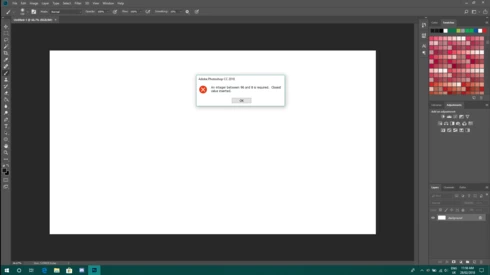
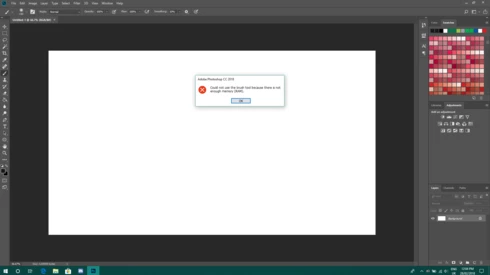
P: An integer between 96 and 8 is required. Closest value inserted. "...not enough memory (RAM)"

  • February 28, 2018
  • 132 replies
  • 3187 views

Photoshop has become suddenly unusable. Almost every tool gives me an "Out of memory (RAM)" error and when I try to open the Performace pane I get the error in the title. I cannot get inside the settings, as this error keeps on popping up. I tried everything (reinstalling PS, deleting everything (including preferences), updating PS, updating Windows 10, switching to the latest Insider Preview). Nothing fixes this error.
This topic has been closed for replies.

132 replies

Hannah Nicollet
Community Manager
Community Manager
May 21, 2018

Hi Everyone,

We have a fix for this issue that needs to be tested. If you would like to try it out and let us know how it goes, please email me directly at the email below and include the email associated with your Adobe ID. I will send you a link with instructions.

Thank you!
Hannah

Hannah Nicollet
Community Manager
Community Manager
May 21, 2018
Hi Rosa,

Apparently this calculation error is impacting a lot of areas, so it's likely that the calculation for available RAM was also impacted.

Thanks,
Hannah
Inspiring
May 21, 2018


 Almost every tool gives me an "Out of memory (RAM)" error and when I try to open the Performace pane I get the error in the title. I cannot get inside the settings, as this error keeps on popping up.
Participant
May 21, 2018
Hi Hannah,
No I have not raised these other issues as a separate thread.
Problems with 'oil paint filter' could be down to my computer, Dialogue box opens, message pops up saying something about drivers then Photoshop crashes.
Also since the latest update Photoshop is even slower to open.
Should I open a separate thread for the above?
RosaPerry
Inspiring
May 21, 2018
Thanks millions Hannah! 

Looking forward to an answer to my second question.

Thanks,
Rosa
Rosa
Hannah Nicollet
Community Manager
Community Manager
May 20, 2018
Hi Martin,

I'm glad to hear that this resolved most of the issues. As far as when the fix will be released, this problem is under investigation by engineering.

Regarding  oil paint and other filters, we track issues with unique threads. Are there threads regarding the issues you're referring to (or have you posted any)? I did a search and I wasn't sure which issue you were referring to, but I'd be happy to check into them if you would like to post to those threads looking for an update. Also, if you haven't already, clicking Me Too will add weight to the issue.

Thanks,
Hannah
Hannah Nicollet
Community Manager
Community Manager
May 20, 2018
Rosa, yes! Good catch! That documentation needs to be fixed. I just put in a request. In the meanwhile here's what it should say:
• Change the base value from "hexadecimal" to "decimal"
• Go to Windows > Settings > System > About and find Installed RAM
• Change the value data from "0" to installed RAM * 1000. For example:

  1. If installed RAM is 16GB, change value to 16000
  2. If installed RAM is 24GB, change value to 24000
  3. If installed RAM is 32GB, change value to 32000
So in your case yes, the value data would be 32000. Regarding your second question I'll do some checking and get back with you.

Thanks,
Hannah
Participant
May 19, 2018
Hannah, thank you, Resolved most of the issues, when will the official fix be released? Will the fix include problems with the oil paint and other filters?
Martin
Inspiring
May 18, 2018
Saved the day. Thank you, thank you, thank you!
Participant
May 17, 2018


Problems with May 2018 upgrade for Photoshop. Preferences - Performance, can not be opened, asks for number between 98 and 8 before crashing cloud filter slow