


Participant
February 28, 2018

P: An integer between 96 and 8 is required. Closest value inserted. "...not enough memory (RAM)"

  • February 28, 2018
  • 132 replies
  • 3187 views

Photoshop has become suddenly unusable. Almost every tool gives me an "Out of memory (RAM)" error and when I try to open the Performace pane I get the error in the title. I cannot get inside the settings, as this error keeps on popping up. I tried everything (reinstalling PS, deleting everything (including preferences), updating PS, updating Windows 10, switching to the latest Insider Preview). Nothing fixes this error.
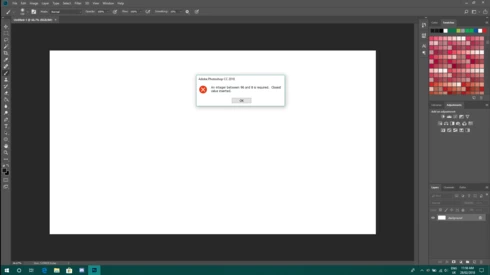
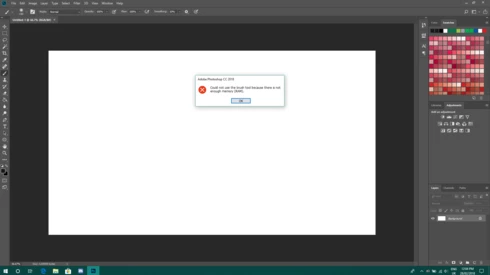
This topic has been closed for replies.

132 replies

RosaPerry
Inspiring
May 16, 2018
Hi Hannah Nicollet 

When changing the value data from 0" to "24000" should we be mindful of how much memory we have? If my total memory is 32Gb does the amount of value data (2400) differ in the edit DWord? 

https://helpx.adobe.com/photoshop/kb/invalid-numeric-entry-integer-96-8-required-photoshop.html

I'm not having problems with my PS CC but was wondering why there was such a variation of available RAM between this version of my Photoshop 19.1.3 compared to the previous version 18.1.2. 

My question here:

https://feedback.photoshop.com/photoshop_family/topics/question-about-ram-allocated-to-photoshop?utm...
Rosa
Inspiring
May 16, 2018
omg! Thank you so much for this workaround!!!
Inspiring
May 2, 2018
i am facing this problem and try to used this method but didn't worked i got this problem after windows 10 april  updates
Inspiring
April 25, 2018
I really want to thank you
You have solved my problem.
After a whole week of trouble.
thank you very much
Inspiring
April 14, 2018
it was helpful. thanks! 
Inspiring
April 3, 2018
Thanks Hannah, the link you sent helps and am able to save my work and do all other things on photoshop cc 2018. - Adeyemi Matthew
nicogigAuthor
Participant
February 28, 2018
Hi Hannah,

Yes! This finally did it! I was able to fix this issue with the workaround you provided.
Thank you so much!
Hannah Nicollet
Community Manager
Community Manager
February 28, 2018
Hi Nicola,

This is a known issue and it's in progress, but there is a workaround:

https://helpx.adobe.com/photoshop/kb/invalid-numeric-entry-integer-96-8-required-photoshop.html

Let me know if that helps - thanks!

Hannah
nicogigAuthor
Participant
February 28, 2018
Hey David,

I have 4.5GB on this laptop I'm trying to work with (which should be good enough). There are no other programs running while trying to use Photoshop.

Yes, I already tried reinstalling Photoshop both via the Creative Cloud app and via the offline installer.
David Mohr
Participating Frequently
February 28, 2018
Howdy Nicola,

No, you're right, that's plenty of space on your hard drives!  What about your RAM?  How much do you have?  What else is running?

Have you tried downloading a new installer from Creative Cloud?

Thanks,
David