


Participant
February 28, 2018

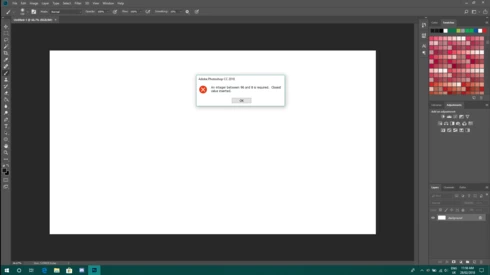
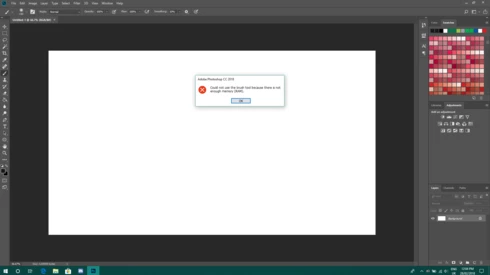
P: An integer between 96 and 8 is required. Closest value inserted. "...not enough memory (RAM)"

  • February 28, 2018
  • 132 replies
  • 3186 views

Photoshop has become suddenly unusable. Almost every tool gives me an "Out of memory (RAM)" error and when I try to open the Performace pane I get the error in the title. I cannot get inside the settings, as this error keeps on popping up. I tried everything (reinstalling PS, deleting everything (including preferences), updating PS, updating Windows 10, switching to the latest Insider Preview). Nothing fixes this error.
This topic has been closed for replies.

132 replies

Hannah Nicollet
Community Manager
Community Manager
November 30, 2018
Hi Ivan,

Would you please open Photoshop and go to Help > System Info and then copy and paste the contents of that window in a reply?

Thanks,
Hannah
Inspiring
November 30, 2018


I tried using Content-aware fill and got the message in the screenshot.


Notice this:

Efficiency is 100%

Memory usage by PS is only 3,6GB's with 78% memory being used overall (totally normal).


YET, I got this error message by PS.

There's no sense that allocating 75% memory to PS (11GB), it refuses
to do a simple content-aware fill when only 3,6GB is used for PS with
78% memory used in total. It's like Photoshop freaks out when PC memory usage
goes beyond 80%.

I wouldn't mind if PS would do Content fill slowly, but totally refusing to do with "no memory" message breaks it for me.

My usual workflow:


Opened in the background:


Firefox

Adobe Lightroom Classic


Working in: Photoshop CC 2019

About
8-10 imported 30mpix RAW files from LR to PS. No layers, except
temporal ones that are soon flattened. Working with images start nicely
but soon PS clogs. Starting Alien Exposure 7 soon crashes. Trying to use
history brush reports "out of RAM" after a while. Firefox also has
crashing tabs. Task manager reports 94-97% memory usage.

 It worked without problems in previous PS & LR versions.


W10, 16GB ram, Scratch disk 480GB free. Also 6GB of DDR5 video memory. I did install CC 2019 from scratch, disabled plugins and reset the preferences.


Hannah Nicollet
Community Manager
Community Manager
October 3, 2018
Hi Jo Ann,

That post is out of date. This fix is no longer in a test phase. It became public in Photoshop 19.1.5 on June 19, 2018 (announcement is in this thread).

Launch the Creative Cloud desktop app, update Photoshop and you will have it. 

Thanks,
Hannah
Inspiring
October 3, 2018
I'm having the same issue with the latest version.  Can you look up my e-mail and send the link to fix.   Jagphotography3@yahoo.com

Thanks
Jo Ann
Hannah Nicollet
Community Manager
Community Manager
July 17, 2018
Hi Sarah,

This error was triggered after a Windows update that came out in April. One option would be to go to a restore point before that Windows update to avoid triggering the error. Another option would be to do the workaround documented here.

As far as getting Photoshop 19.1.5, which is compatible with the Windows update, that does require a subscription. There isn't a patch (so to speak) where I could offer a download that would make your version of Photoshop compatible with the current version of Windows.

Thanks,
Hannah
Inspiring
July 17, 2018
I have read through this thread and it looks like there is a good solution to fixing the issue of my photoshop thinking there is not enough RAM when I have plenty. My question is, how do I get the update if I am not a CC member? I own my product from before the subscription program started. Hannah, is it an option to download the fix outside of the cc accounts?
Inspiring
July 16, 2018
How about photoshop elements?
Inspiring
June 20, 2018


Same problem as many others, photoshop telling me i don't have enough RAM, go to preferences, get told An integer between 96 and 8 is required. Closest value inserted. how long before an update is released to counter this. I'm currently like many people it would seem paying for a product I can't use
Hannah Nicollet
Community Manager
Community Manager
June 19, 2018
Thanks for letting us know, Rosa! It seems this error was at the root of several issues. Glad to hear the RAM allocation issue was resolved too.

Regards,
Hannah