


Participant
February 28, 2018

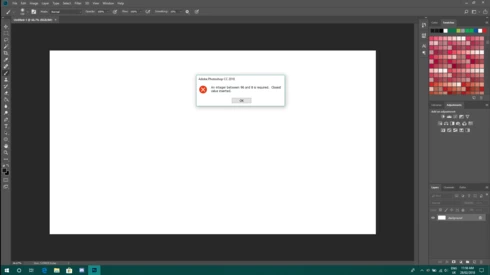
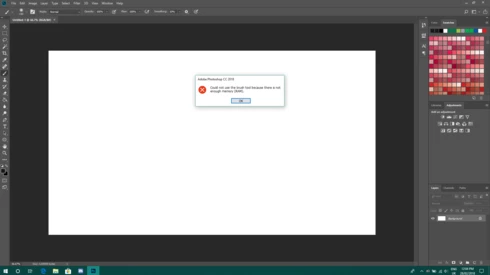
P: An integer between 96 and 8 is required. Closest value inserted. "...not enough memory (RAM)"

  • February 28, 2018
  • 132 replies
  • 3186 views

Photoshop has become suddenly unusable. Almost every tool gives me an "Out of memory (RAM)" error and when I try to open the Performace pane I get the error in the title. I cannot get inside the settings, as this error keeps on popping up. I tried everything (reinstalling PS, deleting everything (including preferences), updating PS, updating Windows 10, switching to the latest Insider Preview). Nothing fixes this error.
This topic has been closed for replies.

132 replies

RosaPerry
Inspiring
June 19, 2018
Hi Hannah,

My RAM allocation is fixed with this update.

Thanks for all your help.

Regards
Rosa
Rosa
Hannah Nicollet
Community Manager
Community Manager
June 19, 2018
Hey Everyone,

Photoshop 19.1.5 is now available! This is the update that includes the fix for this issue.

If you changed your registry, you will want to return it to it's unedited state. The documentation that explains this is here: https://helpx.adobe.com/photoshop/kb/invalid-numeric-entry-integer-96-8-required-photoshop.html

Thanks to everyone who participated in helping solve this issue. Please open your Creative Cloud and select "Update" beside Photoshop and let us know how it goes!

Regards,
Hannah
Pete.Green
Community Manager
June 19, 2018
Hi all,

We've release an update to Photoshop CC, version 19.1.5, which includes a fix to this issue. 

To update Photoshop CC to 19.1.5, click "Update" in the Creative Cloud desktop app next to Photoshop CC.
More detailed instructions for updating


Note!! After Updating, to allow Photoshop to manage memory, remove the Registry key you added for 19.1.4:

If you were using Photoshop CC 2018 (19.1.4) and added the Registry entry to fix the Invalid Numeric Entry issue, you’ll want to remove that registry key after installing this 19.1.5 update.
More info on what to do here

If you would like assistance removing this Registry key, please Contact Support.

Hannah Nicollet
Community Manager
Community Manager
June 18, 2018
Hi Catalin,

I see that the email you have is associated with your subscription. I sent you an invitation to try the build with the fix. Please check your email for that. Also, I will post here when the fix is publicly available.

Thanks,
Hannah
Inspiring
June 17, 2018
Me too
RosaPerry
Inspiring
June 13, 2018
Yaay! Can't wait for the update to appear on my CC App.

Thanks 🙂
Rosa
Hannah Nicollet
Community Manager
Community Manager
June 13, 2018
Hi David,

Thanks for asking! Please update Photoshop to the current release. The version that you were using is a beta version and the public release is in general more stable.

Regards,
Hannah 
Inspiring
June 13, 2018
OK.  I have that workaround 2019 White Lion you sent, which is working well.  What should I do?


Regards,

David
Hannah Nicollet
Community Manager
Community Manager
June 13, 2018
Hey Everyone,

This issue should be resolved in the most recent update to Photoshop, which went live last night. Please go to your Creative Cloud Desktop App, update Photoshop and let us know how it goes.

Thank you!
Hannah
Hannah Nicollet
Community Manager
Community Manager
June 13, 2018
Hey Everyone,

This issue should be resolved in the most recent update to Photoshop, which went live last night.

Thank you!
Hannah