


Participant
February 28, 2018

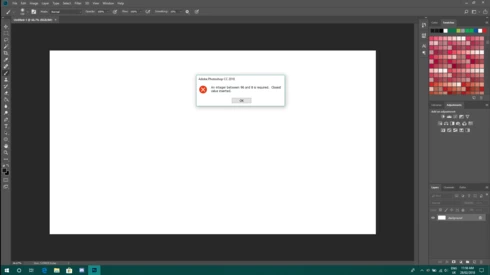
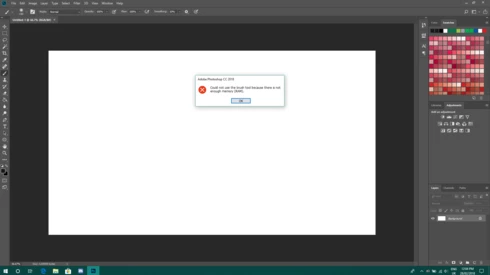
P: An integer between 96 and 8 is required. Closest value inserted. "...not enough memory (RAM)"

  • February 28, 2018
  • 132 replies
  • 3186 views

Photoshop has become suddenly unusable. Almost every tool gives me an "Out of memory (RAM)" error and when I try to open the Performace pane I get the error in the title. I cannot get inside the settings, as this error keeps on popping up. I tried everything (reinstalling PS, deleting everything (including preferences), updating PS, updating Windows 10, switching to the latest Insider Preview). Nothing fixes this error.
This topic has been closed for replies.

132 replies

Hannah Nicollet
Community Manager
Community Manager
June 12, 2018
I'm glad the fix helped. Michel is right that I don't have time to help everyone personally -- a video with the workaround for this issue had 54,000 views as of yesterday. Needless to say I wouldn't have been able to help over 50,000 people personally. For the record I really appreciate the champions on this site who do their best to disseminate information. They do their best to curate publicly available downloads/information, but obviously they do not have access to internal software fixes. And for that matter we need people to try out a fix before it's released also. The more people who vet the fix before it's released the better, so thank you to everyone here who helped us validate the fix. 
Hannah
Inspiring
June 12, 2018
Teresa,

Give Hannah the credit she is due, please.
That's already done, here :
The merit of Hannah is not only to have helped you personally, it was already to find and publish the solution. 
Maybe also read all the posts of this discussion to find more praise ? 

Can you imagine the number of thanks I have already received by repeating the same solution (her solution)  which too many users were too lazy to search for ?


Inspiring
June 12, 2018
I agree with David that Hannah is to be praised for her efforts to help us with this issue. We don't think we can sit and wait for a CSR to provide us personal help, but it's nice to have a rep from the company at least guide us to the resource that offers the solution. Give Hannah the credit she is due, please. 
Inspiring
June 12, 2018
David,You don't seem to realize that thousands of Photoshop and Elements have the same Microsoft issue. The merit of Hannah is not only to have helped you personally, it was already to find and publish the solution. 

Do you really think she can help thousands of users as she did for you? If you want to make readers of this forum think that the solution is to wait for her personal help instead of trying the very successful 'same old string of post', you are not doing them a good service.
Inspiring
June 12, 2018
I'd like to openly thank Hannah for her dedicated assistance in helping with a solution to my problem.  She stuck with me and looked for a solution based on the technical information I pprovided.  Unlike other "champions" on this forum who just kept referring to the same old string of posts, she dug in and actually helped me.  Thanks again, Hannah!
Hannah Nicollet
Community Manager
Community Manager
June 11, 2018
Robert,

This forum is hosted by Get Satisfaction. You should be able to opt out of emails. I posted a request for support concerning that issue here:

https://getsatisfaction.com/getsatisfaction/topics/cant-opt-out-of-koodo-email-replies?topic-reply-l...
Hannah Nicollet
Community Manager
Community Manager
June 11, 2018
Monique, I found your Adobe ID with the email in this login and I sent you an invitation to try the build with the fix. Please check your email for it.

Thank you,Hannah
Inspiring
June 11, 2018
David Burdett
[Private info removed by moderator]
Inspiring
June 11, 2018
Robert - to be fair on Adobe, I only saw this error after a big Windows Update, which suggests the update introduced the problem, which is out of Adobe's control. I'm sure it is something they will address in the next update of PS CC.
Hannah Nicollet
Community Manager
Community Manager
June 11, 2018
Are both of you still unable to use Photoshop? Did you download the build with the fix?