


Participant
February 28, 2018

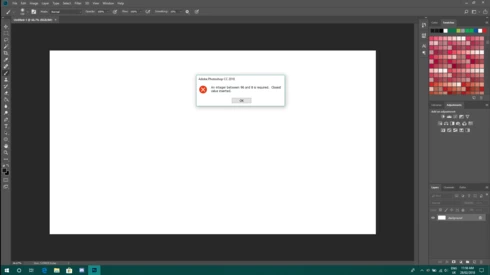
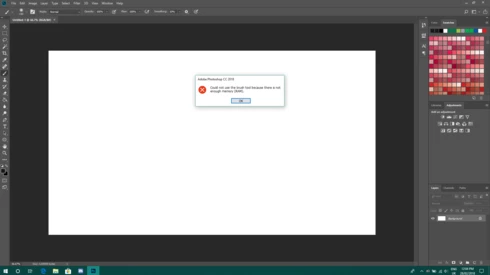
P: An integer between 96 and 8 is required. Closest value inserted. "...not enough memory (RAM)"

  • February 28, 2018
  • 132 replies
  • 3186 views

Photoshop has become suddenly unusable. Almost every tool gives me an "Out of memory (RAM)" error and when I try to open the Performace pane I get the error in the title. I cannot get inside the settings, as this error keeps on popping up. I tried everything (reinstalling PS, deleting everything (including preferences), updating PS, updating Windows 10, switching to the latest Insider Preview). Nothing fixes this error.
This topic has been closed for replies.

132 replies

Known Participant
June 11, 2018
After trying many things I finally found out how to stop following a thread. My email was being bombarded with responses from this thread. I clicked on the "stop receiving" link but it just brought me back to this thread without saying anything about stopping to receive notifications. I finally found out you have to go to your profile and uncheck notifications...4 or them. 
Anyway, WHEW!!! FINALLY!!!  This should be illegal, and actually I think it is.
Known Participant
June 11, 2018
I think, with this integer problem is caused by Adobe reaching to far and beyond their capabilities. They should do much more testing before releasing parts of programs that are so unstable like this. In the old days of Photoshop is was much more stable and reliable. It seems the new generations of engineers are not nearly as knowledgeable as in the old days. They're trying so hard to make money that they release upgrades without testing them fully. That's really where the problem lies. 
Known Participant
June 11, 2018
Why is it that I can't stop receiving noticications about the converssation? As much as I try, I can't get out of this and I keep getting emails about it. I clicked on the "stop receiving notifications about this topic" but when I click it, it just brings me to this page. Isn't this illegal of adobe to do this????
Hannah Nicollet
Community Manager
Community Manager
June 11, 2018

Hi David,

Thanks for your patience. Like you, I didn't find an associated subscription with that email. Would you please email me your full name, address, phone number and/or any other information that I might be able to cross reference to find you? My email is pictured in the comment above, but I'll paste it again for your reference.

Thanks,Hannah

Inspiring
June 10, 2018
David,
If you browse the huge flow of posts in the Elements and Photoshop forums, you'll see that most users have solved their problems with the registry edit.  A tiny part reported that it did not work for them. It appears that they did not  edit the registry correctly and many of them reported later that it worked when they did it properly. So, I had to post a test a few days ago to see how they could check by themselves if the registry had been correctly edited.
You just use the menu Help >> System Info to see if the the available RAM for Elements or Photoshop has been increased after your edit.
I have still to get a single feedback that when the amount has been increased the issues still persist.

Adobe and Windows need to coordinate a proper solution, so that users that do not have an understanding of registry editing can have a solution!
Adobe has not taken hold of your computer and modified its code overnight. That's what Microsoft did to modify the code of the OS resources offered to other programming editors. Simply roll back to the old Windows version and wait for a solution. Perhaps from Microsoft in June? For Adobe, a solution is announced when the next Photoshop CC update comes. No official  annoucement for Elements today. The workaround has been published by Adobe more than three months ago.
About the registry edit, it takes less than two minutes and has been performed by just normal users having no special knowledge; simply by following step by step basic instructions. With now probably  more than one thousand of successful edits, can you find an example of a situation where the edit has caused serious problems? 

That said, the way the empirical workaround  solves the issue is still mysterious as well as other important questions: 

- Why does the issue appear only in a part of the users after the Windows update? The issue has not even been mentioned in other Elements forums, which make me suspect that most users don't have the problem like me

- Why did the issue appear before the Windows update?   For Elements, it was apparently only on powerful configs with much RAM, SSD etc. 

- When the issue is solved, you don't see in the Windows task manager that more memory is really freed...- It seems that if you enter different decimal values, 4 000  or 24 000 or 4 096, that works as well? 

That's why I suspect that there are more parties involved than Adobe and Microsoft :  software, antivirus, hardware drivers...
Inspiring
June 10, 2018
Michel,
Registry manipulation workaround does not seem to work on all Windows platforms.  I have tried it several times with no effect!

Adobe and Windows need to coordinate a proper solution, so that users that do not have an understanding of registry editing can have a solution!
ssprengel
Inspiring
June 10, 2018

You can stop using Elements/Photoshop until they are updated or you can do the regedit.  Your choice.  You don't need to backup your registry, just to the simple steps.

Participant
June 10, 2018
This may be a great fix for more knowledgeabe people.I don't even want to or know how to back up my registry.And it is ecommended.Thank you for your help though..!
Inspiring
June 10, 2018
See the other posts in the first posts of this discussion.
Photoshop :
https://helpx.adobe.com/photoshop/kb/invalid-numeric-entry-integer-96-8-required-photoshop.html
Elements:
https://helpx.adobe.com/photoshop-elements/kb/integer-50-8-required-closest-value-inserted-photoshop...
The workaround is to edit the Windows registry (less than two minutes...)
Participant
June 10, 2018
I cannot do anything on my PS CC since this morning after a Windows update..I need help:(  Out of Ram..and integer of..I have plentty of space.