


Participant
February 28, 2018

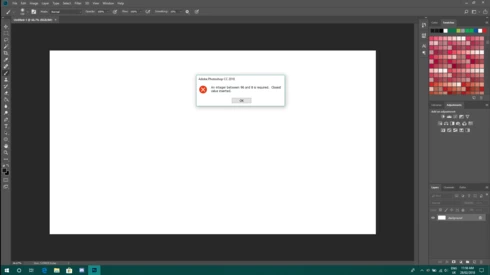
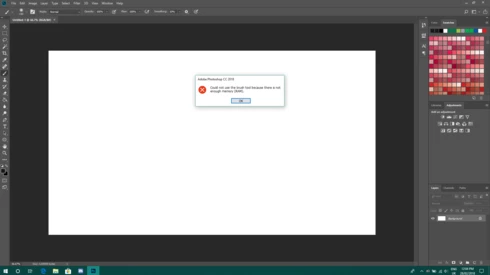
P: An integer between 96 and 8 is required. Closest value inserted. "...not enough memory (RAM)"

  • February 28, 2018
  • 132 replies
  • 3186 views

Photoshop has become suddenly unusable. Almost every tool gives me an "Out of memory (RAM)" error and when I try to open the Performace pane I get the error in the title. I cannot get inside the settings, as this error keeps on popping up. I tried everything (reinstalling PS, deleting everything (including preferences), updating PS, updating Windows 10, switching to the latest Insider Preview). Nothing fixes this error.
This topic has been closed for replies.

132 replies

Inspiring
June 8, 2018
Hannah, I want to pass along my experience regarding this known issue. I have asked for the upgrade to the newest Adobe Suite for several years. We had been using CS 6. I teach photography and felt it was important for my students to have access to the newest version of PhotoShop. I was finally upgraded recently, and this version of PhotoShop is useless. I can't even "auto tone" without getting a message saying my computer doesn't have enough memory, and then when I try to follow the instructions for the workaround, I get the "integer" error message. I have researched it online and tried several options, but today I finally called your help desk. The customer service rep was not helpful at all. First, I could hardly understand him because of his heavy accent. Plus, he wouldn't begin trying to solve my problem until I gave him the email address associated with the account. My IT department sets up all those software accounts and I didn't know it. I have a personal Adobe ID account but he didn't see it. He could not understand my Texas accent any better than I could understand his. Why would a non-customer call for help on this issue? Why not try to resolve the customer's problem? I am beyond frustrated. I am unable to use PhotoShop -- the software we are paying for through our community college account. What a waste of money...
Inspiring
June 7, 2018
Thanks for your help, by the way.  I'm sure it's frustrating to have all of these problem crop up from a matter out of your control.
Inspiring
June 7, 2018
davidburdettarchitect@gmail.com appears to be the Adobe ID.  However,  I logged into my Adobe Account and didn't see my Photoshop Lisc. there.  That was weird.
Hannah Nicollet
Community Manager
Community Manager
June 6, 2018

This is a workaround and it seems to help most users encountering this issue. However, it is only a workaround.

What I would suggest is that you try the build with the fix. If you email me your Adobe ID I can send you an invitation to download the build with the fix. Otherwise it will become publicly available in the next update to Photoshop. 

Thanks,
Hannah


Inspiring
June 6, 2018
Didn't work.  New value set at 4096 decimal (1000 hex)
Inspiring
June 6, 2018
let me try that...
Hannah Nicollet
Community Manager
Community Manager
June 6, 2018
Just to be clear, 4GB would be (1024*4) so you put 4096 as the value, correct?
Inspiring
June 6, 2018
Hi, Hannah,

I tried to modify the 90.0. file as you suggested.  My Surface Pro 4 appears to have 4 GB RAM, so that is the decimal value I added to the new  OverridePhysicalMemoryMB Key.  Same error message appeared.

Photoshop was working fine before the latest Windows Update.  I've asked them to comment too.  Any ideas?
Inspiring
June 6, 2018
Sharon - I had to do the registry fix as I described earlier in this thread, but backup registry first of course. I got 'out of memory' errors all over PS, couldn't save, same as you.
Inspiring
June 6, 2018
Caro - I had to do the registry fix as I described earlier in this thread, but backup registry first of course. I got 'out of memory' errors all over PS, same as you.