


Participant
February 28, 2018

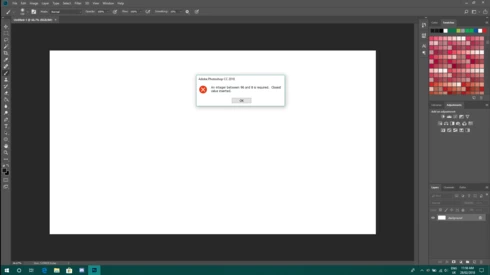
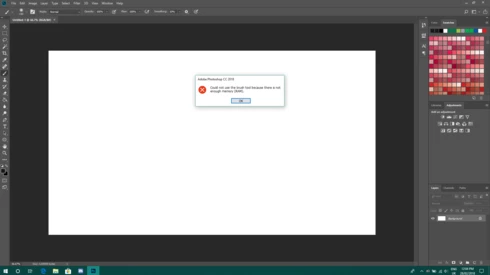
P: An integer between 96 and 8 is required. Closest value inserted. "...not enough memory (RAM)"

  • February 28, 2018
  • 132 replies
  • 3186 views

Photoshop has become suddenly unusable. Almost every tool gives me an "Out of memory (RAM)" error and when I try to open the Performace pane I get the error in the title. I cannot get inside the settings, as this error keeps on popping up. I tried everything (reinstalling PS, deleting everything (including preferences), updating PS, updating Windows 10, switching to the latest Insider Preview). Nothing fixes this error.
This topic has been closed for replies.

132 replies

Inspiring
June 5, 2018


Hi, Hannah, photoshop error could not complete the open as command because there is not enough memory (RAM). Tried to adjust the registry on my Photoshop CC 5015 as you suggested, but there is not 120 directory. Is there another workaround?
Inspiring
June 4, 2018
Hi Emma,
As per my other reply. I did the Registry fix -very reluctantly, but it did work.
Inspiring
June 4, 2018
I worked through the 'workaround' on the link https://helpx.adobe.com/photoshop/kb/invalid-numeric-entry-integer-96-8-required-photoshop.html (added the key to my registry, but if you follow this backup your registry first, just in case..).
After the Windows creator update last week, which I only just got round to installing, I had a few problems with my Photoshop 2015 - note I run Photoshop on Windows in Parallels on an iMac (weird?, but my company develops cross platform software so we need to run stuff on both Win + Mac). E.g. when I tried to edit some text Photoshop crashed, after editing a file (simple move a layer) the file would not Save. Most things gave me message about "not having enough memory".
The fix on the link definitely fixed all this - it's just that you wouldn't normally expect to edit the Registry to get stuff to work...!!
Good luck.
Inspiring
June 1, 2018
Hi Andrew, could i ask which bit of advice it was that you followed in particular?
Inspiring
June 1, 2018
I was getting a crash when trying to edit text in a PSD, and the advice on the helpx.adobe.com link here seems to solve it. The crash was after a big Windows 10 update this week, 30/31 May 2018.
Inspiring
May 30, 2018
Since a windows update that almost killed off my computer, I am having trouble with photoshop. I have just installed elements 18 and it is unable to open, saying "code execution cannot proceed because MSVCP140.dll is missing." Does anyone know what to do?
RosaPerry
Inspiring
May 29, 2018


Just curious as to why I have such a variation of available RAM between this version of my Photoshop 19.1.3 compared to the previous version 18.1.2. I was double checking my preferences and noticed that the available RAM is low. 

My installed RAM is 32.0 GB with (31.9 GB usable) Photoshop says I have less available RAM than I had in the previous version (18.1.2) and I would like to understand how PS calculates the available RAM. My Photoshop's working fine and so is my System which had no changes.

Below is the comparison and I've included my System info.

This version 19.1.3 
Performance Panel: Memory Usage: 
Available RAM is 25593 MB
Ideal Range 14076-18427 MB
Photoshop Use 15355 MB or 60%

Previous version 18.1.2
I took snapshots of my preferences in the previous version of PS and the available ram was higher:
Performance Panel: Memory Usage
Available RAM was 29419 MB
Ideal Range 16180-21182 MB
Photoshop Use 20299 MB or 69%


This is the top part of my System info through PS CC.

Adobe Photoshop Version: 19.1.3 20180323.r.293 2018/03/23: 1163761  x64
Number of Launches: 901
Operating System: Windows 10 64-bit
Version: 10 or greater 10.0.17134.1
System architecture: Intel CPU Family:6, Model:14, Stepping:3 with MMX, SSE Integer, SSE FP, SSE2, SSE3, SSE4.1, SSE4.2, AVX, AVX2, HyperThreading
Physical processor count: 4
Logical processor count: 8
Processor speed: 3408 MHz
Built-in memory: 32627 MB
Free memory: 2 MB
Memory available to Photoshop: 25593 MB
Memory used by Photoshop: 60 %


This is part of my NVIDIA System Information report

Operating System: Windows 10 Home, 64-bit
DirectX version: 12.0 
GPU processor: GeForce GTX 970
Driver version: 397.31
Direct3D API version: 12
Direct3D feature level: 12_1
CUDA Cores: 1664 
Core clock: 1215 MHz 
Memory data rate: 7010 MHz
Memory interface: 256-bit 
Memory bandwidth: 224.32 GB/s
Total available graphics memory: 20409 MB
Dedicated video memory: 4096 MB GDDR5
System video memory: 0 MB
Shared system memory: 16313 MB
Video BIOS version: 84.04.36.00.71
IRQ: Not used
Bus: PCI Express x16 Gen3
Device ID: 10DE 13C2 29783842
Part Number: G401 0010

I hope someone can clarify this for me.

Thanks in advance.
Rosa
Inspiring
May 29, 2018


Good Morning,

I wonder if anyone can help me with this problem.

Photoshop is displaying less available memory than the system provides. I have 8GB and it only shows me 3GB available.

I updated Windows and Photoshop this week and I can not say that had anything to do with the problem.


Adobe Photoshop Version: 19.1.3 20180323.r.293 2018/03/23: 1163761  x64


Operating System: Windows 10 64-bits 10.0.17133.1

System architecture: Intel Família CPU:6, Modelo:10, Etapa:9 com MMX, número inteiro SSE, SSE FP, SSE2, SSE3, SSE4.1, SSE4.2, AVX, HyperThreading

Physical processor count: 2

Logical processor count: 4

Processor speed: 2893 MHz

Built-in memory: 8048 MB

Free memory: 2 MB

Memory available to Photoshop: 3065 MB

Memory used by Photoshop: 100 %


Thanks,

Inspiring
May 28, 2018
Hi Hannah,
I have tried the solution which edit the registery but it did not work for me. would you please send me any fixing tool for photoshop cc 2015 in windows 10. Thanks alot. 
Inspiring
May 28, 2018
Excellent ! Thank You So Much ..... you solved my problem