

Barb Binder
Community Expert
Community Expert
March 28, 2024

P: Auto-numbered lists in Photoshop 2024?

  • March 28, 2024
  • 39 replies
  • 7351 views

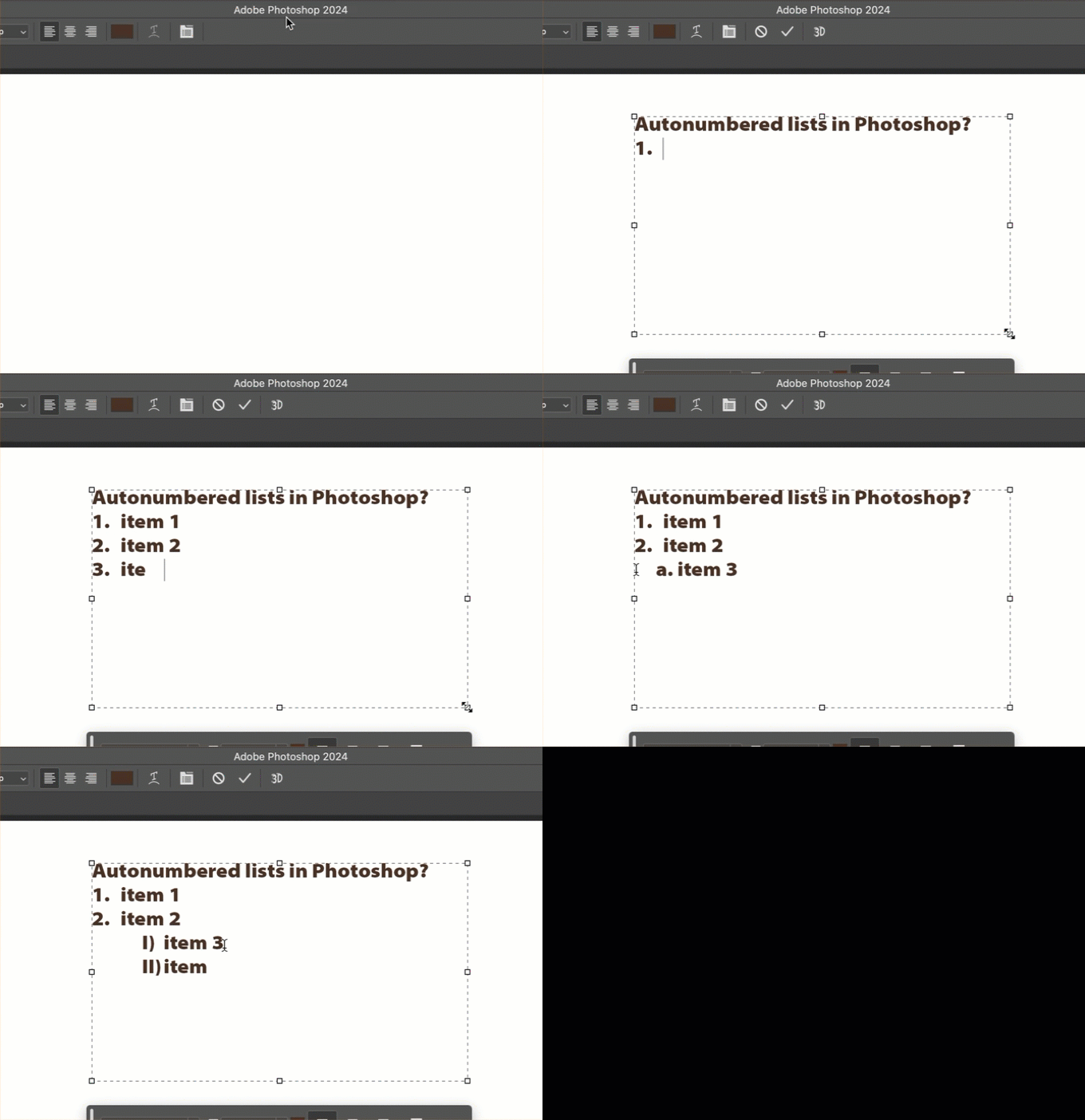
Can someone point me to the documentation that describes how to manage auto-numbered lists in Photoshop? I can't find any controls within Photoshop, other than what I stumbled on by randomly pressing tab or enter (looked in Settings, Properties panel, Options bar, Para and Char panels) and can't find any reference to these lists sudden appearance in Ps 2024 anywhere online!! 


TIA,

~Barb
 

39 replies

mediaistic
Participant
September 26, 2024

That messes up alignment though when aligning to other elements within the document.

Adobe Employee
August 8, 2024

Preference to enable/disable auto detection of bulleted and numbered lists while typing.


Participant
August 8, 2024

Pete.Green
Community Manager
June 6, 2024

Hi everyone, 


Wanting to clear up some confusion around this topic.

Portions of this feature made it into the 25.7 release, and have been removed in the 25.9 release.


The Bullets and numbering feature is now available in the latest Photoshop beta release, and is being discussed in this thread created by Cory

For those of you who want to test this out and provide feedback on it, please do so in the above linked thread in the Photoshop beta forums. 

In the beta, you have the ability to enable/disable bullets and numbers in Preferences, and modify its behavior via the Properties panel.


Regards,

Pete

OG Mr P
Participant
June 5, 2024

Update to version 25.9 absolutely DID NOT fix this issue!

Participating Frequently
May 23, 2024

Can you please explain why you are making Photoshop a second Indesign? Is it really necessary to bother designers with these pointless innovations?

Participating Frequently
May 23, 2024

Another completely unnecessary annoying feature. "Thank you" Adobe. You are "better and better"!

Participating Frequently
May 22, 2024

Fixed for me. Thx.

Mohit Goyal
Community Manager
Community Manager
May 22, 2024

Hi all,


We are happy to announce the release of Photoshop version 25.9, which incorporates the fix for this particular problem. To see the list of all fixed issues, click here


To update Photoshop to 25.9, click "Update" in the Creative Cloud desktop app next to Photoshop. More detailed instructions for updating


Let us know if the update resolves the problem for those affected, and share your feedback.


Thanks,

Mohit

Participant
May 18, 2024

This is impacting my work productivity.  Here's an idea -- if you add something, include an OFF switch!  Absolutely incredible.  And the fact people have been complaining for a month and you'd done NOTHING to fix this says a lot about Adobe and the way they value their customers.