Known Participant
January 17, 2021

P: Black Canvas when used with Egpu on MacBook Pro. Cannot see image on Canvas.

  • January 17, 2021
  • 21 replies
  • 1649 views

1. Pertinent System Specs  (Platform, RAM, HD Space, Monitor resolution, Video Card, etc)

MacBook Pro 13 inch 2018 with 4 thunderbolts

500GB Hard Disk

Intel Core i5 Quad Core

8gb RAM

Integrated Graphics: Intel Iris Plus Graphics 655

Egpu : Razor Core X with AMD Radeon RX 580


Display Bounds: top=0, left=0, bottom=1050, right=1680 OpenGL Drawing: Enabled. OpenGL Allow Old GPUs: Not Detected. OpenGL Drawing Mode: Advanced OpenGL Allow Normal Mode: True. OpenGL Allow Advanced Mode: True. AIFCoreInitialized=1
AIFOGLInitialized=1
OGLContextCreated=1
NumGLGPUs=1
NumCLGPUs=1
NumNativeGPUs=2
glgpu[0].GLVersion="2.1"
glgpu[0].IsIntegratedGLGPU=0
glgpu[0].GLMemoryMB=8192
glgpu[0].GLName="16915464"
glgpu[0].GLVendor="AMD"
glgpu[0].GLRenderer="16915464"
glgpu[0].HasGLNPOTSupport=1
glgpu[0].CanCompileProgramGLSL=1
glgpu[0].GLFrameBufferOK=1
clgpu[0].CLPlatformVersion="OpenCL 1.2 (Nov 23 2020 03:06:15)"
clgpu[0].CLDeviceVersion="1.2"
clgpu[0].IsIntegratedCLGPU=0
clgpu[0].CLMemoryMB=8589
clgpu[0].CLName="AMD Radeon RX 580 Compute Engine"
clgpu[0].CLVendor="AMD"
clgpu[0].CLBandwidth=1.770000e+11
clgpu[0].CLCompute=2877.863474
clgpu[0].CLRawDeviceName=AMD Radeon RX 580 Compute Engine
clgpu[0].CLRawDeviceVendor=AMD
clgpu[0].CLRawPlatformName=Apple
clgpu[0].CLRawPlatformVendor=Apple
nativegpu[0].NativeName="AMD Radeon RX 580"
nativegpu[1].NativeName="Intel(R) Iris(TM) Plus Graphics 655"


2. OS version number*

Mac OS Big Sur 11.1


3. Photoshop/Camera Raw version number
Photoshop V22.1.1


4. A brief description of the problem.


Setting: Macbook Pro Connected to Razor Core Egpu with Radeon RX 580. 


Description:

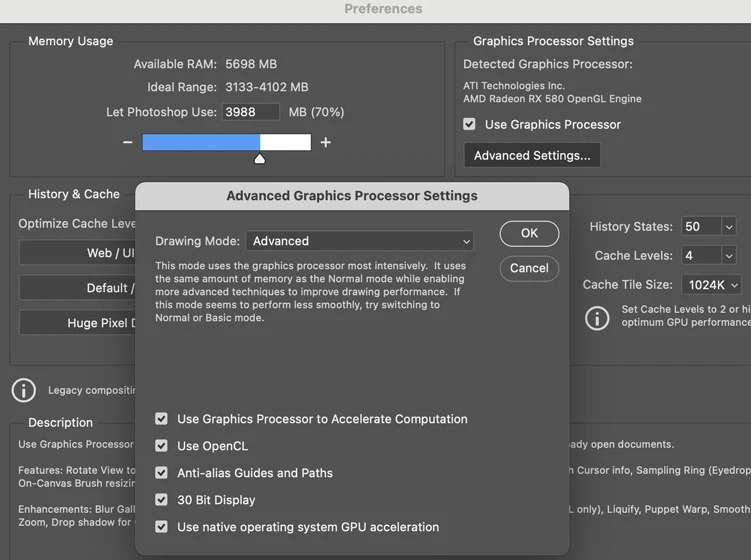
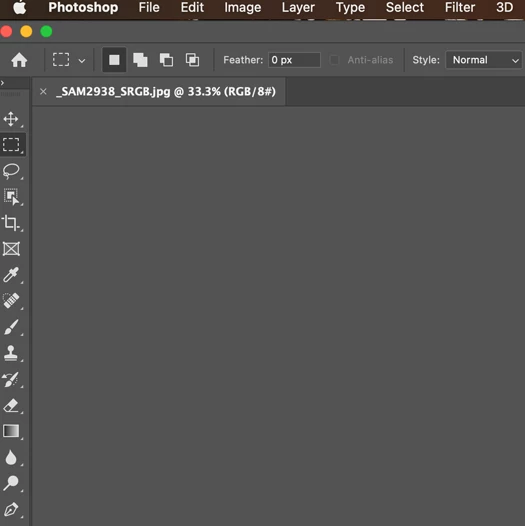
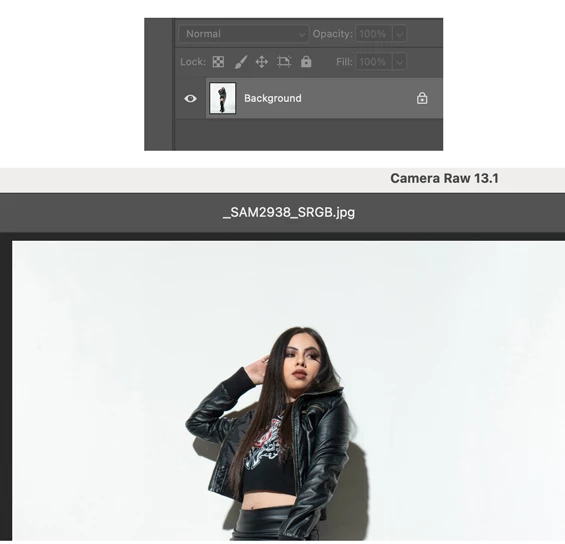
I have selected "prefer external egpu" in app. Phootshop recognizes my egpu. When i open an image, it displays blank on the canvas. However I still can see the image in the layers section. Image also appears in camera raw and other panels like liquify. I have tried to reset preferences, tried all different modes in drawing mode and no use.


For now I have a workaround. I first disable graphics processor and then open the image. Once the image displays, I enable my graphics processor again and continue working. but I have to do this for every pic i work on. Plus it is slow when zooming in and out of pic. I can confirm the Egpu is working this way as i can see the gpu chart from activity monitor.


Note: I dont have these issues when connected to an external monitor. Seems like photoshop has this issue when I directly use egpu with MacBook Pro internal monitor without an external monitor.


5. Steps to recreate the issue:


Connect your macbook to a egpu without an external display and try opening an image in photoshop in macbook pro itself.


Plzzz fix. gurhhhh


This topic has been closed for replies.

21 replies

Inspiring
January 23, 2021

Hi,

I have the same problem. (Mac mini, macOS 11.1, Photoshop 22.1.1, Razor Core X with AMD Radeon RX Vega 64).

The monitor ( BENQ SW 27) is connected to the Mac Mini via USB-C. (Connecting the monitor to the Razor Core prevented the monitor to be recognized sometimes).

I hope, there will be a solution soon.

Regards

Andreas

36758666Author
Known Participant
January 21, 2021

@mark_dahm When I use external monitor connected to egpu, I make sure primary display is selected as external monitor. I also make sure " Prefer External Gpu" is selected in photoshop app. In this setup I can keep PS on my external monitor or my MacBook Pro and PS will use egpu without any problem.

When I use macbook conected to egpu without any external display, obviously macbook internal display is the primary display. This is where PS displays blank canvas even though PS correctly recognies and shows egpu in the graphics processor.  I will have to close the document and disable the grahics processor (untick) in performace and then reopen the document with graphics porcessor disabled. The document will show this way. Now I will enable graphics processor (egpu) in performace to continue working. 

If I have to edit another image, I will have to repeat the same process.

"Photoshop will designate the GPU that is driving the monitor that displays the first open Ps document (that is a change that happened earlier in the year)" - I am no developer but I doubt if this is the right way to determine which gpu to use.  Especially when Mac OS (since Mojave) has an option to you can select on installed apps to "Prefer external gpu". So I am already telling PS to use egpu with this option. So I fail to understand why photoshop has to determine which gpu is driving the display.

Note: If I do not have "Prefer external gpu" selected at app level, it does not matter whether you are working on internal mac dispaly or external monitor, PS will only select internal mac integrated gpu - "Intel graphics 655" ( in my case)  in performance even though EGPU is still connected. If I want to take advantage of egpu, I will need to select that option, and restart PS to take that into effect. I will need to make sure I connect egpu first to macbook before opening the PS so it will automatically select egpu because it was intructed to use egu with "Prefer external gpu" option selected in earlier step.

JohanElzenga
Community Expert
Community Expert
January 20, 2021

I use only one display, an LG 38WK95C-W ultrawide curved monitor. I see the problem when I connect it to my Mac Mini rather than the BlackMagic eGPU (but let Photoshop use the eGPU).

-- Johan W. Elzenga
Mark C. Dahm
Community Manager
Community Manager
January 20, 2021

We have to look into the blank canvas issue for sure, but there may also be a flaw between the OS switch and how Photoshop determines the 'right' GPU. 

Photoshop will designate the GPU that is driving the monitor that displays the first open Ps document (that is a change that happened earlier in the year).

At this point I'm presuming that the blank document comes from Ps and the OS not agreeing on the same GPU when the eGPU is selected without an external monitor. 

We can do some testing on our side to determine whether our logic is bad, or the timing of the switch from the OS is confusing it.

Can you tell me (either @JohanElzenga or @deoxygen7 ) which display is designated as your Primary display?

JohanElzenga
Community Expert
Community Expert
January 20, 2021

@mark_dahm I recently upgraded to MacOS Big Sur, but as far as I can tell it was the last update of Photoshop that suddenly caused it to occur. I have now connected my screen to the eGPU again and the problem is over.

-- Johan W. Elzenga
36758666Author
Known Participant
January 19, 2021

@mark_dahm Thank you for the response. It is the update in the photoshop that broke the way its supposed to work. OS is fine. Mac lets you force an application to use EGPU as preferred graphics. This is done by selecting "Prefer External GPU" as shown below. When photoshop is launched with this option selected and egpu connected to MacBook Pro, Photoshop automatically detects and selects the egpu and locks on to the egpu in the "preferences" -> "performance"-> "use graphics processor" as shown in my original post. This option lets the eGPU accelerate apps on any display connected to the Macincluding displays built in to iMac, iMac Pro, MacBook Air, and MacBook Pro:

See "Use the Prefer External GPU option" in the below link.

https://support.apple.com/en-us/HT208544

This is from my MacBook:

Mark C. Dahm
Community Manager
Community Manager
January 19, 2021

@JohanElzenga @deoxygen7  can you say whether this changed with an update to the operating system or Photoshop (or both)?

JohanElzenga
Community Expert
Community Expert
January 19, 2021

I can answer that: yes, it worked differently before. I could connect my screen to the internal GPU, and check “Use eGPU” for Photoshop. That would work fine. Photoshop would recognise and use the eGPU.

-- Johan W. Elzenga
Mark C. Dahm
Community Manager
Community Manager
January 19, 2021

@deoxygen7 , did this used to work differently in a prior version of PS for you? 

Photoshop never supported multiple GPU configurations. It locks onto the GPU that is driving the monitor at launch. But We did recently change the way we designate GPU resources at launch to make it simpler, but may have overlooked a scenario.

If it did support multiple GPUs, the time it would take to swap the data back and forth between GPUs would defeat whatever benefits that the faster GPU would provide. 

36758666Author
Known Participant
January 17, 2021

i invested in this egpu just for photoshop. I dont even play games. let's hope they address this issue.