Participating Frequently
April 14, 2021

P: Can't detect GPU

  • April 14, 2021
  • 156 replies
  • 8535 views

Recently I just did an update of Photoshop to V22.3.1

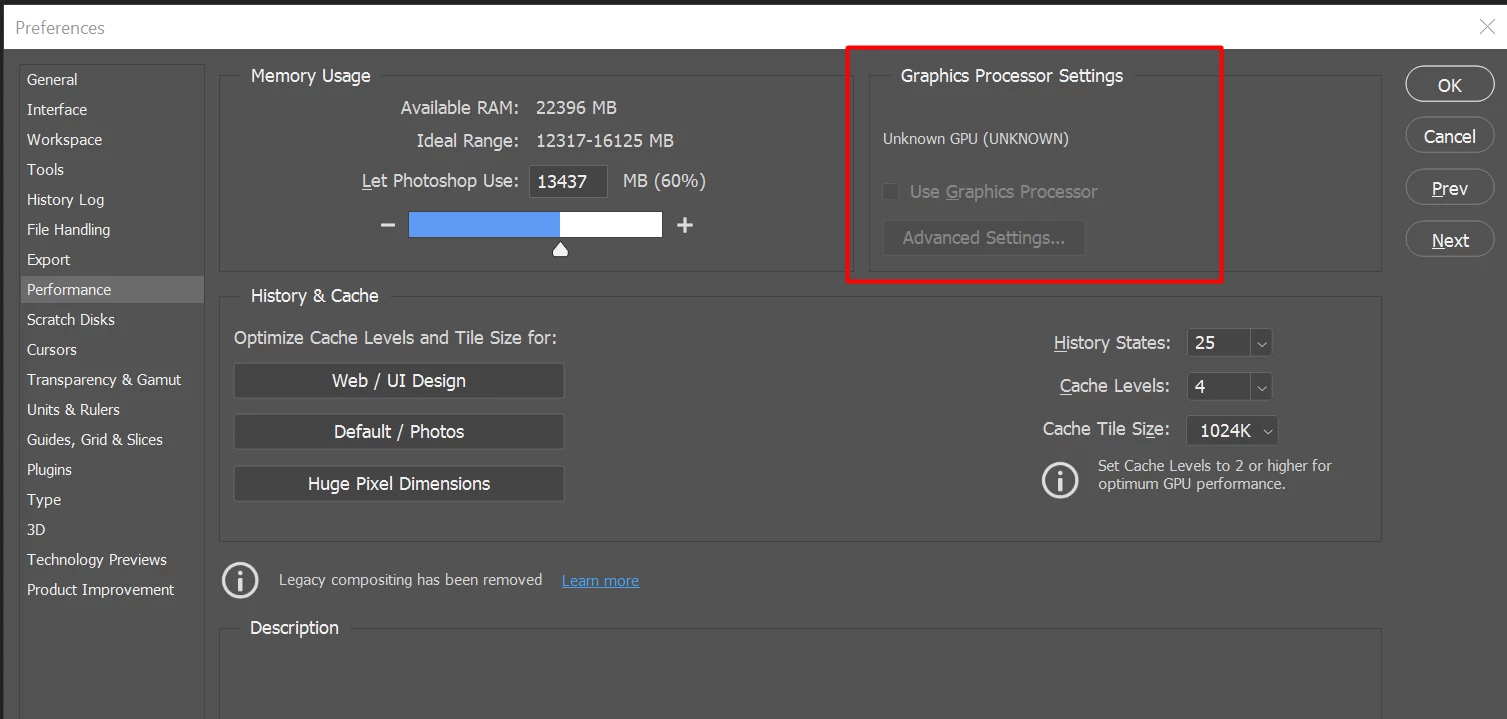
After I launched PS, and then go to the performance dialog box, then noticed that it can't detect my GPU GTX1050i.

This was working fine with the previous version of PS. I suspect that the latest update had something to with this problem.

Thank you

BR,

FS Wong

This topic has been closed for replies.

156 replies

Known Participant
April 20, 2021

Same problem here. GTX 1650Ti

Known Participant
April 20, 2021

Hi there..

There is no right or wrong here, it's called trying to solve problems, no blame, everybody has different computer system setups with different problems....

What works for one may not work for another, but clearly Adobe will either fix the update or by fixing these issues the will cause other issues, being a computer geek you no nothing ever goes smooth when it comes to updating software and hardware...

Everyone needs to work I need photoshop for my job of 37 years so I have no choice but to find work "a rounds" and adobe is one of the worst companies to deal with, they really don't care!!!!.

Known Participant
April 20, 2021

@SDS_Paul

Hi Adobe keep throwing out untested updates, trying to put to many gimmicks in and soon you will need a super computer to run it. One thing I have noticed is they have removed Legacy Compositing of the performance preferences page don't know when but a lot of people use to use this if they had GPU problems so was wondering if this is not a possible reason for everyone s problems....

71-L3N
Inspiring
April 20, 2021

My system is Lenovo ThinkStation P330 with GPU Quadro P2000, Windows 10 system language is English, regional settings/keyboard is set for my home country <Slovenia>.

Here is what I do. I closed all adobe programs and beckuped all settings files and than launch program Creative Cloud Desktop and I opened preferences "File>Preferences>Apps" and under apps I chose "default install language" from English (North America)" to "English (International).

 By doing that I needed to reinstall all adobe programs, but no fear, since all programs are already installed it just changes system locale, installation for programs that I have took about 1 min and for Photoshop I needed to replace settings files, for other programs that was not necessary.

Inspiring
April 20, 2021

It seems the older graphics cards are spared. This doesn't mean you did anything right that we didn't.

I am a geek if it comes to hardware and my drivers and Windows are up to date, and my Photoshop optimized to utilize my hardware to the best possible. Driver reinstall didn't solve the problem.

it is clearly an Adobe problem, not a user problem...

Inspiring
April 20, 2021

Adding a 5600XT to the affected cards. My drivers and Windows are always kept current.

And the download is stuck....

Edit: rollback to 22.2 solved it.

Participant
April 20, 2021

Also have this issue, Adobe support deleted the settings folder, restarted photoshop and it fixed the issue, I restarted photoshop again to confirm while the tech was there and it worked again. True to form however with tech issues, on the next restart when the tech was not watching the problem had returned.

For the moment that it worked, however, my keyboard was actually responsive, I have a persistent problem in photoshop where my keyboard shortcuts do not work, I have to hammer on them multiple times sometimes to make them work. I have even replaced my laptop keyboard trying to fix this issue!

I noticed that when I open too many files in photoshop the GPU acceleration stops and the keyboard works properly. So my keyboard not working seems to be directly related to the GPU drivers.

For a moment the other day when the GPU was detected photoshop ran like a dream, so much so I thought there was something wrong with my images!! It speeded up my work maybe 200% which being self employed would double my earnings!

For about 2-3 versions now I have been having GPU issues, the latest is the first version to have Unknown GPU fault. Running 22.3 and opening photoshop with no other programs running 3 or 4 times I can normally get it to detect the GPU.

Everyone keeps pestering LIVE support daily on this issue. Its only ever the squeaky wheel that gets the oil


BobWongAuthor
Participating Frequently
April 19, 2021

@Lawrence Robson

The issue here is PS latest version can't detect my GPU GTX1050Ti. It's nothing to do with ram setting. The PS older version is working fine. So maybe you got a very powerful machine?  

If Adobe PS had a solution to overcome this issue then they should specific what the users should do, and not to upset its users further, right?

BobWongAuthor
Participating Frequently
April 19, 2021

Hi Tylkko,

Hope you could share with us what is the detailed step that you overcome the problem?

Initially what problem did you have?

What is the GPU, OS that you are using? Laptop/Desktop? 

BobWongAuthor
Participating Frequently
April 19, 2021

*Sandra Meyer

Hi Sandra, does it work after installing the older version of PS?