Participating Frequently
April 14, 2021

P: Can't detect GPU

  • April 14, 2021
  • 156 replies
  • 8535 views

Recently I just did an update of Photoshop to V22.3.1

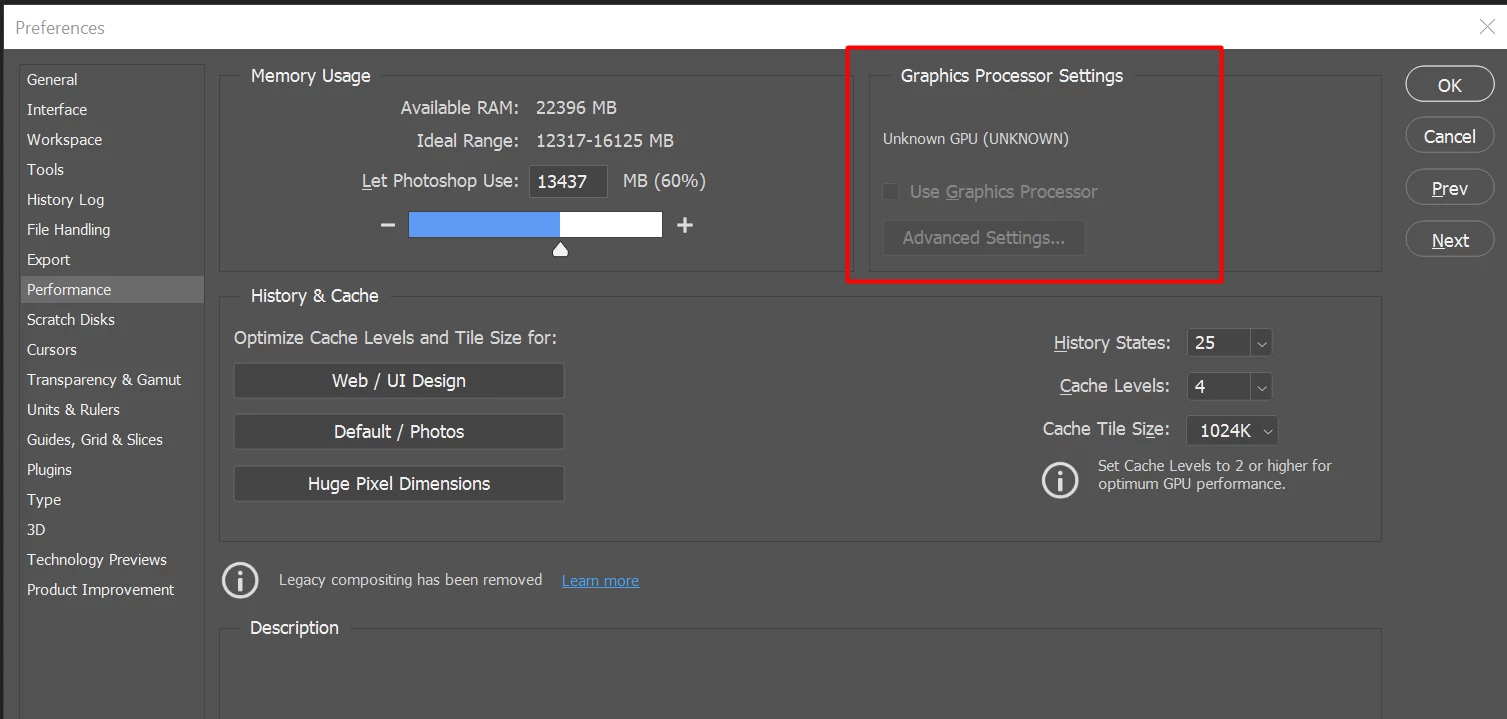
After I launched PS, and then go to the performance dialog box, then noticed that it can't detect my GPU GTX1050i.

This was working fine with the previous version of PS. I suspect that the latest update had something to with this problem.

Thank you

BR,

FS Wong

This topic has been closed for replies.

156 replies

BobWongAuthor
Participating Frequently
May 3, 2021

My friend also had problem with her laptop came with MX250 2GB GPU from nVidia. I asked her to reverted back to PS v22.3 then it started to work again. I still think Adobe should fix this problem in next release.

Participating Frequently
May 2, 2021

That's exactly what I do. Unfortunately newest PS version 22.3.1 works only untill the restart. after restart - i have to downgrade to 22.3.0 and upgrade back to 22.3.1 to make it work. 
Also, what i noticed - I cannot change the GPU used by PS in Nvidia Control Panel. I have multiple single tasks to select used GPU, but there's no global setting for specific app. To select that, I need to go to Windows 10 settings - but after addressing Nvidia GPU for photoshop it still didn't fix the issue...

BobWongAuthor
Participating Frequently
May 2, 2021

@wroublin

Propose that you shut down your PC/Laptop and have a clean restart to check whether it could be detected. Don't launch any other apps except PS.

Good Luck!

Participating Frequently
May 1, 2021

I'm having the same issue. My GPU drivers are up to date. I tried studio drivers dated 14.04.2021, it worked only untill i rebooted my laptop. I then reverted photoshop version to 22.3. - GPU was detected. Then I installed 22.3.1 again - GPU worked untill i rebooted my laptop. Now it's back to 'unknown' and I am reverting back to 22.3 as it sort of worked, just PS itself is slower i think, as it only supports basic GPU acceleration. Today I updated GPU drivers to game ready and that didn't help either.

Participating Frequently
April 27, 2021

Glad it worked for you. I still need to reinstall Ps 22.3.1 again to be able to test this on my computer. Will share the results too as soon as I get the chance. Thanks a lot for sharing this update!

BobWongAuthor
Participating Frequently
April 27, 2021

Yes, after full reboot, it's still there.

Here is the nvidia driver version

Participating Frequently
April 27, 2021

That’s great news! Have you restarted your Photoshop and computer to make sure it sticks after a full reboot? Also can you please share with us which NVIDIA driver version you currently have installed? And whether it is the Studio driver or Gaming driver?

BobWongAuthor
Participating Frequently
April 27, 2021

Hi guys,

I originally posted this issue at the 1st place that PS can't detected my GPU GTX1050Ti in the performance screen.

Recently I did some things to my laptop...

1st I updated my GPU driver to the lastest Studio Version (nVidia)

2nd then I updated a new release of Windows 10 (regular minor update)

3rd I tried to reinstall again the lastest version of PS v22.3.1

To my surprise, now PS able to detect my GTX1050Ti again

  Strange things do happen? Or maybe PS had fixed the issue in the same release v22.3.1?

BR,

FS Wong

BobWongAuthor
Participating Frequently
April 26, 2021

*PNWDRONE

My Laptop got two display ports, 1xHDMI and 1xminiDisplay port. The HDMI output is from Intel GPU and Display-Port output from nVidia GTX1050Ti (4GB vRAM). I connect my 4K monitor (10bit/Color Channel) to the Display-port to enjoy the richness of colors. So after updated the PS to v22.3.1, then my GTX is not detected. So I reverted back to v22.3.0 then it's OK.

I still suspect PS latest version got a bug!

Inspiring
April 26, 2021

I'm on a laptop, disconnecting my external display from HDMI and starting Photoshop also works for me. The GPU is detected and I can plug the display back in and GPU still works.
Needless to say I shouldn't have to do weird things like this but that's what I'll be doing for now until Adobe decides to care about their customers.