Participating Frequently
April 14, 2021

P: Can't detect GPU

  • April 14, 2021
  • 156 replies
  • 8535 views

Recently I just did an update of Photoshop to V22.3.1

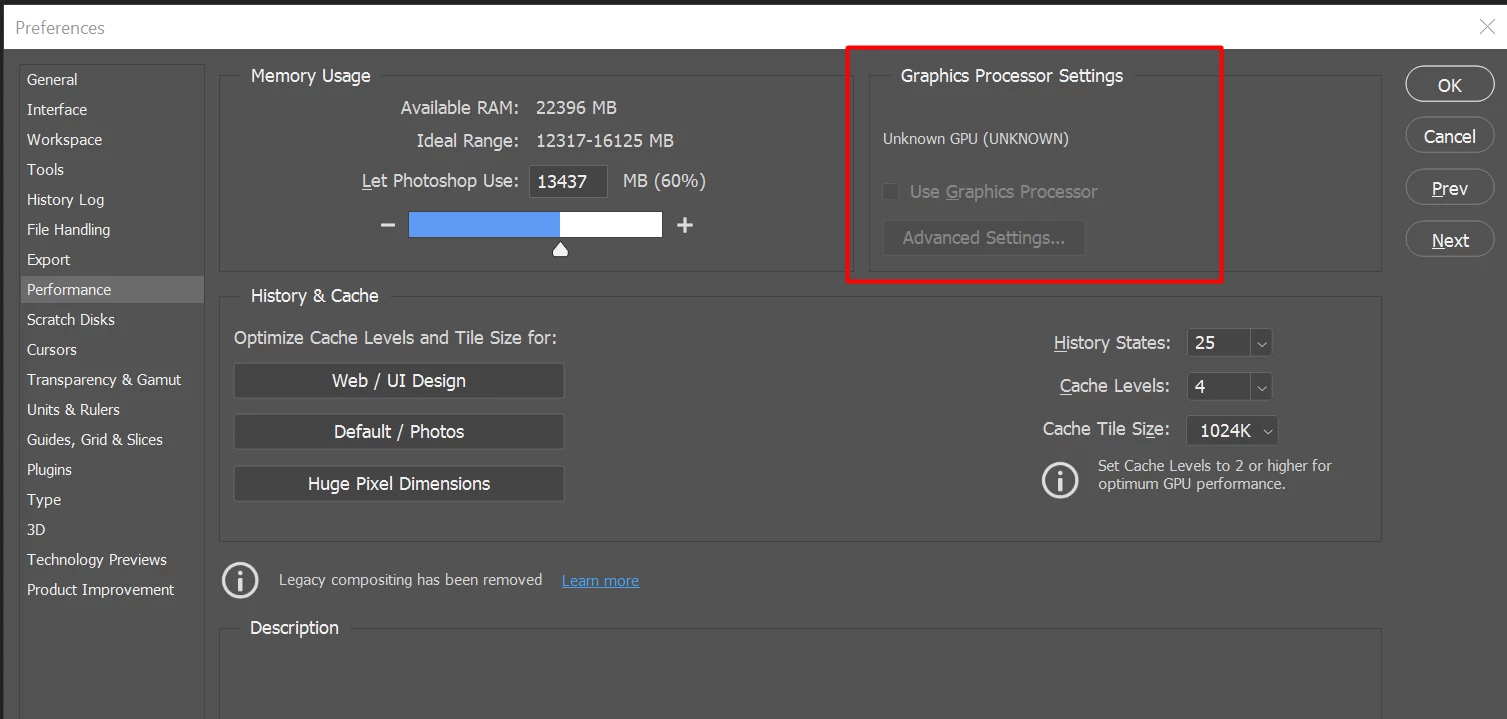
After I launched PS, and then go to the performance dialog box, then noticed that it can't detect my GPU GTX1050i.

This was working fine with the previous version of PS. I suspect that the latest update had something to with this problem.

Thank you

BR,

FS Wong

This topic has been closed for replies.

156 replies

Inspiring
April 25, 2021

Having the same problem with the following configuration:

System Model:  Alienware Area-51m R2
Processor:  Intel(R) Core(TM) i7-10700K CPU @ 3.80GHz, 3792 Mhz, 8 Core(s), 16 Logical Processor(s)
Installed Memory (RAM) 32.0 GB
Display Adapter: NVIDIA GeForce RTX 2070 Super (8GB), Nvidia Studio Driver 461.92

Rolled back from PS 22.3.1 to 22.2 and now it works fine. Anxiously awaiting a fix.

...Jerry

Inspiring
April 23, 2021

I have been battling this issue for months, updating and then reverting Windows 10 several times... updating and reverting PS versions several times... nightmare. Today I got my fix after a 30 second chat with a Geek Squad employee. I am shaking my head at myself for not trying this, but hopefully this will help someone here....

I am running a Dell XPS Tower with an AMD Radeon RX 480 video card. My dell has 2 default HDMI ports, and then 4 additional HDMI ports directly to the video card. I have always had both my monitors connected to the Dell default HDMI ports. He told me to simply switch to the video card HDMI ports. Just did that and boom, PS is detecting my GPU again and all functionality is restored.

Participant
April 23, 2021

I tried this "solution" and it worked.... sort of and only temporarily: While PS did detect the GPU, brushes were behaving bizarrely (affecting areas I hadn't brushed). Tried rebooting and -- poof! -- GPU detection gone again. Am looking into competing apps, as this has gone on quite long enough and, as far as I can tell, Adobe hasn't addressed or even acknowledged the issue at all.

Inspiring
April 22, 2021

Just adding my +1 to this issue since we are seeing it on several systems - primarily with Intel 10th and 11th Gen processors. Haven't seen it yet on AMD.

We can clear it up temporarily by deleting the "%appdata%\Adobe Photoshop 2021" folder, but that only works the next time Photoshop is launched. If we close and re-open Ps, the GPU shows up as "Unknown" again. So likely, there is something in those preference files that is causing the problem.

I also have system info output for both the first and subsequent runs of Photoshop after deleting that folder uploaded to my Google Drive if that helps troubleshooting

Known Participant
April 22, 2021

@roshanz92 

Thank you. I changed the language to english international and reinstall latest version 22.3.1 of PS and it works! I can now select "Use Graphics Processor"

71-L3N
Inspiring
April 22, 2021

I am using photoshop since version 4.0, and I've never had so many issues since they go with Creative cloud platform, not just Photoshop but other software as well, Indesign specially. Only good thing within Creative cloud platform is that you can remove never version and use older version that works. Of course auto updates must be disabled. They are like Microsoft, they let go their internal testing team and they test their product on public.

Eagle-Eye_MJG
Participating Frequently
April 22, 2021

I've been following this particular thread for a while now (along with a few others). I also have many issues with my 1080Ti and Photoshop.🙄

Almost everyone here is a Creative Artist of some kind and many of us have deadlines to keep. This notion of "Beta Testing" problematic software is NOT an acceptable approach for ANY company that provides software for Professionals.

Although this forum is a wonderful place for Professional Artist to gather and complain, it is a platform that is moderated, closed off, and limited by Adobe.

One suggestion I have is to take ALL these screenshots & lists of computer specs, and errors to Adobe's PUBLIC facing Twitter posts....YouTube Page.....Facebook Page....and Instagram. Let the WORLD see how Adobe handles their clients and let the competition see where there is room for improvements.

Participating Frequently
April 22, 2021

Thanks for everyone who shared this temporary (and unexpected) fix of changing the language. I’m glad it worked for some of you. However in my case I cannot afford to simply make this change, since I have the Install Language in Creative Cloud set to “English (supports Arabic)” which obviously supports writing in my native language. I had it set to that option all the way from the beginning without a problem (and it should never be a problem anyway). I don’t mind having the UI language set to any version of English, but changing it from my current settings to “English International” means I will no longer be able to type in my language, not only in Photoshop, but in all Adobe apps. This is by no means an acceptable solution. It’s Adobe’s responsibility to fix whatever they have broken in the last version.

Inspiring
April 22, 2021

I succeeded to install version 22.2 and my GPU is Ok now.  Tnx for helping me

Inspiring
April 22, 2021

I think all has been told by us already. It would be nice if any of Adobe's representatives/developers would respond here and tell us when the fix for this is coming.