


Inspiring
March 28, 2014

P: Can't open PNG files

  • March 28, 2014
  • 88 replies
  • 1064 views

We can to view the png file in finder mode.
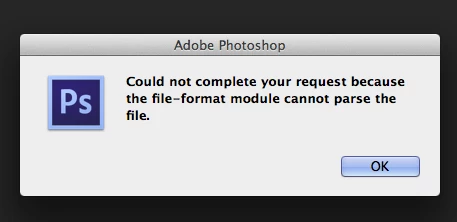
When we try to import png file, in the Photoshop, we receive the message:
"Could not complete your request because the file-format module cannot parse the file."
Mac OS. Maverick
Photoshop CS6
This topic has been closed for replies.

88 replies

Inspiring
March 5, 2016
Basically, when you normally save a PNG file, you're using full 24-bit truecolor (8 bits per channel) plus an alpha mask that stores the transparency info (basically another 8-bit channel). When you use palette colors, it indexes the colors as 24-bit RGB colors and keeps a separate 8-bit alpha mask.
Inspiring
February 29, 2016
Extension in my file is still .png and right, jpg can`t have transparency. So I don`t know what is this, but it works for me and maybe works for others either.
Inspiring
February 29, 2016
That means it wasn't a PNG file at all, but a JPEG file (which can't have transparency) with the wrong file extension.
Inspiring
February 29, 2016
I had the same problem and I fixed it 🙂 Rename the file and at the end try ".jpg". Write .jpg as a part o the name. E.g. "sky.jpg". I my case it was still png file (transparent), but I could open it in PS.
Inspiring
February 21, 2016
Post the files somewhere so we can take a look.  Most likely they aren't actually PNG files, but something else with the wrong extension.
Inspiring
February 21, 2016
I had the same issues with several .PNG from the web that wouldn't open in Vegas either yet perfectly visible in windows and all browsers. EVERY single one opens in paint and saves and a PNG that does work in Photoshop and Vegas. Who'd a thunk paint was actually useful for something.
Inspiring
February 14, 2016
Then in your case you might be missing some of the required plugins installed with Photoshop.

But most of the time the files have the wrong file extension, or are corrupted on disk.  (customers send me a lot of these files to examine)
ssprengel
Inspiring
February 14, 2016
Do you want to post one of the PNG files that won't work?
Inspiring
February 14, 2016
I know this is an old thread, but this keeps happening to people & Adobe always says the same thing- it's a corrupted file. They aren't listening- we can't open ANY .png files. I'm a cumputer science major & have been a web designer for 20 years- it's not a corrupted file & not something I've done wrong. Something happens to certain versions of Photoshop & Adobe won't even admit to the problem.
Inspiring
February 20, 2015
Possibly because that is not a PNG, but a PSD file.

Make sure you don't change the extension on your files to something that won't work.