


AxelMatt
Community Expert
Community Expert
March 6, 2026
Question

P: Canvas size doesn't save relative dimensions on recording an action

  • March 6, 2026
  • 14 replies
  • 294 views

I would like to change the canvas size via action in Photoshop 27.4. I’ve tried to record changing canvas size but I doesn’t work correctly. The dimensions wasn’t saved.


Steps to reproduce

  1. Open a document.

  2. Create a new action in the “Action” panel. The recording starts automatically

  3. Go to Image → Canvas Size…

  4. Let the units as it is.

  5. Switch the size mode from to Relative.

  6. Enter values for Width and Height

  7. Click OK to apply.

  8. Stop recording the action.

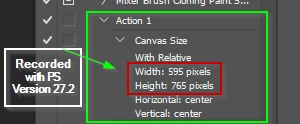
In the action the appropriate parameter for Width and Height are empty.
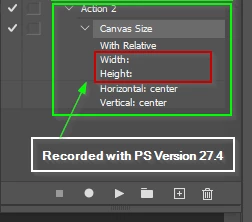
 

The same steps in Photoshop 27.2 working correctly.
 

The same issue was reported for the Photoshop Beta here. 

P: Canvas Size relative Width/Height not recorded in Actions (values saved as blank) | Adobe DME


A temporarly workaround is to deactivate “Enable Modern User Interface” option. After a restart of Photoshop it worked.


    14 replies

    AxelMatt
    Community Expert
    AxelMattCommunity ExpertAuthor
    Community Expert
    March 27, 2026

    Moderators, @Mohit Goyal,  please merge this with the following existing post:

    P: Canvas size doesn't save relative dimensions on recording an action | Adobe DME


    My System: Intel i7-8700K - 64GB RAM - NVidia Geforce RTX 3060 - Windows 11 Pro 25H2 -- LR-Classic 15 - Photoshop 27 - Nik Collection 8 - PureRAW 6 - Topaz Photo AI
    Ged_Traynor
    Community Expert
    Community Expert
    March 27, 2026

    @K24470592b963 disable this option in the preferences and restart Photoshop


    Participant
    March 27, 2026

    Thanks, Do you know if there is a list of features that this effects, or features that might break with this unchecked?

    I am concerned that unchecking this will break more than one bugged action functionality as this has already cost hours in troubleshooting.

    Ged_Traynor
    Community Expert
    Community Expert
    March 27, 2026

    There’s actually more bugs with this option enabled, it’s still a work in progress, you can disable it to run the action and then enable it for the new enhanced features, there is no list of features that it effects that I’m aware of though

    Participant
    March 27, 2026

    When recording a new action that includes the “Canvas Size” tool, the parameters for width and/or height are not captured during the action recording process, thus no changes to canvas size are made when replaying the action or including it in a batch process


    Expected Functionality: (view of the entry in the actions panel)

    Height parameter is properly captured when recording an action

    Current Functionality: (view of the entry in the actions panel)

    Nothing is captured for for the height parameter when recording an action

    This bug is present in both Photoshop v27.4 and the beta.


    To reproduce this issue:

    Open an image, record an action, while the action is recording open the “Canvas Size” tool. Adjust the height or width (or both) fields. View the action panel and view the height and/or width information taking note that it is empty/blank.

    You can further confirm the information not being capture, by playing the action or selecting the action for batch processing, and note that no canvas-size changes are made to the resulting images


    Following up with further experimentation:

    Installed photoshop 26.11.3 and the “Canvas Size” tool parameters are captured as expected.

    v26.11.3 captures information properly


    Lucilelucile
    Participant
    March 27, 2026

    J’ai exactement le même problème sur photoshop v27.4

    lobety
    Participant
    March 28, 2026

    Bonjour. La solution proposée par Jeff, ci-dessous, a corrigé le problème.

     “In Photoshop go to Edit>Preferences>Technology Previews, uncheck Enable Modern User Interface , restart Photoshop and see if that makes any difference when recording the action.”

    NaumRa
    Participant
    March 24, 2026

    Windows 11,
    Adobe Photoshop 27.4.0

    Actions: When creating Resize Canvas actions, the resizing parameters are not recorded. Please fix this in the next version. (Tested in different language versions.)

    CMass
    Legend
    March 24, 2026

    Merged into primary post. :) 

    Jeff Arola
    Community Expert
    Community Expert
    March 15, 2026

    There is a known bug with Canvas Size that can be avoided until Adobe fixes it by going to Edit>Preferences>Technology Previews, unchecking Enable Modern User Interface and restarting Photoshop.

    Then the Canvas Size action should record properly.

    ursv76710934
    Participating Frequently
    March 15, 2026

    Many thanks for your hint. It worked!

    ursv76710934
    Participating Frequently
    March 15, 2026

    Umgebung:

    • HP Laptop mit Windows 11
    • Photoshop 27.4.0
    • Tastatur Swiss-German

    Schritte:

    1. Neue Aktion erstellen und Aufzeichnung starten
    2. Alle Ebenen auf Hintergrund reduzieren
    3. Bildgrösse reduzieren auf 1914 x 1274
    4. Arbeitsbereich relativ Breite und Höhe je 6 Pixel einfügen
    5. Aufzeichnung abschliessen

    Fehler:

    • Schritt 4. Arbeitsbereich wid gespeichert aber mit leerer Breite und Höhe
    Participant
    March 6, 2026

    same problem here. tried everything, manual reinserting the canvas into the action, opening and re-entering the parameters, with tool recording or without.  it does not remember the parameters for canvas in the action.

    AxelMatt
    Community Expert
    AxelMattCommunity ExpertAuthor
    Community Expert
    March 7, 2026

    @olehner2000 As  I wrote in my origin post there’s a temporarly workaround.

    Deactivate “Enable Modern User Interface” option in Photoshop preferences on the “Technology Previews” tab. After a restart of Photoshop it worked.


    My System: Intel i7-8700K - 64GB RAM - NVidia Geforce RTX 3060 - Windows 11 Pro 25H2 -- LR-Classic 15 - Photoshop 27 - Nik Collection 8 - PureRAW 6 - Topaz Photo AI
    Sameer K
    Community Manager
    Community Manager
    March 6, 2026

    Hey, ​@AxelMatt. Thanks for the detailed post. The team is aware of the issues we’ve raised around Canvas Size panel. I’ll link your post to highlight this.

    Thanks for understanding!
    Sameer K

    AxelMatt
    Community Expert
    AxelMattCommunity ExpertAuthor
    Community Expert
    March 6, 2026

    @Sameer K Thanks for the info.

    I saw this problem in the Photoshop Beta forum and I wasn't sure if it was known that it also affects the normal Photoshop version.


    My System: Intel i7-8700K - 64GB RAM - NVidia Geforce RTX 3060 - Windows 11 Pro 25H2 -- LR-Classic 15 - Photoshop 27 - Nik Collection 8 - PureRAW 6 - Topaz Photo AI
    Jeff Arola
    Community Expert
    Community Expert
    February 25, 2026

    In Photoshop go to Edit>Preferences>Technology Previews, uncheck Enable Modern User Interface , restart Photoshop and see if that makes any difference when recording the action.