


AxelMatt
Community Expert
Community Expert
March 6, 2026
Question

P: Canvas size doesn't save relative dimensions on recording an action

  • March 6, 2026
  • 14 replies
  • 292 views

I would like to change the canvas size via action in Photoshop 27.4. I’ve tried to record changing canvas size but I doesn’t work correctly. The dimensions wasn’t saved.


Steps to reproduce

  1. Open a document.

  2. Create a new action in the “Action” panel. The recording starts automatically

  3. Go to Image → Canvas Size…

  4. Let the units as it is.

  5. Switch the size mode from to Relative.

  6. Enter values for Width and Height

  7. Click OK to apply.

  8. Stop recording the action.

In the action the appropriate parameter for Width and Height are empty.
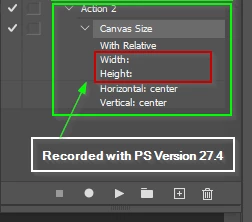
 

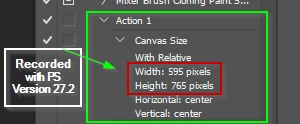
The same steps in Photoshop 27.2 working correctly.
 

The same issue was reported for the Photoshop Beta here. 

P: Canvas Size relative Width/Height not recorded in Actions (values saved as blank) | Adobe DME


A temporarly workaround is to deactivate “Enable Modern User Interface” option. After a restart of Photoshop it worked.


    14 replies

    Sameer K
    Community Manager
    Community Manager
    February 25, 2026

    Hey, ​@lobety! Welcome to the Photoshop Community. The reason  ​@Jeff Arola asked if you’re using Photoshop Beta is because of a bug in the Beta that has likely made its way to Photoshop 27.4.


    This issue is already under review, and a fix may arrive soon. 

    I hope this helps. Thanks!
    Sameer K

    lobety
    Participant
    February 25, 2026

    Thank you, Sameer. Do you know how long it may take to fix this issue?

    Sameer K
    Community Manager
    Community Manager
    February 25, 2026

    I don’t have a timeline to share yet, but you can use the workaround Jeff shared above during this period. 

    Thanks!
    Sameer K

    Jeff Arola
    Community Expert
    Community Expert
    February 25, 2026

    If you tell us the exact version of Photoshop from within Photoshop by going go to Help>System Info and tell us what version it says on the top line Adobe Photoshop Version that would be very helpful.


    The action that you show in the screenshot in your first post, is that made using Image>Canvas Size?

    lobety
    Participant
    February 25, 2026

    The exact version is 27.4.0 20260218.r.15 6bd4063  x64 (final, Release). And the screenshot has been generated with Windows screenshot tool.
    Thank you for your help…

    Jeff Arola
    Community Expert
    Community Expert
    February 25, 2026

    What version of Photoshop and operating system are you using?


    Is that Image>Canvas Size?

    lobety
    Participant
    February 25, 2026

    I am using PS 2026 on Windows 11.

    Jeff Arola
    Community Expert
    Community Expert
    February 25, 2026

    What menu command are you using to record the action?


    Are you using the Photoshop Beta?

    lobety
    Participant
    February 24, 2026

    Quand je crée une action dont une des étapes est la modification de la taille de l’espace de travail, PS n’enregistre pas les nouvelles dimensions. La modification de taille a bien lieu quand j’enregistre l’action, mais elle n’est pas enregistrée pour les utilisations de l’action. Et aucune taille n’est affichée dans les détails de l’étape de l’action (voir fichier attaché). 
    Le plus étrange est que dans des actions que j’ai enregistrées précédemment, tout se passait normalement, et les nouvelles dimensions étaient enregistrées correctement. 
    Qui aurait une solution? Ou une piste…

    Merci