




P: Canvas size doesn't save relative dimensions on recording an action
I would like to change the canvas size via action in Photoshop 27.4. I’ve tried to record changing canvas size but I doesn’t work correctly. The dimensions wasn’t saved.
Steps to reproduce
-
Open a document.
-
Create a new action in the “Action” panel. The recording starts automatically
-
Go to Image → Canvas Size…
-
Let the units as it is.
-
Switch the size mode from to Relative.
-
Enter values for Width and Height
-
Click OK to apply.
-
Stop recording the action.
In the action the appropriate parameter for Width and Height are empty.
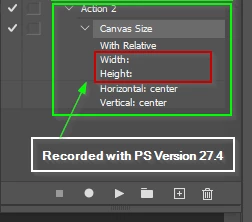
The same steps in Photoshop 27.2 working correctly.
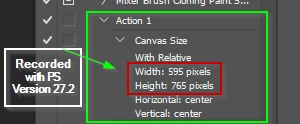
The same issue was reported for the Photoshop Beta here.
P: Canvas Size relative Width/Height not recorded in Actions (values saved as blank) | Adobe DME
A temporarly workaround is to deactivate “Enable Modern User Interface” option. After a restart of Photoshop it worked.
 AdChoices