Participating Frequently
October 25, 2013

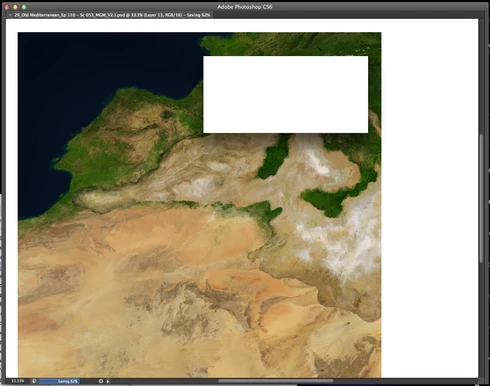
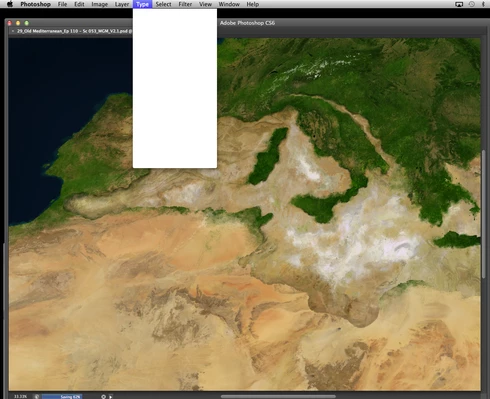
P: CS6/CC Menus blank (white) Mavericks Mac OS X 10.9

  • October 25, 2013
  • 208 replies
  • 2474 views

Hello, I hope I am in the right place for this:

I am on a Mac 2.2 GHz Intel Core i7, with 16 GB 1333 MHz DDR3. I just installed OS Mavericks. I am running Photoshop CS6.

Randomly throughout using the program, my windows/palettes (i.e. the layers palette) will become white. Even the "Save" window menu will become white. It's still functional (if I press enter on the save menu, it will save), but I can't see any of the options. I've uninstalled the program and reinstalled. This has unfortunately not solved the problem. Please help

Thanks for the help in advance!

Michael
This topic has been closed for replies.

208 replies

Inspiring
January 5, 2014
Neither Adobe or Wacom can reproduce the problem. It is ridiculous that their systems are the only ones that seem to work. I spent weeks torturing myself with it and eventually the only real solution I had was to migrate back to Mountain Lion. Now it works perfectly and I don't miss Maverick at all.

But I am very disappointed with all three parts. Adobe, Wacom and Apple. They have all failed to the expectations we have from them and the prices they charge for their products and the reliability they have now compared to days past when the creative industry was their main consumers.
Participating Frequently
January 5, 2014
@3157933
Too bad it isn't working for you. In the meantime, I've spent a couple of hours editing photos in PS, without any problems.

I'm also surprised by the fact that Adobe can't reproduce the problem. There's topics all over the Internet reporting the exact same problem.

What kind of hardware are your guys using? I'm using a 21,5" iMac, late 2010. 3,06Ghz i3. Details here: http://support.apple.com/kb/SP588
Maybe it's partially a hardware conflict too. Maybe the guys at Adobe are using newer hardware which doesn't have any conflicts.

But I do agree that this is not an optimal solution. However, it's still way better for your workflow than having to reboot PS every 10 minutes or so. I've gotten used to using CTRL-click instead of the assigned button on the pen quite quickly.
Participating Frequently
January 5, 2014
If Adobe what to try re-producing this bug. Try opening a new file, then mess around with multiple selections with the selection tool. Always seems to trigger the bug for me. Might need to make a few layers too. It mostly happens when you are making very quick moves in succession.
Participating Frequently
January 5, 2014
Disabling one of the wacom keys hasn't worked for me. In fact, its gotten worse. Also, I rely on the lower key for a faster work flow. I don't want to disable this.

I'm surprised to hear that Adobe and wacom haven't been able to re-produce this bug. There's so many people complaining of this issue that I would assume that anyone with a wacom, Mavericks and photoshop will not be able to avoid this.
Participating Frequently
January 2, 2014
@10502412
Thanks for the tip! I've tried it, and so far it seems to be working.
I have one of the keys on the Wacom pen assigned as right-click. I disabled this, and now it seems to be working perfectly.

The people at Adobe are actually looking into this problem, but as Simon stated, they haven't been able to reproduce the problem.

I would strongly suggest that you place your findings on the Adobe forums. There's some Adobe staff there, and maybe also on the Wacom forums, especially this topic: http://forum.wacom.eu/viewtopic.php?f...

Your info could help them out a lot.
Known Participant
January 2, 2014
Obviously Adobe DO care about this problem but they can't fix it if they can't reproduce it reliably

your info might help them in this regard
Mac OS Sonoma, 64 GB RAM 27" 2019 iMac 3.6 GHz 8-Core Intel Core i9
Participant
January 2, 2014
Hello All,
It seems noone from adobe is caring about this issue.
Today I came up with a solution, I wonder if it works with everyone.
I realized this problem occurs when I use the secondary click button on the Wacom pen. So I cancelled this secondary click from the system preferences/wacom settings. Now I use the ktrl key on the keyboard for the right click and it seems to work fine.
Its not a solution, but better than restarting photoshop every 5 minutes.
Participant
January 2, 2014
I had this issue pre-mavericks in 10.8. I was hoping Mavericks would fix it (foolish i suppose). I had it in CS6, and also now in CC. Lightroom doesn't do it. I've only had it in Photoshop. It seems to somehow becoming more and more frequent. I'm losing a ton of time blindly saving files and quitting photoshop and reopening to fix it. I've reinstalled wacom drives and it doesn't seem to change anything. It's acting like some sort of buffer. It's been well over two months this issue is going on with no real official word of hope to fix it.
Participating Frequently
January 1, 2014
Exactly the same issue here.
I've tried creating a clean user account, with nothing installed except Photoshop and Bridge CC, and the apps that were pre-installed.

There seemed to be no problems, until I installed my Wacom Intuos 4. Blank menus almost instantly. Installing the latest driver didn't help. With the new driver installed, it only takes a tad longer before the blank menus appear.

When I disconnect my Wacom and restart PS, it seems that I can work without the menus getting blank. I have not tried it extensively, but today I was able to work for 2 hours straight without getting blank menus.
But then again, when I can use only the mouse to edit photos, what's usually 30 minutes work now takes me 3-4 times as long.

I hope this will be fixed soon, because I'm really having trouble meeting my deadlines at the moment!
Participating Frequently
January 1, 2014
I couldn't stand the problem anymore, so I formatted my HD and reinstalled Maverick s, ACS6 and the latest Wacom driver leaving my mac clean of anything else. I have been working for five days without any issues at all. Yesterday I installed Flash Player, and today the blank menus are back.

Maybe it is a coincidence that I just installed Flash, but just in case...

Please, like many other users I would also appreciate a solution as soon as possible for, as it is now Photoshop is useless for profesional use and is creating serious problems and making us waste valuable time.

Thanks.