Participating Frequently
October 25, 2013

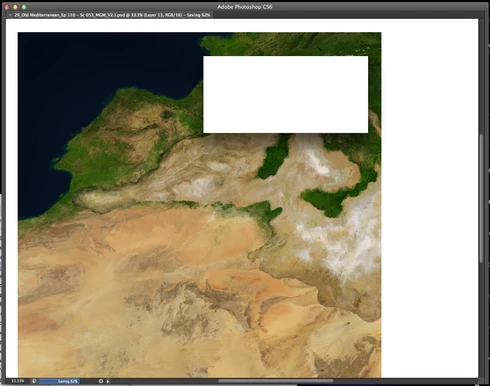
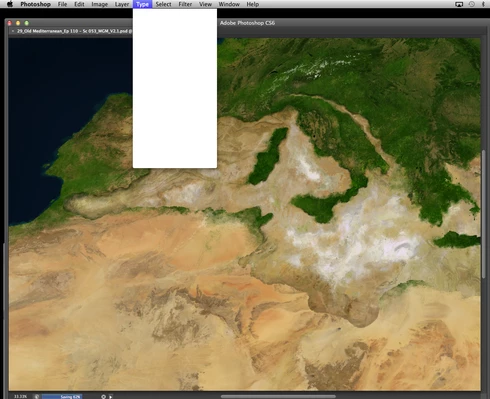
P: CS6/CC Menus blank (white) Mavericks Mac OS X 10.9

  • October 25, 2013
  • 208 replies
  • 2474 views

Hello, I hope I am in the right place for this:

I am on a Mac 2.2 GHz Intel Core i7, with 16 GB 1333 MHz DDR3. I just installed OS Mavericks. I am running Photoshop CS6.

Randomly throughout using the program, my windows/palettes (i.e. the layers palette) will become white. Even the "Save" window menu will become white. It's still functional (if I press enter on the save menu, it will save), but I can't see any of the options. I've uninstalled the program and reinstalled. This has unfortunately not solved the problem. Please help

Thanks for the help in advance!

Michael
This topic has been closed for replies.

208 replies

Participant
December 10, 2013
I installed latest wacom driver.
I Also tried "Displays Have Separate Spaces"

It doesn't work for me,

oi ADOBE: Any news from Adobe, or Apple, or Wacom side?
image33photo
Participant
December 10, 2013
⌘ S ⌘ S ⌘ S ⌘ Q. ⌘ S⌘ S ⌘ S ⌘ Q. thanks adobe & apple for all the help!
Participant
December 8, 2013
It seams that problem is not properly solve, SO , Is Adobe going to contact WACOM and APPLE about this any time soon. I think they all should sit down and have a chat...
Participant
December 8, 2013


I recently installed MAVERICKS on my Mac . After about 10 to 20 minutes working with Photoshop ( CS5 Extended all Photoshop ) all bar menus are WHITE, BLANK with no info whatsoever. I need to force quite because I ́m not even able to read QUIT PHOTOSHOP. After 10, 20 mins it happens again. and again... and again...
Pretty annoying. It makes working rhythm impossible.

I also recently change my graphic card. However, this ONLY happens with Photoshop. ( I guess if this is a card issue, it would happen in other applications as AFTERFX...blah blah blah )

SO I ́m pretty confused, is it the new card? Is it Mavericks? this never ever happen before any of those items.

HERE an image.

Need help asap!!
Participant
December 8, 2013


Hello!
Is anyone else having problems/bugs with mavericks and photoshop? I have two problems, All menu bars blank to white when trying to save a file.
Second is, the graduation tool, when you select 2 different colours, photoshop will only use one solid and no graduation.
Known Participant
December 4, 2013


Good day.

I am experiensing a bit of a problem with photoshop cc on mac os x mavericks. At some point all the information windows (i.e. coordinates while dragging), popup windows such as choose color dialog or program menus (file/edit/view, etc.) displays as a white rectangles. It gets back to normal if i restart the program. Sometimes i see this behavior more than once a day.

Looks like this https://www.dropbox.com/s/lpnijpotapf...
Inspiring
December 4, 2013
I haven't tested CS5 on 10.9. We've been trying to figure out what is causing this for some people, but numerous bugs in 10.9 make it difficult. We are still pursuing it, and working with Apple on a number of bugs introduced in MacOS 10.9.
Inspiring
December 4, 2013
i mean blank menu's.... it is really irritating... one more thing is it happening on cs5 as well?? or should i get back to Mountain Lion?
Participant
December 4, 2013
I totally agree Adobe needs to address this issue. I have been trying unsuccessfully to get help from them. With as many people having the problem you would think it would be fixed by now
Inspiring
December 4, 2013
blank screen, or blank menus (as this topic discusses)?