Participating Frequently
October 25, 2013

P: CS6/CC Menus blank (white) Mavericks Mac OS X 10.9

  • October 25, 2013
  • 208 replies
  • 2474 views

Hello, I hope I am in the right place for this:

I am on a Mac 2.2 GHz Intel Core i7, with 16 GB 1333 MHz DDR3. I just installed OS Mavericks. I am running Photoshop CS6.

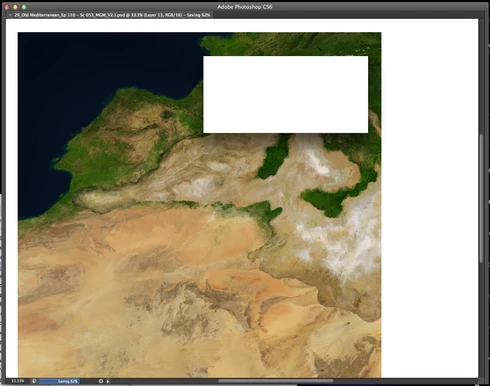
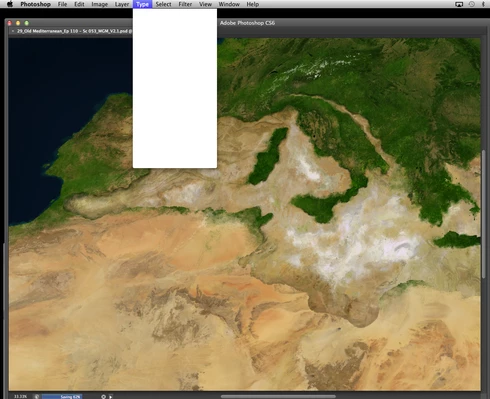
Randomly throughout using the program, my windows/palettes (i.e. the layers palette) will become white. Even the "Save" window menu will become white. It's still functional (if I press enter on the save menu, it will save), but I can't see any of the options. I've uninstalled the program and reinstalled. This has unfortunately not solved the problem. Please help

Thanks for the help in advance!

Michael
This topic has been closed for replies.

208 replies

Inspiring
December 4, 2013
experiencing the very same thing....first my Macbook Pro started doing this..then tried all the suggestions here..... thus i bought a Brand new Imac 27" just yesterday. Thinking it might be really my old MBP ( 2009) cant handle CS6 with mavericks running. Then i used my newly accuired imac and the same thing happened! WHITE BLANK MENU starts to come out after 30 mins of using it and getting more and more frequent!... ADOBE or APPLE's Bug? Please solve this as it's getting more and more annoying with these blank screen!!!!!!!!!!

i dont mind downgrading back to CS5 or going back to mountain lion as it doesnt have those problems before the maverick came out!
Participant
December 3, 2013
I changed to int English version yesterday an it worked fine 1 day now it's back to frustrating restarts of CC again :-((
3.2 quadcore 16GB mac pro...
Inspiring
December 2, 2013
David Field here again. I've already written a few times before. For some reason, this problem has become much worse all of a sudden. Today, I have spent the last 30 minutes unsuccessfully trying to make 2 minutes worth of revisions to a PSD, because of the blank windows issue. The windows all went blank and I quit / reopened photoshop. I used the dodge tool once and the windows went blank immediately. Then I shut down my cpu and started over. The same thing happened again! Wow. 3 times in a row. Perhaps it's because my image is over 1GB in size and is 16 bit? I'm using an 8-core Mac pro (mid 2008) with an NVIDIA Quadro 4000 graphics card and Mavericks OS.
Participant
December 2, 2013


I am about ready to cancel my membership with Adobe Creative Cloud. I have reported and so have many others that Photoshop is not working properly with the release of Apple Maverick. I dont know why Adobe is not giving any information on the status of them trying to fix this problem. It is white squares that appear after using photoshop for any length of time
Participant
November 29, 2013
same problems on imac's macro's and mac book pro's running maverick and CS6 and CC...
Participating Frequently
November 21, 2013


When using "edit in Photoshop" from LR to edit and image, PS works fine, until sporadically and randomly all the menus and the image turns white and you can not see them anymore. Keyboard shortcuts still work (THANKFULLY!) so at least you can save your work, but it is happening with more frequency. It never happened until I upgraded to Mavericks OS. After reading the forums lots of people are having this problem! Seemingly a Wacom driver is to "blame", but after reading all this, and even going out and buying the latest Intuos Pro tablet, installing the latest drivers thinking this would solve the problem- same issue!! This never happened before the upgrade, and does not happen in ANY other program, just PS. Restarting PS "fixes" it, until it happens again- it can happen hours apart or minutes apart. It appears to be happening more frequently. I make my livelihood as a professional photographer, and during the busiest time of year, the disruption in the workflow is inexcusable. I am not going to reinstall my whole system, and even those who did said it didn't fix it. It would be nice for Adobe to at least acknowledge that this is a known issue and assure everyone they are seeking a solution. All threads I've seen acknowledge nothing. Please at least HEAR us!!
Inspiring
November 17, 2013


HI, i have photoshop CS6 and MacOsx Maverick. Before upgrade to Maverick all functions of photoshop are good, after update, when i use selection instrument over one image, after some selections, all menu go to white and the text disappear. Then i can't save file and i lost all my work. I have tried also CC release but it the same. The selection tools is very important for me and my work, normally i make some step to select the contour and save the selection but also when the selection lost is little this is not a pleasure. I use one Mac Mini with 16Gb of ram, 1Tb of HDD, Mac Osx 10.9, Photoshop CS6 13.1.2 x64.
Inspiring
November 16, 2013


Since installing Mavericks my Photoshop Cs5 menus keep going blank . Ive noticed this happens more often when using the select tool. I have installed the latest Wacom drivers just in case and it still happens. Has been happening every day several times and I need to reboot Photoshop every time. Is there a fix for this?
Inspiring
November 15, 2013
I am following this thread. I've tried all solutions proposed. The issue still remains.
This issue is a menace.

PLEASE FIX
Inspiring
November 15, 2013
After a week or so of testing with the Wacom Driver, it has reduced it, but i still get the blank menus ussually when I turn the software on use it for 10 -15mins then try to use the burn tool and thats when it occurs. Switch off and back on and the problem goes away for a number of hours. But yeah certainly not fixed it.

Is Adobe investigating their end aswell? As far as I'm concerned this occurred when I updated to Mavericks, sure you Adobe should be considering if the software is fully compatible?