Participating Frequently
October 25, 2013

P: CS6/CC Menus blank (white) Mavericks Mac OS X 10.9

  • October 25, 2013
  • 208 replies
  • 2474 views

Hello, I hope I am in the right place for this:

I am on a Mac 2.2 GHz Intel Core i7, with 16 GB 1333 MHz DDR3. I just installed OS Mavericks. I am running Photoshop CS6.

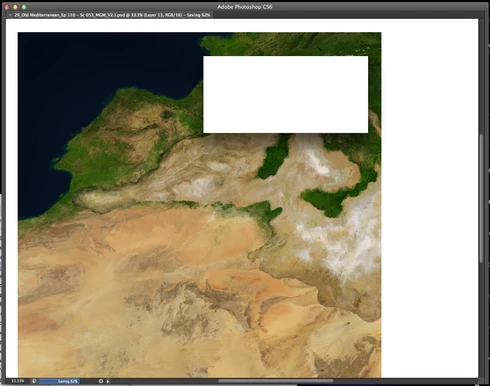
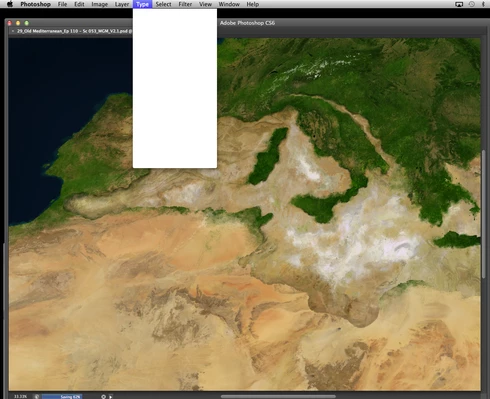
Randomly throughout using the program, my windows/palettes (i.e. the layers palette) will become white. Even the "Save" window menu will become white. It's still functional (if I press enter on the save menu, it will save), but I can't see any of the options. I've uninstalled the program and reinstalled. This has unfortunately not solved the problem. Please help

Thanks for the help in advance!

Michael
This topic has been closed for replies.

208 replies

Participant
November 15, 2013
updated wacom drivers -no help.
menus go blank very often now, very irritating.
please solve this issue fast. please.
Inspiring
November 12, 2013
I have had the same problem-removed the wacom driver and reinstalled an updated one and still had white menus after a few minutes. I then opened photoshop cc as a new user and everything works fine now, but I really hope that this problem is resolved soon
Inspiring
November 12, 2013
Regarding the blank menus: Updating the Wacom Driver has helped to reduce the frequency, but it still happens. Instead of 4 times per day, now only once per day, on average.
stefanbungart
Participant
November 12, 2013
Deleted all traces of Wacom Driver from my system, including hidden root prefs file (using terminal), then restarted and reinstalled new Wacom Driver linked in the top comment. This did not resolve the glitch. CS6 menus still blank out after a while.

I noticed that once menus went blank -> when clicking on opacity in the layers palette: instead of the slider appearing the sponge tool is shown. Moving the mouse left and right on the sponge tool icon appearing instead of the opacity slider changes opacity.

If it is not the way memory is allocated in CS6 that causes the behavior (some CS6 process using the wrong part of memory) then I suspect some other third-party software uses memory space allocated to CS6 (overflow into the memory space allocated to CS6 menu content).

Maybe the sandboxing and memory allocation in Mavericks make a process run out of memory and overflow into the memory area for menu content.

I hope you can pinpoint the problem soon and find a solution. Pretty annoying to restart every so often. Luckily all keyboard shortcuts continue to work so I can save my work and restart PS.
Inspiring
November 12, 2013
updating Wacom Driver worked for me initially, but now the issue has recurred. Bummer.
Participating Frequently
November 11, 2013
For those still having the problem (I am), don't forget your hot keys. Command + S will save your work. Command + Q should quit Photoshop. I don't use the 'quit' hot hey often as I roughly know its at the bottom of the first drop down menu.
stefanbungart
Participant
November 10, 2013


Working on images with multiple layers open. Applying Nik filters to some layers. While working with layers at some stage all photoshop menus blank out, text disappears, just empty white rectangles display. This is true for all menus, context menus, top menus, right-click, etc. every photoshop menu goes blank. Restarting photoshop restores the menus. After some time menus go blank again. Clicking anywhere on the white boxes still triggers actions, so if you can remember where the save button was before you close down your work is saved before closing. Does anyone else have this? Is it connected to using Nik filters? Using Creative Suite German version, latest update to 10.0.6 installed.
Participating Frequently
November 7, 2013
Oh well. Disabling "Displays Have Separate Spaces" didn't work. I made the change yesterday and have been using photoshop all day today. 5 mins ago the black menu accrued again! I hope Wacom is speedy with that driver update you mentioned Michael.
Participating Frequently
November 6, 2013
Update:

After creating a completely new user and carefully migrating select files and reinstalling applications and drivers, I had the same blank menu problem in Photoshop last night.

My system was working smoothly after several working days previous to this. Here is what I had done:
• I turned off 'Displays Have Separate Spaces' (I noticed that when I was working on my cintiq monitor, the top menu bar would occasionally flash on my laptop, prompting me to disable.
• I ran a disk utility to repair permissions (of which there were quite a few)
• I went to 'Wacom Tablet Utility' in applications and created a 'backup folder' and 'restored' my tablet.
• I reset Photoshops preferences as suggested
The cobination of these changes made my computer recognize my tablets and drivers upon startup and eliminated the blank menu problem until last night.

After performing every preference/utility/new user/driver suggestion listed I still encounter a few issues:

• The brush stalling never went away
• The polygonal lasso tool, occasionally 'acts a fool' (technical term). Albiet less often now.
I called Wacom:
"They're working on a new driver", "reinstall the old OS"...

THANKS!

Michael
Participating Frequently
November 6, 2013
After reinstalling drivers and doing a preference reset in photoshop I still had blank menus after about half an hour. I did the driver reinstall one more time strait from the Wacom web site, so it should have been the latest driver.

I thought that I had solved the problem as I hadn't had blank menus for a whole day. Until now.
Its back so I believe that updating drivers has no effect or only temporary effect.
I will try the US driver to see if that has an effect and also try disabling "Displays Have Separate Spaces".
I will report back if these do anything.