Known Participant
April 22, 2020

P: Curves lag since version 21.1

  • April 22, 2020
  • 43 replies
  • 2614 views

There's a noticeable lag in curves since version 21.1.
I am now on 21.1.2 and it's still there.
Up until 21.0 they used to refresh smoothly. I am attaching a video to illustrate the problem.
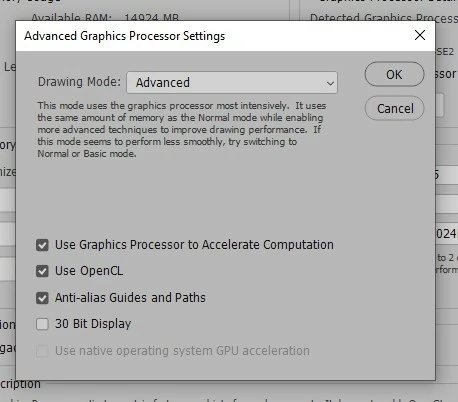
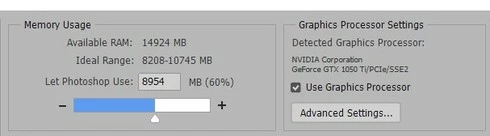
I'm also attaching a couple of screenshots of my performance tab in "Preferences".
These are my PC specs:

Operating System
Windows 10 Home 64-bit
CPU
Intel Core i7 7700K @ 4.20GHz
Kaby Lake 14nm Technology
RAM
16.0GB Dual-Channel Unknown @ 1070MHz (15-15-15-36)
Motherboard
ASUSTeK COMPUTER INC. PRIME Z270-A (LGA1151)
Graphics
4095MB NVIDIA GeForce GTX 1050 Ti (Gigabyte)
NVIDIA Studio Driver 442.92 (latest one)

Thanks!
 

This topic has been closed for replies.

43 replies

Participating Frequently
July 1, 2020
I too have not noticed any improvement ... unfortunately I remain at 21.0.3

Todd Shaner
Legend
July 1, 2020
Using your suggested Preferences settings does not improve the Curves lag on my Windows 10 system. Just an FYI.

i7 8700K 3.7-4.3Ghz six Core, 32 GB RAM, 1TB NVMe SSD, 4TB 7200RPM HDD, NVIDIA Quadro P2000 w/5GB, Windows 10 Pro


Image is not available

Inspiring
July 1, 2020
Actually I take it back... it is better with 1028k tiles but it's not up to the 21.0.3 performance.
Inspiring
July 1, 2020
Yes, that's what I've got. Although if you've only got 16GB RAM total, you'll need to be careful about allowing Photoshop to take 90%, as the OS tends to need a couple of GB to itself, to keep things moving along at a decent clip (otherwise you'll get pauses where it's relying on virtual memory, ie your drives instead of actual RAM) - and particularly if you have anything else open. I'd maybe dial that back to 70%.

The memory allocation I'd set didn't seem to make a difference - it was the tile size being set to 1028 K that really helped.
Participating Frequently
June 30, 2020


Are these settings correct?

Inspiring
June 30, 2020
Hmm - okay, having fiddled with a lot of settings, I can get roughly 21.0.3 performance in 21.2.0 on big, heavily 30-bit layered files with curves. It not amazing, still but it's usable. The key thing seems to be using the maximum tile size - 1028k. For whatever reason, it's noticeably better than 1024k.

Other stuff I've also amended: Memory 45GB / Cache Levels 8 / Graphics set to Advanced and all tick boxes checked. Also updated to the just released 6.32.40-2 Wacom driver. None of thpse had an obvious performance impact but you know how sometimes it can be a combination of things...

I agree the brushes panel's a bit of a chore - though nowhere near as bad as the adjustment layers controls, at least on mine. And it's particularly when spacing is set to 1%. On the up side the right click menu for brushes is nice and smooth, as is the the alt-drag interface so there are at least work-arounds there.
Inspiring
June 29, 2020
Brush settings panel is also horrendous.
Inspiring
June 29, 2020
Maybe they're not using adjustment layers enough to notice? Or haven't got complex enough files for it to be a show-stopper... you can put up with quite a lot if you're only coming across an issue infrequently.
Participating Frequently
June 29, 2020
Why do you think few people complain?
This is a big problem.

Inspiring
June 29, 2020
Yeah - you're right, 21.0.3 works okay. It's not quite the silky smooth you'd hope for but it's usable.