Known Participant
April 22, 2020

P: Curves lag since version 21.1

  • April 22, 2020
  • 43 replies
  • 2614 views

There's a noticeable lag in curves since version 21.1.
I am now on 21.1.2 and it's still there.
Up until 21.0 they used to refresh smoothly. I am attaching a video to illustrate the problem.
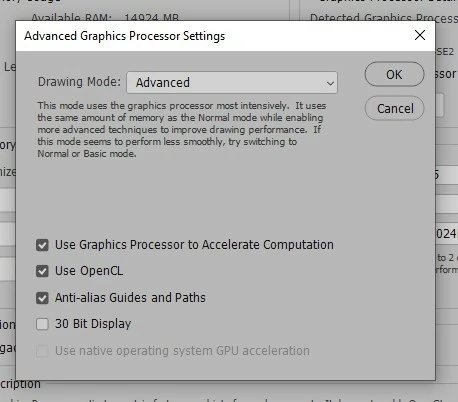
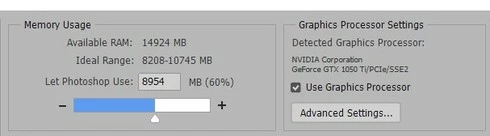
I'm also attaching a couple of screenshots of my performance tab in "Preferences".
These are my PC specs:

Operating System
Windows 10 Home 64-bit
CPU
Intel Core i7 7700K @ 4.20GHz
Kaby Lake 14nm Technology
RAM
16.0GB Dual-Channel Unknown @ 1070MHz (15-15-15-36)
Motherboard
ASUSTeK COMPUTER INC. PRIME Z270-A (LGA1151)
Graphics
4095MB NVIDIA GeForce GTX 1050 Ti (Gigabyte)
NVIDIA Studio Driver 442.92 (latest one)

Thanks!
 

This topic has been closed for replies.

43 replies

Inspiring
June 29, 2020
I'll give that a shot. I just went through patching all my drivers to make sure they weren't at fault; and tried 2019 and that also has the lag - so now I don't know if I'm miss-remembering the version it was smooth with - or it could be some Windows update-related issue.

I've got a MBP too, which displays the same canvas update lag but interestingly doesn't suffer from the input-handle movement lag (which makes the windows iteration of it especially frustrating). Neither's exactly great though!
Participating Frequently
June 29, 2020
Hi Matthew,
so you also confirm that the latest update has not resolved?
But how come they didn't notice the problem?

I stayed at 21.0.3 and the curves work well ... not like 2019 🙂
Inspiring
June 29, 2020
Have this too in 21.2.0.

It's on pretty much all adjustment layers, but most noticeable on Curves (possibly because you're making such fine movements with it). Used to effectively live update, now it's a second or so before the screen updates.

Interestingly the latest Camera Raw's curve interface feels like Photoshop's used to - silky smooth.

I don't think I'm performance gated... Have a large NVME system disk and large NVME scratch disk plus backup vanilla SSDs, 64GB RAM, an i9-900K and a Quadro RTX4000. Working on large, multi-layered images in 16-bit but the lag is even apparent on tiny 8-bit canvases. And going back a few versions, this wasn't apparent.
Participating Frequently
June 1, 2020
Are there some news? ... version 21.1.3 always has the same problem? Thanks
Joel xo
Inspiring
May 15, 2020
Is there any timeframe for a fix? I accidentally updated one of my workstations and rolling the other one back to 21.0 was such a pain, I'm hoping I can skip that and hold out for a fix. I spend hours matching colors every day and having a "blind" targeted adjustment tool is like having one arm in a sling. Even the info panel can't keep up.
Todd Shaner
Legend
April 24, 2020
Thanks Jeff!
Legend
April 23, 2020
I've asked engineering to take look.
Todd Shaner
Legend
April 23, 2020
I can confirm what you are seeing on my Windows 10 system with Nvidia Quadro P2000 GPU and 32 GB system memory (60% allocated to PS).
Participating Frequently
April 22, 2020
That's certainly likely, given the complexity... Most of my use is photo editing, so I don't run into some of the things more advanced users encounter...
Known Participant
April 22, 2020
Thanks, but I allocated more RAM and nothing changed.
Do your curves refresh smoothly?