


Inspiring
November 15, 2019

P: File > "import from iphone or ipad" not active

  • November 15, 2019
  • 33 replies
  • 2363 views

I have a Macbook Pro (15 inch, late 2019) running Mojave 10.14.6. I'm running Photoshop 2020, version 21.0.1 (but I also saw this problem in v21.0.0).

When I choose File > Import from iPhone or iPad, I don't see any options to import. I'm on a WiFi with several of my iDevices nearby and on the same WiFi network. I've also tried this on a different WiFi network with the same results.
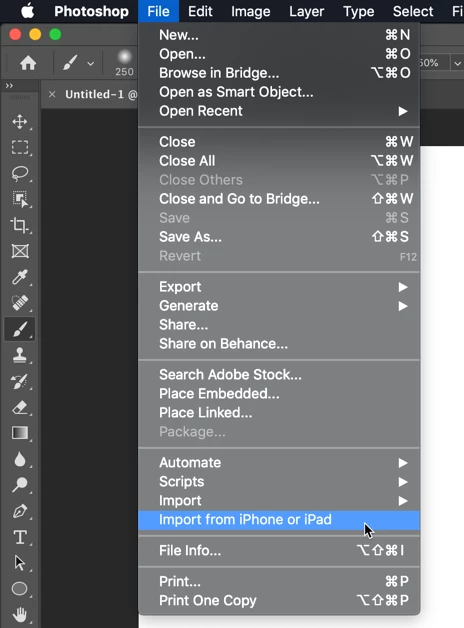


I've seen this question asked in the Community forums, and see that from someone who has it working, I should see a list of my devices and then further options for import:
https://community.adobe.com/t5/Photoshop/MacOS-Photoshop-2020-File-gt-quot-Import-from-iPhone-or-iPa...

Is there some sort of device setup required? Some setting that I haven't activated?

This topic has been closed for replies.

33 replies

rus5
Known Participant
June 24, 2020
What does Apple's text edit have to do with PS's "File>Import from iPhone" function greying out a user's iPhone" ?
rus5
Known Participant
June 24, 2020
Well, to start off with, since adobe can't be bothered with creating a proper users manual, finding information about how to use ANY feature in PS is catch-as-catch-can.  The help system is almost always useless, the adobe webstie information only addresses very basic things, and adobe's support is ALWAYS utterly useless.  And that leaves guessing.

So  I GUESS  if PS was connected to my camera so it could do whatever this function is supposed to do, my camera listing in "File>Import from Phone" wouldn't be greyed out.  But it is.

I have ensured PS and my LrM camera are both on the same WiFI (in case it connects via WiFi - which, of course, I have no way of knowing since there are no instuctions on how to use this) and I have connected my phone to the same computer running PS via a USB cable and ensured the computer was "talking" to the phone.  Still, the phone is greyed out.  Since it's greyed out, there is nothing further I can do to play with the feature to try to figure out how it works.

I'm using the latest version of everything except MacOS which is running Mojave.
Legend
June 24, 2020
What exact issue are you seeing? Are you seeing it work the same or differently from an Apple app like TextEdit?
Legend
June 24, 2020
I don't think that is supported from the feature. Try Apple's text edit. It only allows the same 3 option as Photoshop.
rus5
Known Participant
June 24, 2020
To Jeffrey Tranberry - It didn't.  And, there have been more updates to PS and I STILL have this exact same problem.  Would be nice if Adobe actually fixed something - ANYTHING - once in awhile.
Inspiring
January 23, 2020
Did anyone get this to work?  I reset my preferences but my iphone is still ghosted.  I can take picture through that menu, but won't let me import an existing photo on my phone.  Thanks
Legend
December 11, 2019
This issue should be fixed in the 21.0.2 update that was released yesterday.
JohanElzenga
Community Expert
Community Expert
November 20, 2019
You probably have to ask Apple, because this seems to be an Apple functionality that Adobe just hooked into. There are other ways of getting photos from your iPhone to your computer (and then into Photoshop).
-- Johan W. Elzenga
Participant
November 20, 2019
But then what's the point of importing from iPhone if the only option is to take a photo after you're connected to Photoshop? I don't want to import photos of my office, I want to import photos I've taken elsewhere! 
JohanElzenga
Community Expert
Community Expert
November 20, 2019
I believe the name is always greyed out. It’s just to tell you which device it is, in case you have more than one device (see the screenshot of Pages).
-- Johan W. Elzenga