


Inspiring
November 15, 2019

P: File > "import from iphone or ipad" not active

  • November 15, 2019
  • 33 replies
  • 2363 views

I have a Macbook Pro (15 inch, late 2019) running Mojave 10.14.6. I'm running Photoshop 2020, version 21.0.1 (but I also saw this problem in v21.0.0).

When I choose File > Import from iPhone or iPad, I don't see any options to import. I'm on a WiFi with several of my iDevices nearby and on the same WiFi network. I've also tried this on a different WiFi network with the same results.
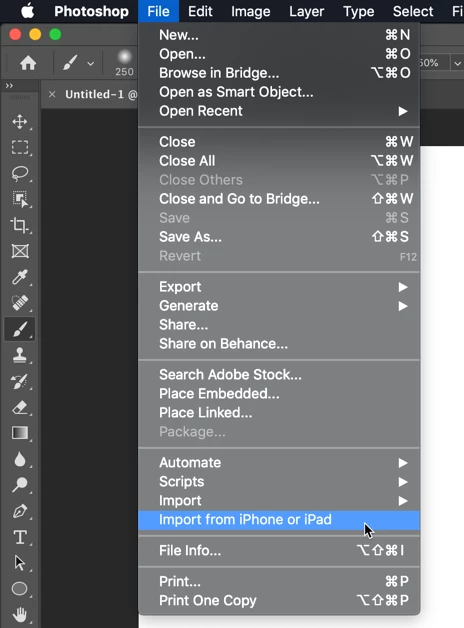


I've seen this question asked in the Community forums, and see that from someone who has it working, I should see a list of my devices and then further options for import:
https://community.adobe.com/t5/Photoshop/MacOS-Photoshop-2020-File-gt-quot-Import-from-iPhone-or-iPa...

Is there some sort of device setup required? Some setting that I haven't activated?

This topic has been closed for replies.

33 replies

Participant
November 20, 2019
This did make the options show up, but my phone was still grayed out so I can take a photo or scan a document, but can't open an existing photo on my phone! 
Inspiring
November 19, 2019
Work for me now when I reset preferences using this method:

With Photoshop closed, press and hold Shift+Ctrl+Alt (Win) / Shift+Command+Option (Mac) on your keyboard and relaunch Photoshop the way you normally would.
Legend
November 18, 2019
Ok. Apparently engineering is looking into this one. Sounds like restoring Photoshop prefs makes this work again.
JohanElzenga
Community Expert
Community Expert
November 18, 2019
This may be a new bug. It used to work fine for me, but now I don't see the sub menu either anymore in Photoshop 20.0.1 and MacOS Mojave... Connecting my iPhone and making sure it is trusted (like Jeffrey says above) did not fix it. And indeed, the menu is available in Pages, so this is something with Photoshop, not with the Mac in general.
-- Johan W. Elzenga
Legend
November 18, 2019
It's working for me here. I can take a photo or scan using the camera have that import into Photoshop. I did connect my iPad pro via USB-C first and go through the Trust this Computer dialogs prior to doing it over wifi.
Participant
November 18, 2019
Ditto!
Inspiring
November 17, 2019
Same problem...

Inspiring
November 16, 2019
me too!!!
Inspiring
November 15, 2019
Thank you, Yves. I have confirmed this, and in fact it even works with other Mac apps (as I demonstrated above), just not with Photoshop.
Inspiring
November 15, 2019
By the way, I tried this with my phone connected via USB cable, and it still did not show up in Photoshop.