


Inspiring
November 15, 2019

P: File > "import from iphone or ipad" not active

  • November 15, 2019
  • 33 replies
  • 2363 views

I have a Macbook Pro (15 inch, late 2019) running Mojave 10.14.6. I'm running Photoshop 2020, version 21.0.1 (but I also saw this problem in v21.0.0).

When I choose File > Import from iPhone or iPad, I don't see any options to import. I'm on a WiFi with several of my iDevices nearby and on the same WiFi network. I've also tried this on a different WiFi network with the same results.
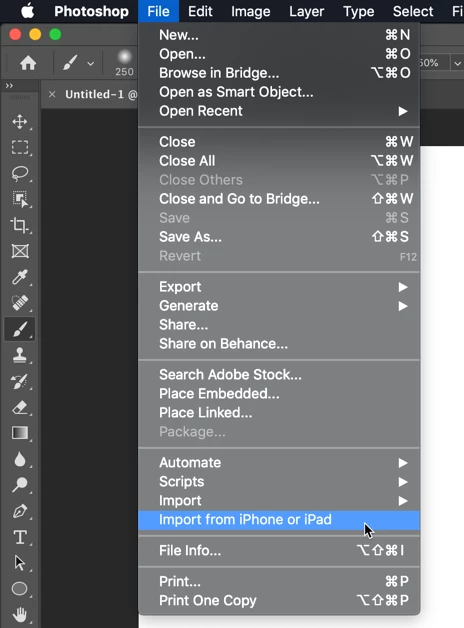


I've seen this question asked in the Community forums, and see that from someone who has it working, I should see a list of my devices and then further options for import:
https://community.adobe.com/t5/Photoshop/MacOS-Photoshop-2020-File-gt-quot-Import-from-iPhone-or-iPa...

Is there some sort of device setup required? Some setting that I haven't activated?

This topic has been closed for replies.

33 replies

Inspiring
November 15, 2019
Johan, Thanks for the reply. I did try signing out and back in, this had no effect.

I was able to use Continuity to "Insert from iPhone" within the Mac Pages app, and successfully transferred a photo. However, even there (in Pages), the devices aren't consistently shown (some seem to come and go from the menu).

But for Photoshop, I never get the second level of menu to appear at all.

Here's my view from Pages:

Inspiring
November 15, 2019
Hello, be careful that the Mac and the iPad is connected to the same WIFI network, otherwise it does not work!

Yves Crausaz, Suisse, retraité actif dans le monde de la photo et des arts graphiques.
JohanElzenga
Community Expert
Community Expert
November 15, 2019
Try this: Log out of iCloud (on the computer with Photoshop) and then log in again. This function depends on Apple's Continuity and that sometimes needs to be reset this way. Also check this page: https://www.idownloadblog.com/2016/03/15/troubleshooting-continuity-ios-mac/ Maybe you do not have Bluetooth on, for example.
-- Johan W. Elzenga