


Inspiring
June 18, 2020

P: Grid is drawing too thick when zoomed out

  • June 18, 2020
  • 70 replies
  • 2381 views

The new grid in 21.1. Oh my God. I can't stand it. Whose idea was it to make the grid be a compulsory 2px thickness?

It looks actually very nice in zoomed-in mode:
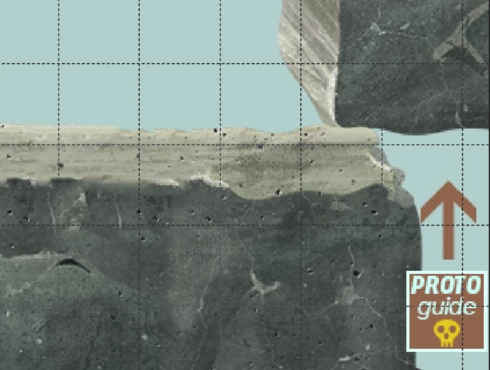


But it's just horrible when you zoom out. What used to be a feather-thin lattice of lines has become a solid 2px-thick mess that overwhelms everything else. When you use use lots of artboards like me (and therefore need to frequently navigate around in zoomed-out mode) it becomes quite problematic. 

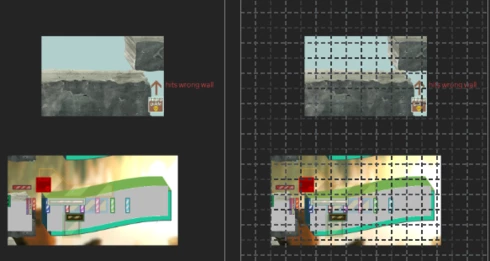
Here's the same portion of a document with the new grid and without. Even though it's zoomed out, you can clearly make out the content of it when there's no grid. But once you show the new grid, you can barely see anything but the thick gridlines. Some of the smaller shapes that are easily visible on the left are now hard to make out, as are the translucent ones; the text is much harder to read too. Plus the whole thing is just straining on your eyes.

The old grid didn't have these problems. Dammit, Adobe, this reminds me of the shift+transform debacle. Why fix things that aren't broken, when there are already plenty of things that are broken but remain unfixed year after year? These updates are exasperating sometimes.  


I can't find any setting anywhere to revert to a more sensible 1-px grid, but I'm just really really hoping that I've missed it somehow. If not, please, for the love of God, let us choose a 1px version in the settings!

This topic has been closed for replies.

70 replies

dblejaAuthor
Inspiring
November 29, 2020

Goddamit, @JeffreyTranberry I went against my gut and decided to trust that you knew what you were talking about. So I followed your advice, to the letter. But it turns out that your advice was inaccurate, and now I seem to have lost my most-workable version of Photoshop for ever. Thanks. 

I installed 22.0 as you suggested. Performance is as poor as before, but worth a try - just need to go back to 21.0.3 which, as I said earlier, is the last properly-working version for me. But now I bloody can't!

22.x did indeed install separately to 21.x, but what you neglected to mention was that by installing 22.x as per your instructions, the Creative Cloud app would automatically update all existing versions of Photoshop. So my 21.0.3 has now become 21.2.4, which is completely unusable. And I don't the term "unusable" flippantly: a simple pan of the canvas took 23 seconds to execute (I timed it). Turning off the grid took more like 40-50 seconds to execute.

That alone would be bad enough, but still just in the territory of mere annoyance rather than serious problem. Because I could just manually rollback again to 21.0.3, right? Well, for some reason, most of the older versions are now inaccessible. The only versions I can roll back to now are 22.0, 21.2.4, 20.0.9 (and yes, I have "show older versions" on in preferences). I guess now that we're in the 22.x generation, Creative Cloud stopped giving access to any but the latest variant of the previous 20.x and 21.x generations. So the 21.0.3 I was using seems inaccessible now. Of the 3 available versions, 22.1 is barely usable, while 21.2.4 is flat out unusable. I'm now stuck with 20.0.9, which robs me of several 21.x-generation features I'd come to rely on. 

Bloody hell. It was for exactly this reason that I was reluctant to heed your suggestion of trying 22.x. Actually, I was merely scared of wasting a few hours having to reconfigure presets - I didn't suspect I'd actually be locked out of my 21.0.3 version forever! But you assured me my existing version would be safe, so I did what you asked. And now I seem to be stuck with 20.0.9 as a result. 

I guess I shouldn't be too surprised. That Creative Cloud's infrastructure has become so byzantine that not even a Senior Adobe Product Manager seems to understand it seems, sadly, just about right. 

Elisei Kulikovsky
Known Participant
November 18, 2020

It's the same on 22.0.1.

Elisei Kulikovsky
Known Participant
November 16, 2020

Version 22.0. The grid is ok now. But the guides are still thick. But I see some progress: at 100% zoom (301x301 px document) I noticed one center vertical guide is displayed with 1 px width. At 66% — there's more, and at 33% — even more but not all of them.

Legend
October 24, 2020

https://helpx.adobe.com/creative-cloud/help/creative-cloud-updates.html

see Advanced options for individual apps and make sure Remove older versions is unchecked.

dblejaAuthor
Inspiring
October 24, 2020

How do I ensure that the update doesn't overwrite my 21.x version? Or does it install a new standalone version by default?

Participating Frequently
October 23, 2020

With version 21.0. the grid is working again as it should

Legend
October 21, 2020

You can install 22.0 alongside your 21.x install. Prerelease has indicated that changes made to GPU drawing, etc have improved this and other performance issues. I can't promise it addresses everything on the thread you link to because there are so many variables (computer hardware, drivers, system specific software conflicts, etc). We're often not able to reproduce some issues.

dblejaAuthor
Inspiring
October 21, 2020

@JeffreyTranberry Not until someone from Adobe comments on whether 22.0 addresses the performance issues introduced in ~21.1 

I'm stuck using 21.0.3 because all later versions are so poor performance-wise that they're basically unusable for me, as they are for very many other users. It has cost me many hours of trial and error to find a version that works (and to re-do all my settings and presets). If there's no indication from Adobe that they are aware of the problem and have addressed it in 22.0, then I can't risk wasting more time. (the fix for this grid problem is a good start, but the problem is more extensive than that).

And yes, I have a very powerful PC, I've updated to the latest GPU drivers, tried older drivers too, tried every combination of nvidia settings I could think of: Gsync on/off, SLI on/off, Performance mode, defined CUDA cores, reinstalled my wacom drivers, uninstalled my wacom drivers, etc. 

Unfortunately, none of it helped. The problem seems rooted not in hardware but in Photoshop, since users with all sorts of hardware have reported similar problems, including both PC and Mac users. 

Here's one thread about the problem: https://feedback.photoshop.com/conversations/photoshop/photoshop-cc-2020212-app-literally-became-critically-slow-with-frequent-stuttering/5f5f46244b561a3d4275f24e

And here's another one: https://community.adobe.com/t5/photoshop/photoshop-2020-running-slow/m-p/11251528?page=14#M344045

The fact that no one from Adobe seems to have even acknowledged these problems, which for so many users are very severe, and have been reported for a very long time now, concerns me. Like many others, I'm stuck using an old version of the software while being forced to continually pay for new versions that don't work. This experience - primarily Adobe's seeming indifference and/or obliviousness to it - has greatly eroded the enormous, decades-long respect, admiration and loyalty that I had for this once-great company. 

Please, @JeffreyTranberry, as one of the only Adobe employees who seems to pop their head up around here, and who actually liases with us and listens to us, could you please make some sort of comment on that thread I Iinked to, or one of the other ones like it. The performance problems many of us are facing are truly crippling, and the enduring silence from Adobe on the matter is maddening. 

I myself am not expecting grand promises that everything will be fixed for everyone in the next version. But something - anything - to indicate that Adobe engineers are actually aware of the problem and will be allotted some time to look into it, would go a long way to restoring some of the good faith that's been lost. 

If you read this all the way through, thank you.  

Todd Shaner
Legend
October 20, 2020

Jeff, looks way better with PS 22.0 on my Windows 10 system. Thank you!

Inspiring
October 20, 2020

Problem resolved! Excellent, thank you.