
Participant
June 17, 2015

P: Has stopped working on launch (librarylookupfile)

  • June 17, 2015
  • 68 replies
  • 1291 views

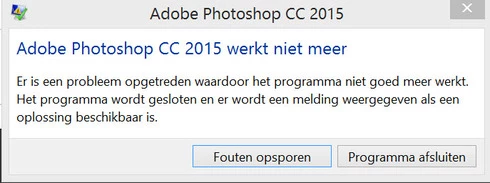
Yesterday I updated to the new Adobe Cloud CC 2015 version. After that Photoshop and Illustrator 'have stopped working' when i load them up.

Windows Version 8.1 Latest patches and updates. Graphics card AMD Radeon 295x2. Updated last version. No crash log, only windows event log.

I have already contacted the indian support guys, but they were not that helpfull and just plain rude but I will make a written complaint for that also. They made me create a new 'admin' user on my system and all should work, well thats just a bogus solution. This update was issued by Adobe and this has nothing to do with userdata. I cant create new users every time software updates, this should be tested by Adobe. I suggest adding a better 'cleaning' tool that also cleans user/roamdata.

I uninstalled, used the cleaner tool, cleaned registry , reinstalled still the same bug.
Muse , Lightroom CC 2015 all work apart from Photoshop and Illustrator.

So please fix this!!
This topic has been closed for replies.

68 replies

Legend
December 1, 2015
This should be solved by the CC 2015.1 update that was released today: https://blogs.adobe.com/photoshop/201...
Participating Frequently
November 4, 2015
I'm still getting a lot of traffic and comments for this issue on my website. Most of the new comments appear to be for other, non-related issues.

Here is a guide to help people search for solutions effectively online.

How Fault Code and Offeset Work
Inspiring
September 5, 2015
Ahhh... interesting enough, I have no appdata files for Photoshop.

Corel just got my business.
Participating Frequently
September 5, 2015
Anything showing up in the event logs? (WIN+R -> eventvwr -> Enter) Look under Application.
Also, any log files in here: C:\Users\CornévanDriel\AppData\Roaming\Adobe\Adobe Photoshop CC 2015\Adobe Photoshop CC 2015 Settings
(replace my name with your user name)
Inspiring
September 5, 2015
There is no alert, warning, etc. It opens, intializes panels opens and before I can get a file open it just disappears. All firewalls are off, all virus software off......

I'm at a loss.
Participating Frequently
September 5, 2015
Do you have a little more detail about the issue you are experiencing Melanie? A screenshot of the crash dialog perhaps?

Thanks,
Corne
Inspiring
September 5, 2015
PLEASE HELP!

Signed out of CC on my laptop ( which is a lenovo P.O.S., but PS 14 runs fine on) and then uninstalled ALL adobe software on a new HP pavillion 23, made sure ALL drivers are up to date, created a new administrator and on the 20th re-download /uninstall rollercoaster......

it stilll crashes.

Spoke to Customer Support-no help. I have no files for photoshop or I would rename the bad file- they aren't there. I've checked each go round. Obviously this is an ADOBE cc issue, not an equipment issue.

Is there another editing software I can purchase and install manually to hold me over? I'm looking at week TWO of this issue. I save all photos i shoot in .NEF, limimting my editing.

Im now turning down clients I'm so far behind on edits. ANd ANGRY.
Inspiring
September 4, 2015
Actually, right now I'm on my 4th download of that, so far, it has NOT helped. Meanwhile, my clients are flipping !
Inspiring
September 4, 2015
As noted above, this issue was solved in the Photoshop 2015.0.1 update.
Inspiring
September 4, 2015
Just invested 1200 dollars in a new desktop, and loaded my CC account, and al my edits I need to work on... and guess what? NO PHOTOSHOP!

It opens, then before I can transfer my RAW file it closes.... no saves, just a bunch of .xmp files. Yes, I could use lightroom nut I HATE it and I KNOW how to use PS 2014.

Help!!!!