
Participant
June 17, 2015

P: Has stopped working on launch (librarylookupfile)

  • June 17, 2015
  • 68 replies
  • 1291 views

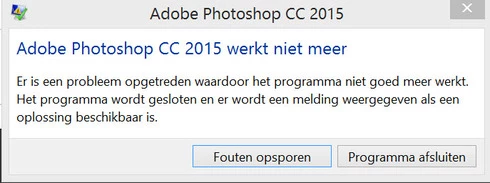
Yesterday I updated to the new Adobe Cloud CC 2015 version. After that Photoshop and Illustrator 'have stopped working' when i load them up.

Windows Version 8.1 Latest patches and updates. Graphics card AMD Radeon 295x2. Updated last version. No crash log, only windows event log.

I have already contacted the indian support guys, but they were not that helpfull and just plain rude but I will make a written complaint for that also. They made me create a new 'admin' user on my system and all should work, well thats just a bogus solution. This update was issued by Adobe and this has nothing to do with userdata. I cant create new users every time software updates, this should be tested by Adobe. I suggest adding a better 'cleaning' tool that also cleans user/roamdata.

I uninstalled, used the cleaner tool, cleaned registry , reinstalled still the same bug.
Muse , Lightroom CC 2015 all work apart from Photoshop and Illustrator.

So please fix this!!
This topic has been closed for replies.

68 replies

Inspiring
August 28, 2015
The file will be recreated once Photoshop launches - that is normal.
But removing the corrupt file should allow Photoshop to launch.

But first, make sure you have the 2015.0.1 update installed - it already fixes this issue.
Inspiring
August 27, 2015
library lookup file
Inspiring
August 27, 2015
deleted library and renamed it. It just comes back again
Known Participant
August 14, 2015
Installed the new version and still have the problem. It won't let me SAVE anything!!! What can I do?
Participating Frequently
August 4, 2015
You may still experience an issue if the file is corrupted, but it no longer crashed Photoshop and is now handled by this dialog.


Thank you
Participating Frequently
August 4, 2015
Thank you very much Jeffrey! I'm updating my blog to reflect this.

Regards,
Corne
Legend
August 4, 2015
This issue should be corrected in the Photoshop CC 2015.0.1 update which was released today. Details here: http://blogs.adobe.com/crawlspace/201...
Participant
July 27, 2015
Same here... Renaming Librarylookup resolved the problem (at least for now).

Rename the librarylookupfile

Quit Photoshop CC 2015
Navigate to this location: %USERPROFILE%\AppData\Roaming\Adobe\Creative Cloud Libraries\LIBS\
Tip: To access the user Appdata folder, you can press windows+R key to open Run window and type appdata.
Rename librarylookupfile to librarylookupfile-old
Relaunch Photoshop
PKHarmon
Participating Frequently
July 25, 2015
Julie, please refer to Corné van Driel's solution posted above. It worked for me and is painless to apply. I, too, had tried uninstalling and reinstalling Photoshop before finding Corné's post.

Good luck!
Inspiring
July 24, 2015


Just restored my computer. Reinstalled PS CC 2015 - TWICE. I can't even use it. Everytime I open it, it stops working and shuts down. I'm really frustrated and I'm angry that Adobe is one of the worst customer service providers. No one to help on a Sunday. No email address.