
Participant
June 17, 2015

P: Has stopped working on launch (librarylookupfile)

  • June 17, 2015
  • 68 replies
  • 1291 views

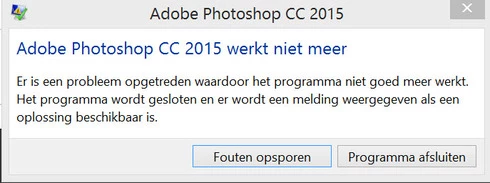
Yesterday I updated to the new Adobe Cloud CC 2015 version. After that Photoshop and Illustrator 'have stopped working' when i load them up.

Windows Version 8.1 Latest patches and updates. Graphics card AMD Radeon 295x2. Updated last version. No crash log, only windows event log.

I have already contacted the indian support guys, but they were not that helpfull and just plain rude but I will make a written complaint for that also. They made me create a new 'admin' user on my system and all should work, well thats just a bogus solution. This update was issued by Adobe and this has nothing to do with userdata. I cant create new users every time software updates, this should be tested by Adobe. I suggest adding a better 'cleaning' tool that also cleans user/roamdata.

I uninstalled, used the cleaner tool, cleaned registry , reinstalled still the same bug.
Muse , Lightroom CC 2015 all work apart from Photoshop and Illustrator.

So please fix this!!
This topic has been closed for replies.

68 replies

PKHarmon
Participating Frequently
July 20, 2015
Thank you for your help, Corne.
Participating Frequently
July 20, 2015
Hi Pam, yes, it is. I recommended renaming just in case it wasn't causing your problem. But if it worked, the old file is corrupt.

Thanks,
Corne
PKHarmon
Participating Frequently
July 20, 2015
I renamed the librarylookupfile, and it appears to have solved my problem. Is it okay to delete the librarylookupfile-old file now?
Inspiring
July 17, 2015
Just deleted it after I deleted the app itself and now redownloading it, hope they fix this asap for the money I'm dishing out to use it on a contract like basis.
Inspiring
July 14, 2015
I am having the same issue. I have tried all of the fixes, repeatedly. Initially, deleting the %USERPROFILE%\AppData\Roaming\Adobe\Creative Cloud Libraries\LIBS worked for the first few resarts. Now it doesn't. Extremely frustrated! I am on Windows 7, my graphics card is supported according to Adobe. I have unchecked it anyway.

I repeatedly try to open PS and after about the 20th or so try, it will remain open and function. That is how I have been doing since installing last week. Major glich Adobe! I hope this is a priority issue as there seem to be a number of people having the problem. This is but just one thread of many!
Legend
July 10, 2015
We are looking into this issue. Please try the solutions in this document: https://helpx.adobe.com/photoshop/kb/...
Inspiring
July 4, 2015
I am having the same problem with Photoshop CC crashing on startup. I do not have the librarylookupfile on my PC. I did an uninstall and reinstall and still have the same problem.
Inspiring
July 2, 2015
Thank you. it works.
search (librarylookupfile) in c-drive, just delete. Thanks again
Inspiring
July 2, 2015
And again. I had renamed the file while allowed the program to open, but not to function. I then renamed it back to the original and lo and behold, a working Photoshop.
Inspiring
July 2, 2015
Ah, spoke too soon. Photoshop CC opened, but crashed when I tried to open a jpg file. Any jpg file.