


Known Participant
October 18, 2017

P: Healing and Spot Healing Brush Lag

  • October 18, 2017
  • 282 replies
  • 7290 views

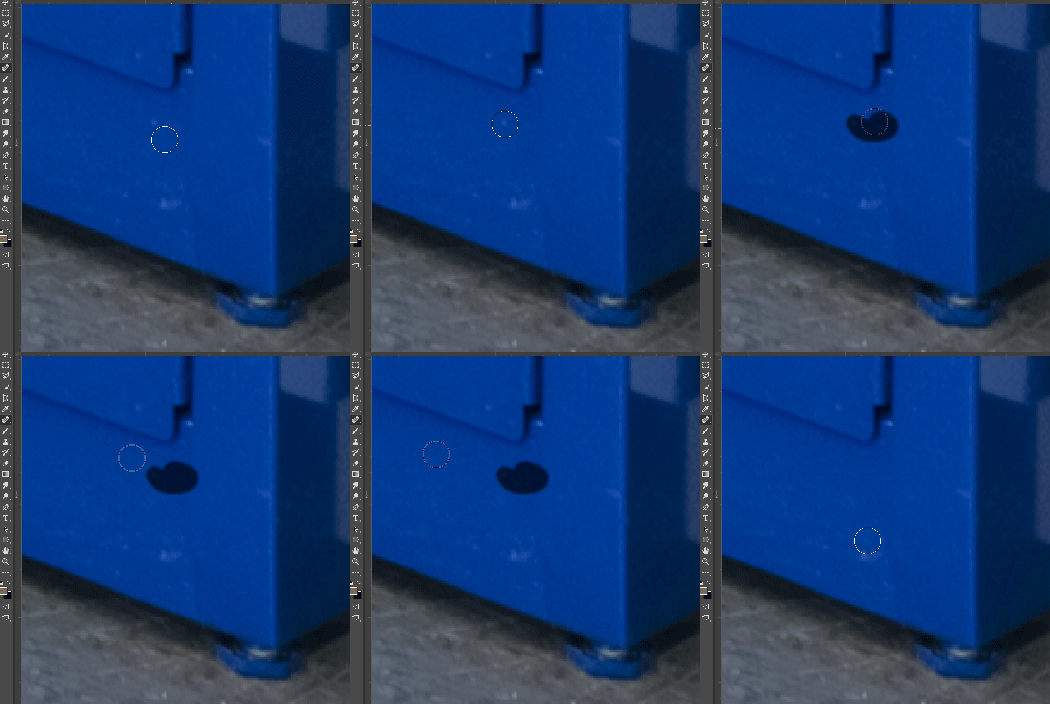
In most recent 2018 update, healing and spot healing brush have become much less responsive, sometimes taking multiple seconds after completion of stroke to affect the image.

Late 2016 Macbook, up to date OS and Software

I've done the regular things like turning off OpenCL and changing other performance options... no change.
GIF framerate is sped up 2x 
 

This topic has been closed for replies.

282 replies

Known Participant
November 6, 2017
Dave, 
It's ok, I think you're just misunderstanding the temporary solve. The bug seems to be caused by smoothing on the *brush tool.* So click on the brush tool, turn smoothing down to 0% in the tool bar and "off" in the brush panel, and healing should resume normal operation, or it will not screw up if you do that first when you first open photoshop.
dave131
Participant
November 6, 2017
I should mention that in general I think this is a very good update. Path colors are a great, if long overdue, addition. And large brushes work much faster on large files. Copy-and-paste layers is helpful. I'd prefer not to downgrade...
dave131
Participant
November 6, 2017
The fix Hannah illustrated doesn't seem possible. I can turn smoothing off, but the spot healing brush (and standard healing brush, which is also brutally slow) have nothing to do with smoothing.

Step 2 says, 
  1. When spot healing tool is active, drag smoothing to 0% (Image 2).
This is physically impossible, as the Options panel doesn't display smoothing when the spot healing tool is active! In the photo Hannah shows, she is clearly on the standard brush, not the spot healing brush.

Am I missing something??
Inspiring
November 3, 2017
My 2c is that it doesn't happen immediately - with me it happens after a few minutes of retouching!
Keeping an eye on the smoothing box though
Peter
Participating Frequently
November 1, 2017
Weirdly I'm in the same boat, after much changing of settings yesterday, and multiple restarts........... I've started it up today and the healing brush is working fine now. I'm not sure what fixed it in the end.
After many years working in Photoshop (since P.S 2) I have never experienced this level of 'rush to market untested' approach that we are currently getting with the CC updates. Adobe, you've got a lot of bugs to fix.
Inspiring
November 1, 2017
Not sure what I've done but I've managed to get it working. Turned off the smoothing, and also the laser line thingy in the brush tool. Reset workspace (annoying, lost all my keyboard shortcuts I'd created), but for now it's fine. I am finding ACR to be behaving weirdly and it's quite slow. hopefully there'll be a fix soon, although I'll wait for the rest of you to test those. ;D
Inspiring
November 1, 2017
Why am I paying for this when it doesn't even work?? Why are we the testers? Don't you guys have a bunch of software developers and testers you pay to do this work? Essentially, the users who pay a monthly fee are testing your broken software. I don't see how this model does anyone any good. Lose-lose.
Edward Caruso Photography
Participating Frequently
November 1, 2017
As it's been said earlier, if you use PS I any professional capacity you should know not to jump in on important work. Install along side a version that works well and test when you have time. I installed CC 2018 and after 5 minutes of slow healing brush I checked the feedback site, saw it was an issue with the update and went back to CC 2017. No productivity lost.
bellevue scott
Inspiring
November 1, 2017
Thanks Hannah for doing a thankless job. 
Inspiring
November 1, 2017
While I don't share your experience with the new Lr classic I have been repeatedly disappointed with several CC updates pushed to the public, because of the more expedited time line Adobe has put it's self into. This promise for faster updates is causing to be unstable, because of the limited amount of testing. Lr classic however, has plenty of time to have been made ready for the public, so I sympathize.

With that being said please don't hijack this thread. Start a new one dealing with your specific issue, so that it can be deleted with constructively.