


Known Participant
October 18, 2017

P: Healing and Spot Healing Brush Lag

  • October 18, 2017
  • 282 replies
  • 7290 views

In most recent 2018 update, healing and spot healing brush have become much less responsive, sometimes taking multiple seconds after completion of stroke to affect the image.

Late 2016 Macbook, up to date OS and Software

I've done the regular things like turning off OpenCL and changing other performance options... no change.
GIF framerate is sped up 2x 
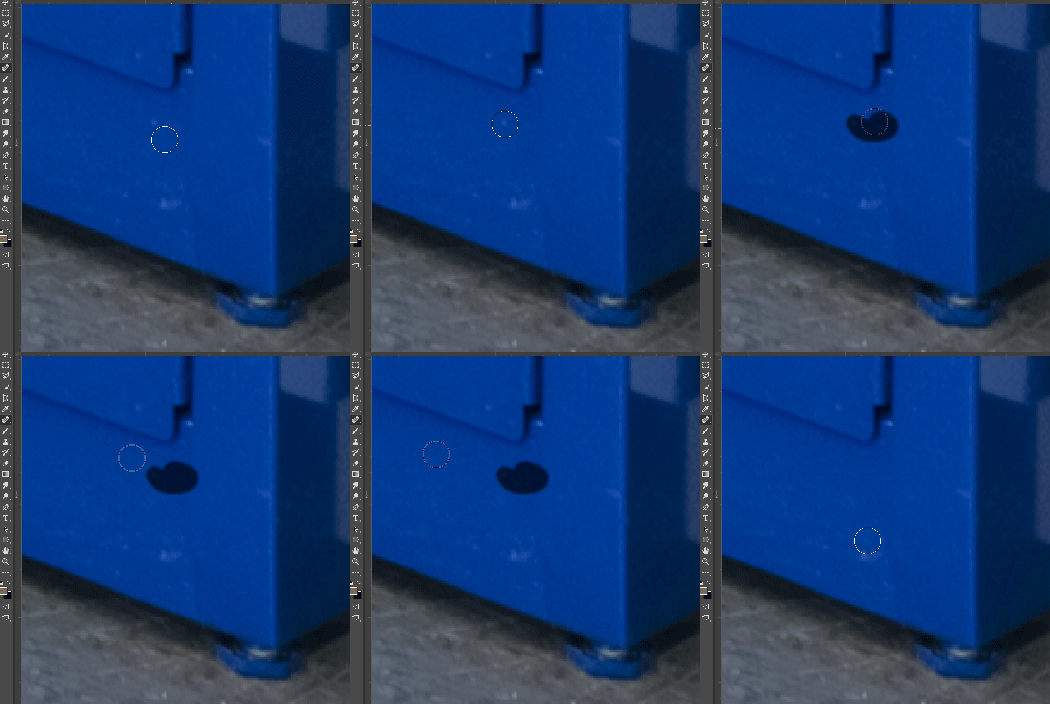
 

This topic has been closed for replies.

282 replies

Earth Oliver
Legend
October 24, 2017
I think the issue with Smoothing not carrying over is working as intended? Brush presets generally revert back to their saved state when you make a change and then restart the app. To make the smooth option stick, you'd need to create a new brush with that option toggled off.
Earth Oliver
Legend
October 24, 2017
Are you using the legacy healing tool or the one which has Diffusion options?
Hannah Nicollet
Community Manager
Community Manager
October 24, 2017
At present, smoothing must be disabled at the start of each new Photoshop session. We are aware of the problem and our engineers are looking into it.
Inspiring
October 24, 2017
I've been seeing this also.  PS 2018 is full of bugs and is unusable.  In addition to this problem, I've been seeing severe issues with rendering Masks depending on the level of zoom.  The ALT key is broken and this means any and all shortcuts that rely on it are useless.  I couldn't revert back to PS 2017 fast enough.  
Hannah Nicollet
Community Manager
Community Manager
October 24, 2017
Window > Brush Settings and then uncheck the box below.

Also be advised that there is a known issue with smoothing reselecting every time you open a new session. We are looking into this but in the meanwhile it's something to be aware of.

Bottom line: Smoothing has to be turned off with each launch.

Bkort
Known Participant
October 24, 2017
That is good news 🙂
Known Participant
October 24, 2017
This isn't the solution guys, its posted further down. Slide the smoothing slider down to 0%
Known Participant
October 24, 2017
Bragi,
We found a temporary solution and they are working on patching it.... I'm not sure how they didn't catch this one, but bugs happen. You don't have to use the solution if you don't want.
rogéz
Participating Frequently
October 24, 2017
Terrible bug for the 19th Photoshop release. You should do some proper beta testing before you release a new major version Adobe... Anyways, disable smoothing completely with the checkmark from the 'Brush Settings' panel works for me, although sometimes it enables itself again after restart. Using the patch tool is the best alternative for me as I use the stamp tool with a low opacity for other purposes.

If you do very intensive retouching, like me, just revert your Photoshop to v18. Install it from the CC app. There are not to many new useful features anyway  besides the smoothing, which is buggy.
Bkort
Known Participant
October 24, 2017
Isn't that a bit too much trouble to ask?