


Known Participant
October 18, 2017

P: Healing and Spot Healing Brush Lag

  • October 18, 2017
  • 282 replies
  • 7290 views

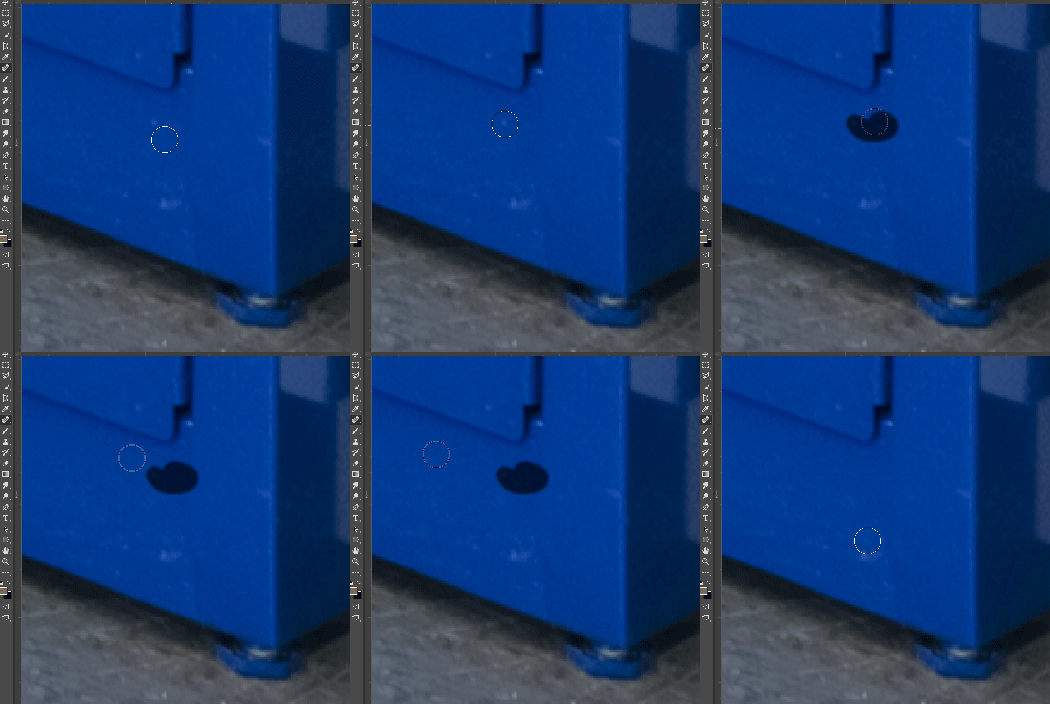
In most recent 2018 update, healing and spot healing brush have become much less responsive, sometimes taking multiple seconds after completion of stroke to affect the image.

Late 2016 Macbook, up to date OS and Software

I've done the regular things like turning off OpenCL and changing other performance options... no change.
GIF framerate is sped up 2x 
 

This topic has been closed for replies.

282 replies

grauenwölfe
Inspiring
October 24, 2017
Yeah, that thread got buried quickly.
PS 2018: Smoothing keeps getting re-enabled despite being disabled and locked in Brush & Tool Presets.

By the way, fresh install of CC on a fresh install of the OS.
Known Participant
October 23, 2017
Hey guys,

Discovered another brush performance hit in the new 2018 that you may want to test out if you're having these issues, brush "resizing " is much more laggy and smoothing settings do not affect this. I've created a new post for this at the link below, it would be helpful to get some me-too's on it:

https://feedback.photoshop.com/photoshop_family/topics/brush-resizing-lag-in-new-2018-update?rfm=1&a...
Known Participant
October 23, 2017
I don't have to uncheck smoothing, I just have to turn it down to zero (in the top panel), and it stays that way between relaunches.
Inspiring
October 23, 2017
If you note the other thread about brush smoothing, a poster uncovered that brush Smoothing doesn't hold through a relaunch. So that cannot work. The second you use another tool, the lag will start to return because in the Brush Settings panel, Smoothing is once again enabled. It ignores the LOCK icon.

I've only had success when turning off Smoothing and sticking to that session. Then it stays off.
Participating Frequently
October 23, 2017
Good point, I just didn't. I just needed to keep going and a few restarts here and there were manageable for the time, but not forever. Hopefully Adobe corrects this quickly.
Adam Jerugim
Community Manager
Community Manager
October 23, 2017
For those still seeing the issue, please go to the Brush Settings panel and disable Brush Smoothing (uncheck the box).  Then quit and restart PS.  Does the problem still occur after re-launching?
Earth Oliver
Legend
October 23, 2017
if you're on deadline and the lag is interfering that much, why not use CC2017 until they fix??
Known Participant
October 23, 2017
Have you tried the smoothing solve above?
Participating Frequently
October 23, 2017
I've been working with this stupid lag issue all weekend as I have major retouching deadlines,

I've learned that resetting tool preferences as suggested by the Adobe Tech Support is a waste of time. You just have to RESTART Photoshop. Don't lose your settings anymore just restart.

The best thing to do is use the healing brush first on anything and everything you need it for. Once you switch through a few other tools it will develop the lag. The only way to fix this is to save your work and restart photoshop. 

I think we should all go Tweet about it, it's the fastest way to get a response from Adobe, I know from past experience...

Tweet your brush lag complaints @AdobeCare and they will respond - quickly.
Participating Frequently
October 23, 2017
The line is easy to remove. Go Preferences > Cursors > then uncheck Show Brush Leash Wile Smoothing.

FYI I had to call about this too as it was making me bananas, I couldn't clearly see the skin I was dodging with that trailing hot pink line.