


Known Participant
October 18, 2017

P: Healing and Spot Healing Brush Lag

  • October 18, 2017
  • 282 replies
  • 7290 views

In most recent 2018 update, healing and spot healing brush have become much less responsive, sometimes taking multiple seconds after completion of stroke to affect the image.

Late 2016 Macbook, up to date OS and Software

I've done the regular things like turning off OpenCL and changing other performance options... no change.
GIF framerate is sped up 2x 
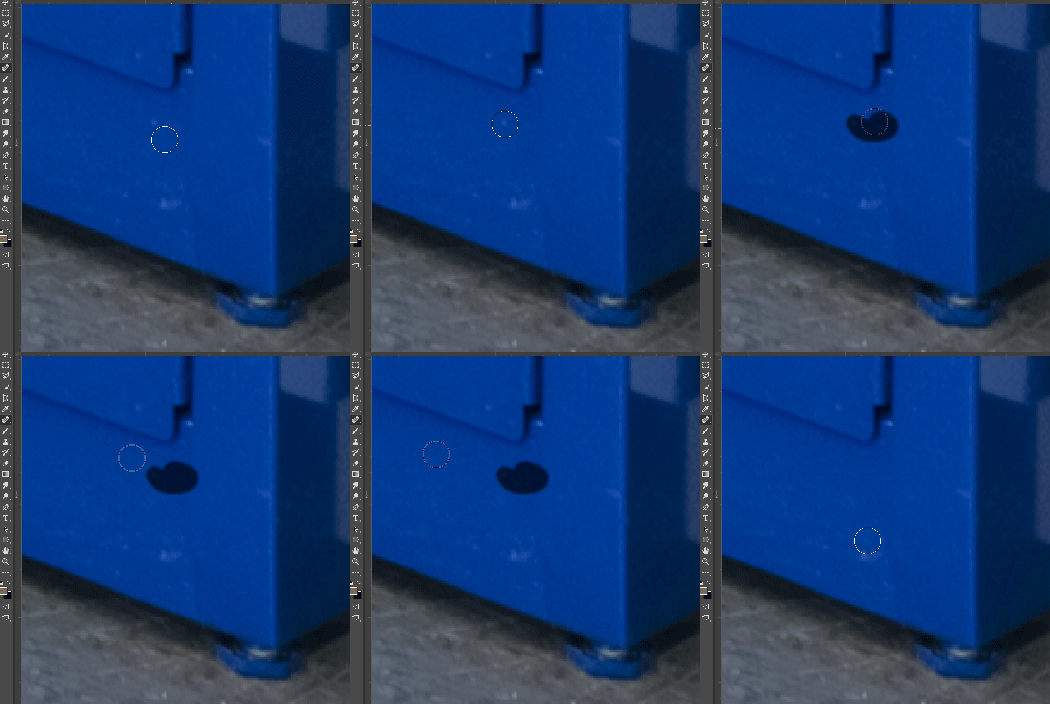
 

This topic has been closed for replies.

282 replies

Known Participant
October 23, 2017
Did you turn smoothing down to 0%? I didn't turn "off" smoothing, I just dragged the slider to zero in the tool bar and everything is working properly now
Inspiring
October 23, 2017
I'm having the same issue also. Tried everything, several PS performance settings, maintenance routines on my Mac, deleting caches....all of it after a few minutes working, the healing brush starts lagging again. Will this be fixed with a patch or should I go back to previous version.
Inspiring
October 23, 2017
Same problem and none of the fixes suggested help. Have smoothing at zero, etc. I either need to reinstall 2017 (not an option on the CC menu) or Adobe needs to fix this ASAP. I have a major, zero delays tolerated project series in one week. Right now, the delays are so bad that effecively, the tools don't exist for me.


There is a work around for those who are desperate (like me). Use split frequency with the clone stamp on the high layer (I am not having issues with the clone stamp). But it is very annoying to have to use this and bloat the file for images that would be fixed just as well with a few healing brush clicks.
Inspiring
October 23, 2017
I have this annoying healing brush lag too. Hope Adobe will fix it soon, it is real trouble now especially when editing large files with smart objects.
Known Participant
October 23, 2017
turning off smothing doesn't work for ever......after cca 1hour of work is there a lag again 😞 
Known Participant
October 23, 2017
even when I turn brush smoothing off, and restart PS or whole system, lag is present after cca 1hour of work again 😕😕 
Participating Frequently
October 23, 2017
In addition to the lag, I'm getting the line between points as well. Anyone else seeing this? I've seen another thread on this but it should be mentioned here as well. So far, trashing my preferences seems to have fixed the lag, but what a hassle...
Participating Frequently
October 23, 2017
I don't see it when the healing brush is active either...? 
Participating Frequently
October 23, 2017
TRashed preferences and it's gone for now. But so are all of my preferences. Bummer of a solution. 
Participating Frequently
October 23, 2017
Same thing here. Mine happens immediately. I get the lag and the lines. I tried resetting to "use the legacy algorithm" for healing brush, but that almost made it worse. Beta testing during my workday is a hassle.