


Known Participant
October 18, 2017

P: Healing and Spot Healing Brush Lag

  • October 18, 2017
  • 282 replies
  • 7290 views

In most recent 2018 update, healing and spot healing brush have become much less responsive, sometimes taking multiple seconds after completion of stroke to affect the image.

Late 2016 Macbook, up to date OS and Software

I've done the regular things like turning off OpenCL and changing other performance options... no change.
GIF framerate is sped up 2x 
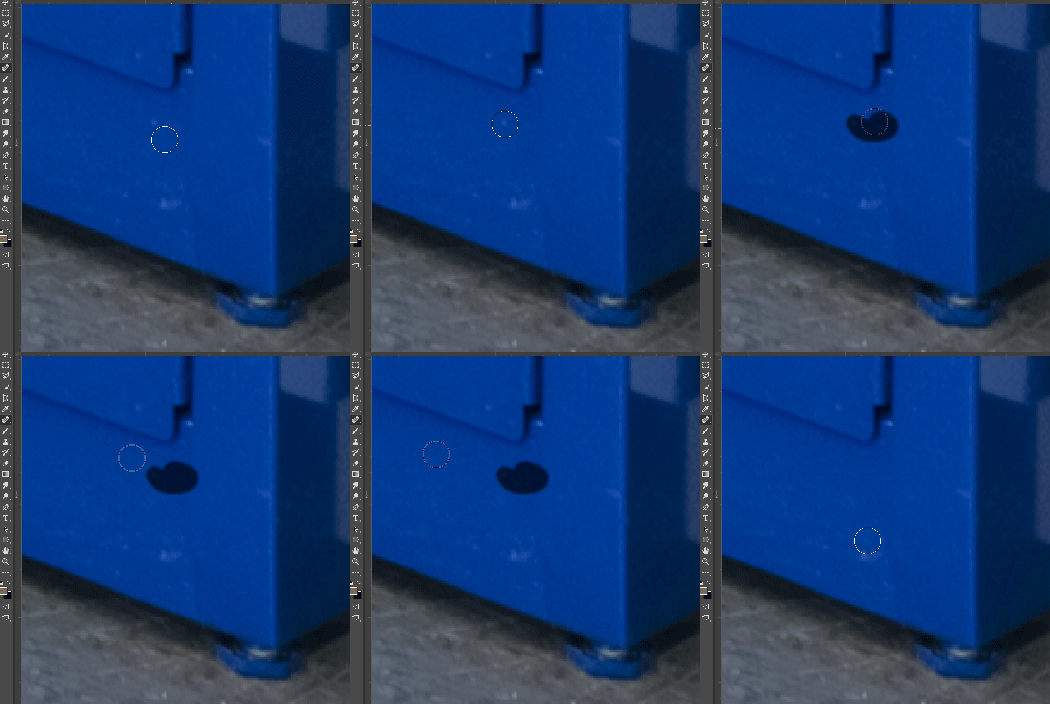
 

This topic has been closed for replies.

282 replies

Inspiring
November 14, 2017
Zolee, I'll wait to see if the new update introduces any new bugs. For now, the "fix" that is out there is working for me. So it's a "no go" until I hear that the "update" is really ready for prime time.
Pete.Green
Community Manager
Community Manager
November 14, 2017
This should be resolved in the 19.0.1 update released last night. Please update Photoshop using the Creative Cloud desktop app, and let us know how it feels!

Regards
Pete
Inspiring
November 14, 2017
Problem solved with Nov 14, 2017 update
Inspiring
November 14, 2017
Got a new update to PS today. Does this solve the healing brush problem, shall we go and install it? Anyone tried it already?
basaski
Participating Frequently
November 13, 2017
yes please fix this asap - very disruptive... thx
Inspiring
November 10, 2017
That's bad news. Here the work around works perfectly and we're retouching images all day, every day, without issues. Anyway - let's hope Adobe gets this patched soon.
bellevue scott
Inspiring
November 10, 2017
me too. Healing brush is just completely broken, rendering 2018 useless. 
Inspiring
November 10, 2017
No guys, smoothing set to 0 and restarting Photoshop or whole computer does not help. After 3-5-7 minutes working in Photoshop Spot healing brush or Lasso Tool start freezing again.
So until this issue solved I've deleted CC2018 and come back to CC2017.
Known Participant
November 10, 2017
great thanks!
Inspiring
November 7, 2017
Easy way to fix the issue - setting the smoothing to 0 must be followed by a restart of photoshop, at least on our systems: https://youtu.be/3_zSm3hlRhE