


Inspiring
January 24, 2018

P: Histogram behaviors are different from prior versions

  • January 24, 2018
  • 104 replies
  • 3328 views

I am experiencing problems with the histogram in 19.1.0. I am a mid-career fine art photographer by profession, and have been a PS user since Version 2. I am also a member of the Authors Guild, and write on photography for various publications. I have been purposely hanging back at PS 2015.5.1, as it has served me well. Yesterday, I decided enough, is enough, and installed 19.1.0.

This first histogram is at Cache Level 1 for the file values of a 36Kx24K pixel 16-bit grayscale file.
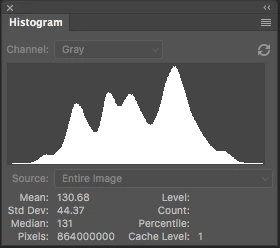
 

Please notice how there are "tails" (lines) out each side of the main body of data, indicating that there are small levels of data almost to the limits of range. For me, it is important to know about these tails exist so that I do not end up creating a clipped condition when applying a curve function. We use S-curve limiters to compact the tails without clipping.

Here is the exact same file at Cache Level 1 for the same 36Kx24K pixel 16-bit grayscale file, but this time in 19.1.0.
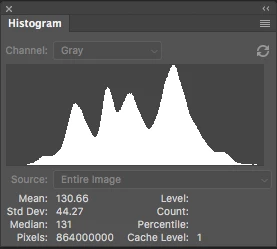
 

Please notice how there is no tail indicating data extending to the left, and rather a botched one going to the right. This is not helpful! You will also notice that the Mean and Standard Deviation values differ.

Further, it use to be nice to be able to take the cursor and scan across the histogram with a display of level and count showing up for whatever was under he cursor. This seems to have gone away in 2015.5, and is even worse in 19.1.0.

Thanks for your help.

Pete

This topic has been closed for replies.

104 replies

Inspiring
May 5, 2020
OK, how do I do that for you? I have never done a screen recording before, so need pointed to some instructions for Mac OS. I would be happy to do so.

I am curious if you are on OS 10.15.4 with PS 21.1.2? I think I am rolled as far forward as is possible, and I wonder if there is a Catalina bug that is driving the disappearing histogram window---that would not surprise me.

I have a WACOM connected, and will make sure to disconnect it on next test to make sure that is not the issue. That too could be buggy from Catalina.

And have I illustrated my point about the tails function on the Histogram enough to understand? Let me know if I can be of further help. It really is critical to image-making to be able to see how far out those tails go, even if they are only showing at a few hundred pixels or less per level. 
Legend
May 5, 2020
"Also, are you able to confirm that the histogram window disappears the moment the Curves function is opened or touched?"

I've also not been able to reproduce the histogram disappear either. A screen recording might help us try and repro. There may be some setup differences that are causing this problem. I've tried panels docked, panels floating, app frame on/off, etc.
Legend
May 5, 2020
Can you provide your source negative or use the file I've provided above so we're all looking at the same thing?
Legend
May 5, 2020
CS6 next to 2020 with Cache level 1

Looks nearly identical to me.
Inspiring
May 5, 2020
I just pulled up a monochrome negative of size 15,254 X 10169 pixels, 16-bit monochrome.

The histogram below at Cache 1 is showing data between level 49 and 206. At those endpoints, the statistical probe is showing 0.10% at 49 and 99.98% at 206. The actual data using the same probe is going from level 19 (2 pixels) to 217 (10 pixels) and should be showing using a logical OR function so that you see the complete tail.

The Curves Function of the same image is showing the data tails doing to Level 23 and 212, so that is not exactly right either, but certainly better then showing 49 to 206.

OS 10.15.4
MacPro 2019 8-Core 96GB memory
PS 21.1.2

So what is missing, and has been since 2015.5, is the Logical OR function of showing ANY pixel count at a level, so that you can see the full extent of the tails. That way you can set the end points just outside of the tails, then use the Curves function to pull the tails in to the photo without making a hole by just clipping data.

This is a 155mp monochrome file. 0.01% of that is a 15KB hole. It does matter. And what you can't see, you can't fix. As it is, I have to run the dang probe along the histogram to find the invisible end points, the 0.01% point, and the 99.99% point.

And I just confirmed again that with my version and setup, the histogram disappears from the desktop the moment the Curves function is activated. If I pull up the histogram again, the moment I touch the curves function, it poooooooofs. So as is, I have to set up my Curves function, then pull up the Histogram function to check how the curve will work, but any revision to the curve will pooooooof the histogram function, and I have to pull it back up for any further checks.

I am sure the histogram stayed up in PS 2018, as did the interception line.

Catalina nightmares?

The last version with the Histogram working correctly was 2015.5 Mac OS.


Legend
May 5, 2020
Let me do Cache Level 1 next
Legend
May 5, 2020
Mac CS6 side by side with Mac 2020

Todd Shaner
Legend
May 5, 2020
Using Jeff's Upload_20200505-195720.tif file I see the tails and no issue using the Curves Adjustment Layer. Jeff's screenshots look different because it's using cached data ('!').


Legend
May 5, 2020
Mac and Win Side by Side:

Todd Shaner
Legend
May 5, 2020
"Also, are you able to confirm that the histogram window disappears the moment the Curves function is opened or touched?"

Using my file that shows the tails the main Histogram panel remains unaffected by changes to the Curves Adjustment Layer.