


cyplot
Participating Frequently
January 23, 2018

P: In fullscreen mode, canvas moves to upper left corner and 3/4 of the canvas is unusable

  • January 23, 2018
  • 62 replies
  • 1262 views

Hej Hannah,

thank you guy for your support & the solution today. I think it solved the issue with the floating Screen somehow, but... something new is happening 😕😕
I think it depends if I work “with“ or “without“ the graphic-card-support and/or the Application-Frame On/Off (just on MAC).
I am using PS on a MacBookPro here with a Nvidacard on 2screens. I always work in PS on the bigger 2nd screen which is a Wacom-Cintiq:

1. I open a PSD-file here (a test-file orange/yellow)
2. it opens in the upper-left corner – ok so far!
3. i changed the screen-mode (F), and...
4. the the hole canvas appears in a small rectangle in the upper-left corner and the other 3/4 of the canvas is just black and not useable?!! (see screenshot)
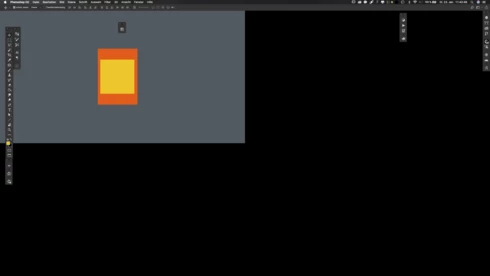


...thats absolutely useless here. When i switch OFF the graphic-card-support is seams to work fine in the frameless PS. Or i have to switch the PS-Application-Frame ON to use the graphic-card-support again. But use “graphic“ and “frameless“ at the same time it cause this new issue?!

This was not an issue in CC2017!
 
– help?!

Note: This conversation was created from a reply on: Photoshop CC 2018: Floating document windows in fullscreen w/menu bar causes wind....

This topic has been closed for replies.

62 replies

Peter Villevoye
Community Expert
Community Expert
February 7, 2018
Nope, but I'm not an American citizen or business.
However, I do think there's no need to take any action, because:
  • software bugs are an integral aspect of software development;
  • the issue can easily be circumvented without further sacrifice;
  • the developer has the clear intention to solve the matter asap;
  • the Adobe EULA probably waives any bug-related damage or loss.
It's like suing parents for less genetic resistance against catching a cold.
You can send me a $15 check, for time spent on this legal consultation...
Dki
Participating Frequently
February 7, 2018
Has anyone else been approached by a legal firm inviting to participate in a class action for a refund on subscription fees due to the app not working as per contract?
Inspiring
February 1, 2018


Photoshop CC 19.1.0 on a MBP running OSX 12.6. When you have a floating document window and hit 'F' for fullscreen, you get the result below. The grey area is the work area, the black area is completely fixed. Zooming in and out only magnifies/shrinks the image in the grey area. Somewhat defeats the point of having a 24" monitor.
Also: I would much prefer to have a proper bug report page but fifteen minutes of googling only turns up this option. I don't want to have "a conversation", I want to file a bug report with the company that's charging me £600 a year and allows a brain-meltingly stupid bug like this to go out in a release version.
EDIT: Fixed it. Had to turn off the "Use Graphics Processor" option in preferences under the 'Performance" section. (This is also the only way to get acceptable performance out of InDesign, BTW, and I think rather defeats the point of buying a MBP with a decent graphics card.)


Hannah Nicollet
Community Manager
Community Manager
February 1, 2018
Sorry I mean what you have your scaling set to - are you on Win?
Inspiring
February 1, 2018
Hi Hanna, as I mentioned in my reply I have an external monitor set as primary and I keep having the issue we're talking about. What do you mean with "2x monitor"?
Peter Villevoye
Community Expert
Community Expert
February 1, 2018
NOOOO !! That's sooo small...
Why focus on a retina car window while I can stare at two panoramic slates ?
Yeah, a Surface Studio would maybe be better option, but that's not portable. 😉
Hannah Nicollet
Community Manager
Community Manager
January 31, 2018
It's not you, Peter! Finding what you need takes some getting used to here. Happy to help! 

The other option is to switch your 2x monitor to primary.

Regards,
Hannah
Peter Villevoye
Community Expert
Community Expert
January 31, 2018
Thanks for merging my question/problem with this thread !
I looked for earlier messages, but as I typed my title and received the results from the automated query, it said: "We found 34368 similar conversations". This thread wasn't in the top 10, and I wasn't in the mood for looking through 34358 other ones... Lazy me !

Seems that my problem has been reported by other users as well (good to know), and has been acknowledged by Adobe, so we'll just sit back and wait for 19.2, while hitting the tab key for now. 😉
Peter Villevoye
Community Expert
Community Expert
January 31, 2018


I have Mac OS Sierra, Photoshop CC 2018 and since this latest 19.1 update (not in 19.0) my full screen suffers from a strange problem when I'm NOT using an application frame. If I hit the f-key to switch to full-screen mode, it initially looks like the enclosed image: the screen seems split in 4 areas, and I can only work in the upper left quadrant. When I temporarily switch to another document (Cmd-tilde) and back again, everything seems alright again.

I guess it might have something to do with the fact I'm using multiple screens: two Cinema Displays and the screen of my MacBook Pro with a retina screen. One of the Cinema Displays is my main screen. When I work on my MacBook Pro without any extra screens attached, the bug doesn't occur.
Participating Frequently
January 31, 2018
Thanks! This workaround is working