


cyplot
Participating Frequently
January 23, 2018

P: In fullscreen mode, canvas moves to upper left corner and 3/4 of the canvas is unusable

  • January 23, 2018
  • 62 replies
  • 1262 views

Hej Hannah,

thank you guy for your support & the solution today. I think it solved the issue with the floating Screen somehow, but... something new is happening 😕😕
I think it depends if I work “with“ or “without“ the graphic-card-support and/or the Application-Frame On/Off (just on MAC).
I am using PS on a MacBookPro here with a Nvidacard on 2screens. I always work in PS on the bigger 2nd screen which is a Wacom-Cintiq:

1. I open a PSD-file here (a test-file orange/yellow)
2. it opens in the upper-left corner – ok so far!
3. i changed the screen-mode (F), and...
4. the the hole canvas appears in a small rectangle in the upper-left corner and the other 3/4 of the canvas is just black and not useable?!! (see screenshot)
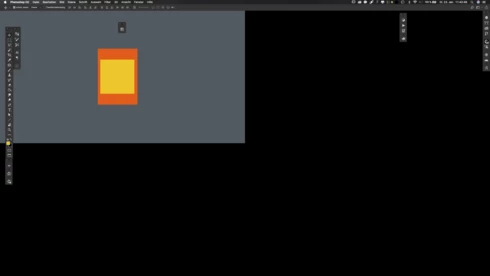


...thats absolutely useless here. When i switch OFF the graphic-card-support is seams to work fine in the frameless PS. Or i have to switch the PS-Application-Frame ON to use the graphic-card-support again. But use “graphic“ and “frameless“ at the same time it cause this new issue?!

This was not an issue in CC2017!
 
– help?!

Note: This conversation was created from a reply on: Photoshop CC 2018: Floating document windows in fullscreen w/menu bar causes wind....

This topic has been closed for replies.

62 replies

Participating Frequently
January 31, 2018
Hello, with 19.01 can't use the pointer to make the work tab appear when set in full screen with the tab. Works only when graphic processor is disabled thats lead to another issues ! I rolled back to 19.0 but do you think this problem will be fixed in a reasonable future ? Using Imac 27,5" with last Sierra. Thanks
Inspiring
January 29, 2018
Thanks Hannah! Yeah, pressing tab works. But making my Macbook pro monitor the primary screen doesn't work so well for me, so I'll wait for the update and a more permanent fix to the issue. Thank you!
Hannah Nicollet
Community Manager
Community Manager
January 29, 2018
Hi Manja,

The two known workarounds are:

1. press tab once or twice
2. set your 2x monitor to primary

Thanks,
Hannah
Inspiring
January 29, 2018
I have the same issue with full screen... I'm working with a 2015 Macbook Pro, 10.13.3, and Eizo primary screen. Please just fix this, I'm not turning off my Graphic processor.
Thank you in advance!
manja
Hannah Nicollet
Community Manager
Community Manager
January 29, 2018
Understandable. The other workaround option fyi is that from what we can tell it only happens when you have a 1x monitor and a 2x monitor with the 1x as primary.  If you make the 2x primary it stops. So no extra keys, but not always feasible either. Does that describe your setup?
simonem77462275
Participant
January 29, 2018
So happy you solved the bug of version 19.0, but now I also have this new bug. ... But the workaround helps so far. 
Participant
January 29, 2018
Hey Hannah,

I've already rolled back to 19.0 since I've gotten used to the center snap these past months.

I couldnt stay using 19.1 cause I toggle through Fullscreen a lot while working so adding the fact of pressing TAB a few times would have frustrated me.

The only thing that worked while I had 19.1 was turning off the Use Graphic Processor but I couldnt work properly cause it made things choppy and slow. 
Inspiring
January 29, 2018
Hello!
Just updated yesterday to 19.1 and I have the same issue. I work with a 2015 macbook Pro with 10.11.6 osx and an Eizo as primary screen. Hitting tab a couple times fixes the weird image position, but I often switch between full screen modes and hide/show the panels in my workflow. Every time I switch I have to hide / show the panels once more by hitting tab few times to view the image I'm working on normally. Hope this will be fixed soon, it's frustrating.
Thank you!

Carlo Favero
Hannah Nicollet
Community Manager
Community Manager
January 29, 2018
Hi Michael, 

Sorry for the frustration. Just wanted to see how you felt about the workaround. Is pressing tab once or twice unacceptable for your workflow? Did it work for you?

Thanks,
Hannah
Participant
January 27, 2018
Same problem here!
I can't work at all like this.

Gonna have to roll back to 2017.

Macbook Pro mid 2015
High Sierra 10.13.2
2,2 GHz i7
16GB
Intel Iris Pro 1536 MB
working with external screen and Wacom Intuos Pro.