


Inspiring
December 1, 2015

P: Liquify lightens result on 16 bit/channel images

  • December 1, 2015
  • 231 replies
  • 4091 views

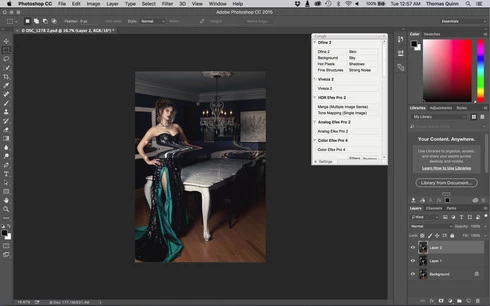
I am having issues with the new upgrade to Photoshop CC 2015 on Mac El Captain. The only thing I did was upgrade from a working CC 2015 to the new version. Using the liquify tool give the following look. There is a box around the area liquified that is lighter than the other areas. When I turn of Use Acceleration in Graphics Processor, it is better but .... I didn't have to do this in the prior version i.e.. Yesterday.

New Update: The Squiggly waist is the liquified:
This topic has been closed for replies.

231 replies

Inspiring
December 4, 2015


Just that. It is messes the whole workflow.

I had to actually roll back to the previous version which is not a problem, but there should be an option to "Skip one update" in the creative cloud dashboard as it now shows that there is an update for Photoshop, but how would I know when the bug free one is released if it always appears as iif there is an available one?

I don't think I am imagining things, but I believe there was an option to "skip the current update" for individual apps in previous versions of the CC.

After the Lightroom import issue and the liquify bug I think Adobe should reintroduce beta testing and implement the "skip one update" option in the CC dashboard.
Inspiring
December 4, 2015
Here is a little how to: rollback to the previous version.

http://www.comeseemy.photos/blog/2015...
Participant
December 3, 2015


On a particular image, when I use liquify on it the areas modified change brightness and contrast.
Inspiring
December 3, 2015
I can't find a way to get the previous version... it's not showing in my "Previous Versions" tab. 😞
Inspiring
December 3, 2015
What is the ETA on this being fixed? As a working photographer this is unacceptable. I have deadlines and cannot work with this.
MarvinHeston
Inspiring
December 3, 2015


When I use the liquify tool it returns the attached image showing a mismatched color where the tool was used.
Inspiring
December 3, 2015


I am running a high spec and new Mac Desktop. The latest update of PScc has an error within the Liquify tool section. When alterations are made with the tool and you return to the main module a rectangular shape covers the amended areas and this is also very overexposed. The last version was better and I hope you rectify quickly as I know many others are suffering and frustrated with the errors in the last few updates
Inspiring
December 3, 2015
ha-ha, community moderator removed my comment as "off topic".
At least we know that moderators do their job well, even better than programmers.

Dear Adobe, my workflow is sufficiently slowed down with all these bugs, I am spending more time than before. Of course, I can install previous version - CC2014 or even CS6, but I can stop my subscription at any time and change Photoshop to another software as I did it already with LightRoom.

Deleting negative comments will not calm angry users down.
Inspiring
December 3, 2015
Same issue here on Windows 7 professional.
Inspiring
December 3, 2015
nice idea but why should they?

you pay subscription anyway and you play the betatester for free.