


Inspiring
December 1, 2015

P: Liquify lightens result on 16 bit/channel images

  • December 1, 2015
  • 231 replies
  • 4092 views

I am having issues with the new upgrade to Photoshop CC 2015 on Mac El Captain. The only thing I did was upgrade from a working CC 2015 to the new version. Using the liquify tool give the following look. There is a box around the area liquified that is lighter than the other areas. When I turn of Use Acceleration in Graphics Processor, it is better but .... I didn't have to do this in the prior version i.e.. Yesterday.

New Update: The Squiggly waist is the liquified:
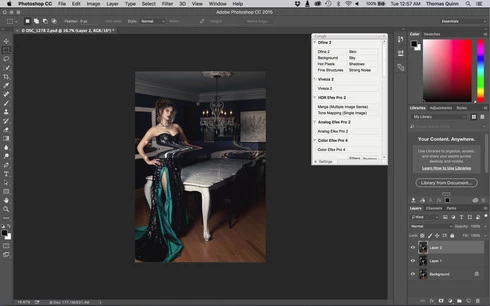
This topic has been closed for replies.

231 replies

Inspiring
December 3, 2015
did he have his degree already... this "engineer"?
Inspiring
December 3, 2015
you should think after the LIGHTROOM 6.2 mess adobe would learn something... but NO.

are there any senior coders at adobe who learned how to do proper coding and quality management?

i guess not...
Inspiring
December 3, 2015
who should pick it up?

adobe obviously has no betatesters.
Inspiring
December 3, 2015
because you did buy into subscription.

intelligent people complained that exactly this will happen.

but the m*r*ns out there thought.. "oh photoshop for 9 dollar a month.. that does not sound bad!".

yeah well..... subscription makes companys lazy.. because you pay anyway.. no matter what crap they produce.

the other bad thing is that adobe has a quasi monopol.
Inspiring
December 3, 2015
it is a sad sad joke what adobe is doing since the subscription program.

they don ́t seem to have a SINGLE betatester or any quality management in place.

first the lightroom 6.2 mess now this.

the worst is adobe learns NOTHING.

and they cost user so many workhours to fix their crappy software....
Inspiring
December 3, 2015


After using Liquify filter part of the layer with changes makes intensive bright as after using Linear light blend mode. Unchanged part of layer remains normal brightness.

Not working partial blending in shadows or lights or channels.
Photoshop version: 2015.1 20151114.r.301 2015/11/14:23:59:59 CL 1053036 ( x64)
Same issues on Mac OS and Windows 7
Inspiring
December 3, 2015
I think a reading of this link could be of some help for the Adobe Management Team:

https://en.wikipedia.org/wiki/Softwar...
Inspiring
December 3, 2015
I just bought a license, could you offer a discount to your customers ?
It is a waste of time and money for me.
flannib
Participating Frequently
December 3, 2015
Like everyone else, I also ran into the liquify problem shortly after upgrading to Photoshop 2015.1. For me, the best solution was simply to revert to the previous version via the Adobe Creative Cloud app and continue working as before. It is obvious that 2015.1 was pushed out prematurely, and I'm fine with the previous version until Adobe gets the bugs worked out.
Inspiring
December 3, 2015


New version photoshop issue with liquify
Macbook pro, ver 10.1.1 8GB ram
since latest update liquify if not working, it often reports out of memory, and when saving it returns to the image but leaving a bright box area around the liquify work