


Inspiring
December 1, 2015

P: Liquify lightens result on 16 bit/channel images

  • December 1, 2015
  • 231 replies
  • 4093 views

I am having issues with the new upgrade to Photoshop CC 2015 on Mac El Captain. The only thing I did was upgrade from a working CC 2015 to the new version. Using the liquify tool give the following look. There is a box around the area liquified that is lighter than the other areas. When I turn of Use Acceleration in Graphics Processor, it is better but .... I didn't have to do this in the prior version i.e.. Yesterday.

New Update: The Squiggly waist is the liquified:
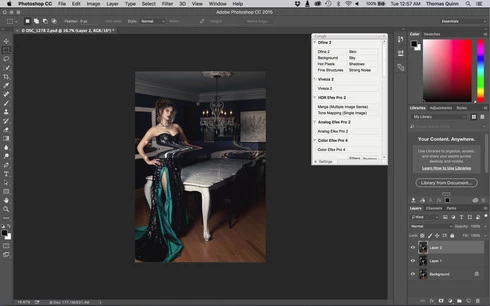
This topic has been closed for replies.

231 replies

Known Participant
December 3, 2015


2015.1 update has now broken the liquify tool when working with 16-bit images.

Simply open a 16-bit image, liquify, hit OK and see what happens. (Tested on El-Capitan and Yosemite, Nvidia GPU's). The problem has also been reported on Windows systems and is well documented here:
https://fstoppers.com/photoshop/photo...
Inspiring
December 2, 2015
in Windows, you cannot hit alt without it exiting out of the menu. The solution I've found is to just use the Ctrl+F command for last used Filter combined with Alt... so Alt+Ctrl+F and then it disables the Graphics Accel
Inspiring
December 2, 2015
Same Issue since the latest update. I converted the document to 8-bit as the workaround suggested and did the trick. i'll be patiently waiting for a fix.
Inspiring
December 2, 2015


This is what it looks like
juno2016
Participant
December 2, 2015


i update the Photoshop 2015.1 Update (11/30/2015) ,when i use the liquify tool,Please look at the picture I uploaded,Feathering over image will appear clear black side, there will be significant liquefaction after the white edge!!!!!!!!

Inspiring
December 2, 2015
Oh, ok... now fire him.
Inspiring
December 2, 2015
Why all of us should be a free beta-testers of all new releases? I expect, as many other licensed users, a kind of compensation from Adobe for all inconvenience resulted with lots of bugs.
Adobe Employee
December 2, 2015
I just spoke to the engineer that wrote Liquify and he stated it is 16bit in and 16bit out.
Inspiring
December 2, 2015
This fix is just not good enough for a professional work. WTF Adobe??? I'm very frustrated. slowly but surely the software is not worth the price 😞
Inspiring
December 2, 2015
I wouldn't like to find out after this problem that the liquify filter is converting 16bit images to 8bits and then re-sampling back to 16bit (which is what I'm starting to suspect)... that would be cheating like WV.