


Inspiring
December 1, 2015

P: Liquify lightens result on 16 bit/channel images

  • December 1, 2015
  • 231 replies
  • 4093 views

I am having issues with the new upgrade to Photoshop CC 2015 on Mac El Captain. The only thing I did was upgrade from a working CC 2015 to the new version. Using the liquify tool give the following look. There is a box around the area liquified that is lighter than the other areas. When I turn of Use Acceleration in Graphics Processor, it is better but .... I didn't have to do this in the prior version i.e.. Yesterday.

New Update: The Squiggly waist is the liquified:
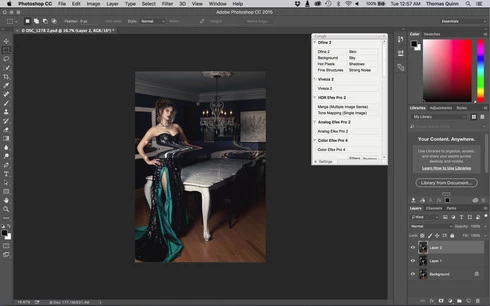
This topic has been closed for replies.

231 replies

Inspiring
December 2, 2015
The difference is probably that you've set up lightroom to process in 16bits but your Camera Raw is rendering in 8 bits. The liquify problem only happens with you liquify 16 bit images.
Participant
December 2, 2015


Hi,

I try to liquify something in my picture, but there is as you see in the pic something really wrong. It happens only when I open the raw (cr2) from Lightroom to photoshop. If I open the raw directly via Photoshop there is no problem.
Wtf?
Can you help me?
Participating Frequently
December 2, 2015


martins32745202
Participant
December 2, 2015


Inspiring
December 2, 2015
Seriously - how could this not be picked up before release??!!!

Can we please get an ETA on a fix?? This is just not good enough for a working professional.
Participant
December 2, 2015
Adam Jerugim thx, its work like that [for now]
Inspiring
December 2, 2015
That workflow isn't really compatible with working for clients. Normally the layer that gets liquified is on top, with its liquify mesh saved. If the client wants changes, you delete the liquified layer, make the changes you need below, and then create another stamp and apply the liquify mesh.

Now, what I have to do is save the liquify with GPU (annoyed by the disappearing cursor), and then cancel the liquify. Then I have to apply the mesh by using liquify with no GPU acceleration.

I have to do that every time a client asks for changes.
PPhotography808
Known Participant
December 2, 2015
My compromised "workaround" at the moment is not changing my current workflow and continue to send 16-bit images from LR to PS. What I'm doing now is saving liquify to the very end of the workflow and then converting image to 8-bit. Which truthfully is where it normally occurs in my workflow.
Inspiring
December 2, 2015
Same problem here - anxious for an update with a fix
Inspiring
December 2, 2015
Thanks Adam. Please please, can this one not take months like the last one? It's only been hours since you rolled out the update and it's hard to understand how this one went unnoticed. Please don't wait for the next pack of new features for a fix. These things are urgent, since most professionals simply cannot work in 8bits or without GPU acceleration anymore.